Amazon PPC audit: the 2026 checklist that judges ads on profit
One account-wide ACOS target cuts profitable ads on high-margin products and keeps losing ones on thin-margin products. This checklist audits against each product's break-even ACOS, with the exact prompts to run it in Claude.
•An audit that judges every campaign on one account-wide ACOS target cuts profitable ads on high-margin products and keeps losing ones on thin-margin products.
•Set the bar first: each product's break-even ACOS is its margin before advertising divided by its selling price, so the bar is different per product.
•The eight checks below cover wasted spend, the search term report, negatives, match types, placements, bids, hidden winners and profit after ads.
•Use a 30 to 60 day window for spend decisions, longer than the 14-day attribution window, or you cut terms whose sales have not landed yet.
•Every check ends with a prompt you can run in Claude through Nova, which computes break-even ACOS and profit after ads per product from your own costs.
Most Amazon PPC audits work the same way: pull up Campaign Manager, sort by ACOS, and cut everything above an arbitrary number, often 30%. It feels disciplined. It is also how sellers pause the campaigns that were making them money.
The problem is that ACOS has no meaning on its own. A 25% ACOS is excellent on a product with a 35% margin before advertising and a slow leak on one with an 18% margin. One account-wide target treats both the same, so the audit cuts the wrong campaigns and keeps the wrong ones. This checklist judges every line against the product's own break-even point instead, and each step ends with the exact prompt to run it in Claude through Nova.
The output of a good audit is short: a list of search terms to negate, a list of converting terms to promote, a handful of bids to move, and the products whose advertising loses money no matter how the campaigns are structured. Everything below points at one of those four decisions.
Set the bar first: break-even ACOS per product
Break-even ACOS is the margin before advertising divided by the selling price. For an illustrative product selling at $24.99 and keeping $8.75 after COGS, Amazon fees and the other per-unit costs, its margin before ads is 35% and its break-even ACOS is 35%. Any ad sale at an ACOS below 35% is profitable; anything above it loses money on that unit.
Because margins differ per product, the bar differs per product. Computing it properly means including every fee, not just COGS and the referral fee, so we will not repeat the formula here: our break-even ACOS guide walks through it step by step. What matters for the audit is that you write down one number per product before you look at a single campaign.
Across a catalogue the spread is usually wide. Products with cheap fulfilment and healthy prices can break even well above a typical account target, while bulky or low-priced items can sit far below it. Judging both against a single 30% target overspends on the second and underspends on the first, which is the exact failure this audit is built to catch.
The audit checklist
Eight checks, in the order to run them. Each one says what to look at, how to judge it against break-even ACOS, and the prompt that runs it in Claude with your own data.
1. Spend with no sales
What to check: search terms and targets that spent real money and produced zero orders. How to judge it: use a window of 30 to 60 days, longer than the 14-day attribution window, or you will cut terms whose sales have not landed yet. A term with $30 of spend and no orders over 60 days is a negative candidate; a term with $8 over two weeks is just unproven.
Set the spend threshold from your own economics: roughly the cost of one to two units of profit. On a product that keeps $10 per sale, $30 of dead spend is three lost sales of margin, which is worth acting on. On a product that keeps $2, the same $30 is fifteen.
Run it in Claude
List the search terms with more than $30 of spend and no orders over the last 60 days, and tell me which ones are already negated.
2. The search term report: what shoppers actually typed
What to check: the queries shoppers actually typed, not the keywords you bid on. How to judge it: sort by spend and split the list into three buckets. Queries that converted at least twice are winners to protect. Queries with spend and no conversions are negative candidates. Queries already blocked by a negative on that exact text are flagged as such, so you do not waste time re-adding a rule that exists. Note that Sponsored Display has no search term report, so this check covers Sponsored Products and Sponsored Brands only.
Run it in Claude
From my search term report for the last 60 days, which customer queries converted at least twice and which spent without converting?
3. Negative keywords: candidates versus rules in place
What to check: the negatives already on your campaigns and ad groups, against the queries that actually ran. How to judge it: two directions. First, every spend-without-sales term from check 1 should either get a negative or a reason to live. Second, and this is the direction most audits skip, check that no existing negative blocks a query that converted last quarter. Negatives added during a rush, a Q4 clean-up or an agency handover often outlive their reason, and a blocked converting query is invisible in every report because it simply stops appearing. In Nova, negative keyword lists cover Sponsored Products only today, so check Sponsored Brands negatives in the Amazon Ads console.
Run it in Claude
Show my campaign and ad group negatives, and check none of them blocks a query that converted last quarter.
4. Match types and auto campaigns
What to check: auto campaigns and broad match ad groups acting as discovery, and whether their converting terms have been promoted. How to judge it: a search term that converted at least twice in an auto campaign has proven itself and belongs in an exact match campaign where you control the bid. Leaving it in the auto campaign means paying discovery prices for a query you already know converts. Amazon's keyword targeting guide explains how each match type decides which queries your ad can serve on.
The reverse check matters too: broad and phrase keywords whose queries are mostly irrelevant are not a bidding problem, they are a match-type problem. Tightening the match type is often cheaper than bidding the keyword down.
Run it in Claude
Which search terms from my auto campaigns converted at least twice in the last 60 days?
5. Placements: where the money goes versus where it converts
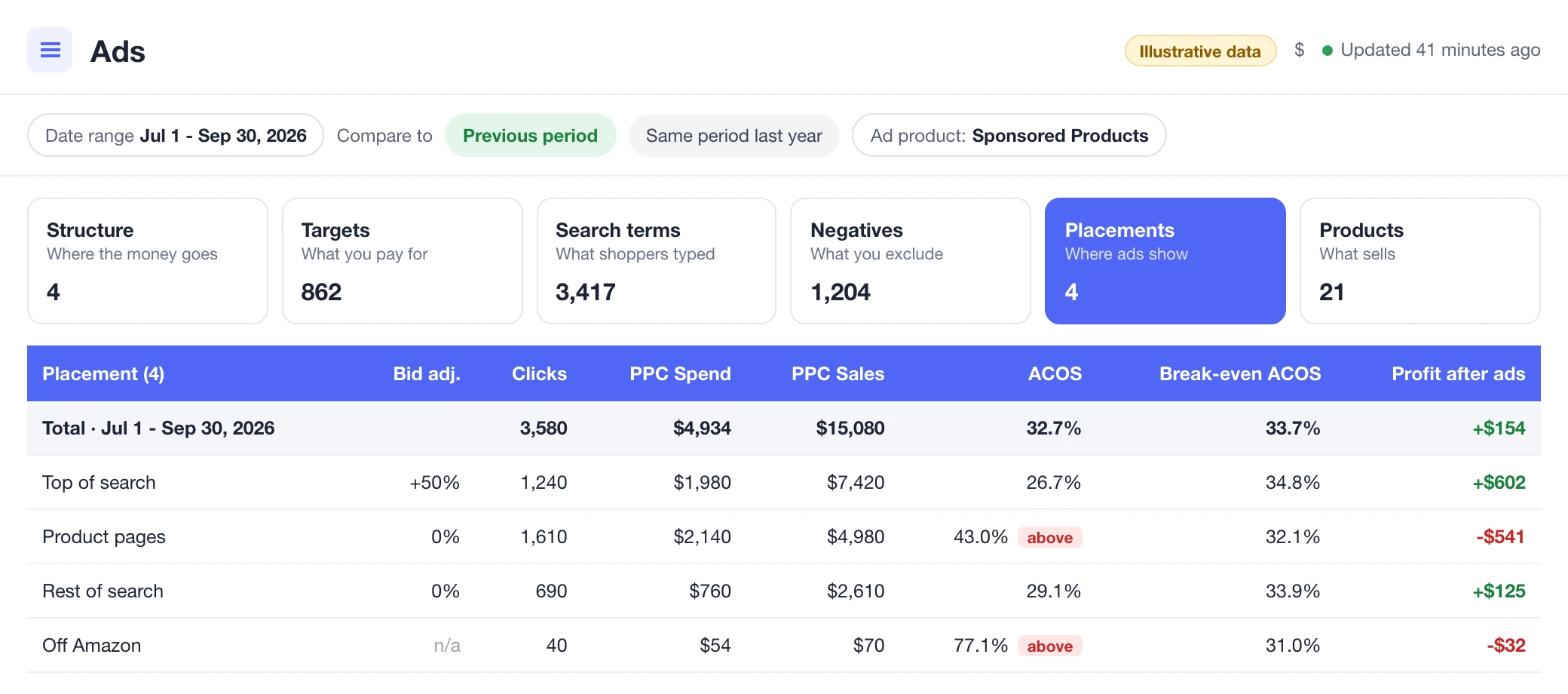
What to check: spend, sales and ACOS split by placement: top of search, product pages and rest of search. How to judge it: top of search usually converts best but costs most, and product pages often carry a large share of spend with a weaker conversion rate. A campaign paying a top-of-search premium whose top-of-search ACOS sits above the product's break-even point is overpaying for visibility it cannot afford.
Read this split per campaign, not account-wide. An account average hides the one campaign sending 70% of its budget to product pages while its sales come from top of search. Placement modifiers are the lever here, and they only make sense against the per-placement ACOS.
Run it in Claude
Break down ad spend, sales and ACOS by placement for the last 30 days.
6. Bids versus cost
What to check: your current bid on each keyword against the cost per click Amazon actually charged. How to judge it: if your bid is $1.50 and the average CPC is $0.90, you have headroom you are paying for in auctions you win comfortably, and room to test lower bids without losing the impression. If the CPC sits at your bid, the auction is tight and any bid cut costs you visibility. Start with the 20 keywords that carry the most spend; everything else is rounding.
Bids drift. A keyword raised during a launch or a peak week keeps its high bid long after the reason is gone, and the gap between bid and actual CPC is the quietest form of overspend in the account.
Run it in Claude
For my 20 keywords with the most spend, compare my bid with the CPC Amazon charged last month.
7. Winners losing visibility
What to check: keywords running below their product's break-even ACOS but with low top-of-search impression share. How to judge it: these are profitable ads that shoppers rarely see in the position that converts best. The instinct in an ACOS-only audit is to leave them alone because they look fine. The profitable move is the opposite: raise the bid or the top-of-search placement modifier and buy more of a good thing.
This is the check that turns an audit from cost-cutting into growth. Cutting waste protects margin, but the hidden winners are where the next quarter's sales come from, and they only surface when you read ACOS and impression share together.
Run it in Claude
Which of my keywords run below their product's break-even ACOS but have low top-of-search impression share?
8. Profit after ads per product: the line ACOS hides
What to check: profit after advertising per product, sorted worst first. How to judge it: this is the number the whole audit points at. A product can hold a respectable ACOS and still lose money once its real margin is priced in, and the reverse is just as common: a high-ACOS product that is quietly your most profitable advertiser. Amazon's own guide to ACOS defines the metric as ad spend divided by ad sales, with no margin in it, which is exactly why this last check exists.
Run it in Claude
Show profit after advertising per product for last quarter, worst first.
A worked example
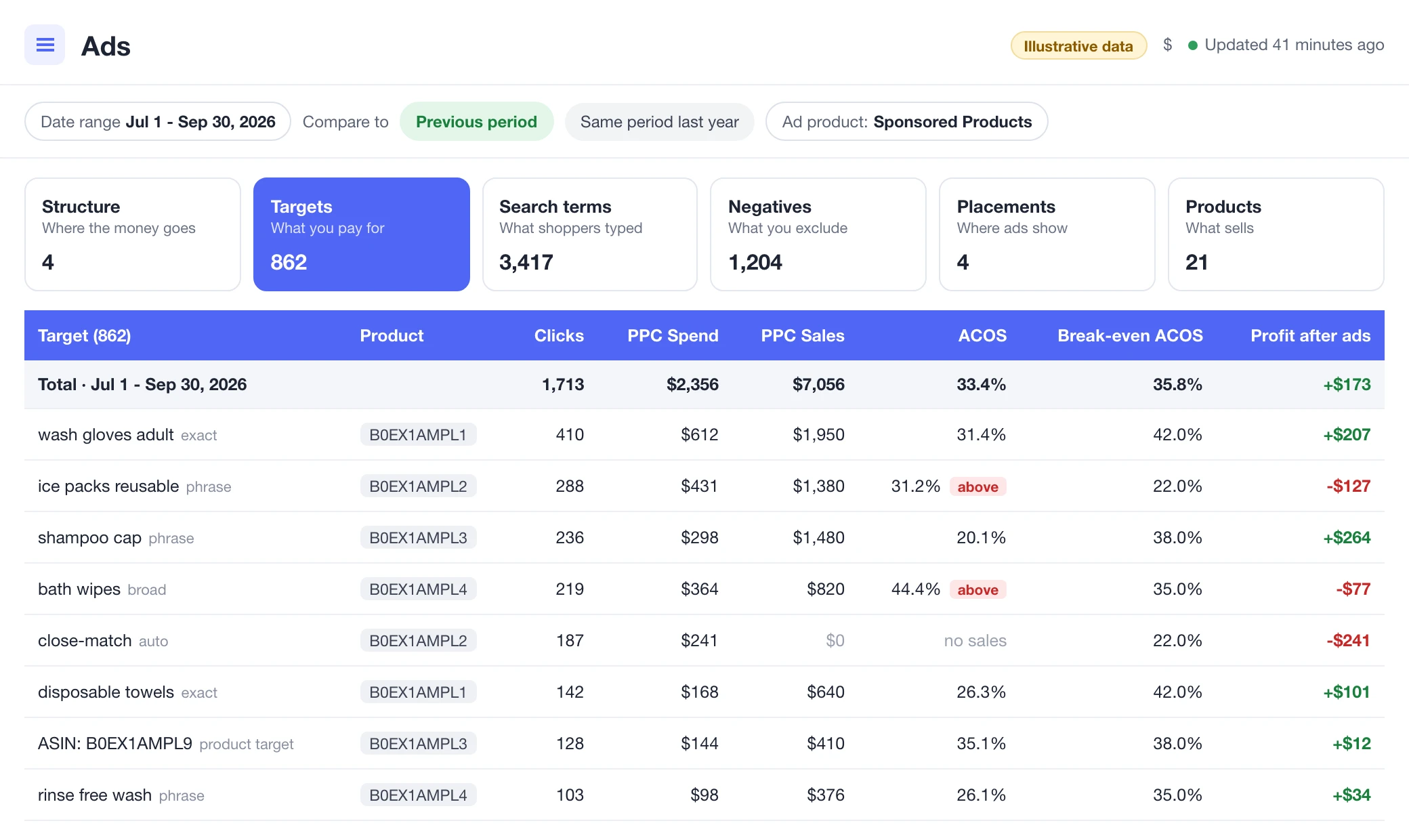
Illustrative numbers, not from any seller's account. The two targets in the screen above both run at about 31% ACOS, but their different break-even points produce opposite outcomes.
Illustrative row, "wash gloves adult": $612 spend, $1,950 sales, ACOS 31.4%, break-even ACOS 42.0%, profit after ads +$207. The arithmetic is $1,950 x 42.0% - $612 = +$207.
Illustrative row, "ice packs reusable": $431 spend, $1,380 sales, ACOS 31.2%, break-even ACOS 22.0%, profit after ads -$127. The arithmetic is $1,380 x 22.0% - $431 = -$127.40, shown as -$127 rounded to the nearest whole dollar.
Profit after ads here is sales x break-even ACOS minus spend. An account-wide 30% target flags both targets for cuts, even though "wash gloves adult" is profitable. An audit against break-even ACOS protects that target and fixes or cuts "ice packs reusable". Almost the same ACOS, opposite verdicts because the break-even points differ.
For "ice packs reusable" the fix is not always pausing. If its ads also lift organic rank, a controlled loss can be a deliberate launch cost. The audit's job is to make that loss visible and chosen, not accidental.
How often to run a PPC audit
A light pass monthly is enough for most accounts: sort the search term report by spend, negate the clear money drains, and promote the obvious auto-campaign winners. Twenty minutes, two decisions.
Run the full eight checks once a quarter, and always before peak events like Prime Day or Black Friday, when budgets and bids move the most and mistakes get expensive fastest. Recalculate break-even ACOS at the same time, because fees and costs shift during the year: a bar set in January is stale by October.
One more trigger: audit after any big change to the account. A new agency, a restructure, a catalogue expansion or a fee update all scramble the assumptions the old settings were built on, and the sooner you re-baseline, the less money the gap costs.
Running this audit in Claude
Nova connects your Amazon Ads data to Claude, ChatGPT and other AI assistants, with break-even ACOS and profit after ads already computed per product from your own costs. Each prompt in this checklist runs as a plain question, and the answer comes back with the numbers behind it, so you can challenge a line before you act on it.
The Seller Central MCP page explains how the connection works, and the PPC analytics page shows the same data in the app if you prefer a dashboard to a chat. If you are still picking tooling, our roundup of the best Amazon PPC software compares the main options.
One boundary worth stating plainly: the assistant reads and explains your data, it does not change bids or add negatives for you. Every decision above stays yours, which is how an audit should work.
The one-line version
Audit against each product's break-even ACOS, not one account-wide target. The same ACOS can be your best campaign and your worst, depending on the product behind it.
An Amazon PPC audit is a structured pass through your advertising account: search terms, negative keywords, match types, placements, bids and budgets. The goal is to find spend that produces nothing and profitable keywords that are held back. A good audit judges every line against the product's break-even ACOS, not against one account-wide target.
Run a light pass monthly: sort the search term report by spend and negate what clearly does not convert. Run a full audit once a quarter, and always before peak events like Prime Day or Black Friday, when budgets and bids move the most.
There is no universal good ACOS. A good ACOS is any ACOS below your product's break-even ACOS, which is its profit margin before advertising. A 25% ACOS is profitable on a product with a 35% margin and loss-making on one with an 18% margin. Our break-even ACOS guide walks through the full formula.
The search term report shows the actual queries shoppers typed before clicking your ad, rather than the keywords you bid on. It is the main diagnostic file in an audit: it reveals negative-keyword candidates, auto-campaign terms worth promoting to exact match, and queries that spend without converting. Sponsored Display has no search term report.
A free agency audit is a quick second opinion, and agencies offer it because it often leads to a management proposal. You can run the core checks yourself in an afternoon with the search term report and your break-even ACOS per product, or ask an AI assistant connected to your ad data to run them. Bring in an agency when you need someone to act on the findings across a large account.
Continue Learning
Explore more expert insights to grow your Amazon business