Amazon Profit Margins by Category: 2026 Benchmarks
Healthy margins vary dramatically by category. Compare your margins against 2026 benchmarks for 10 major Amazon categories, with referral fees, FBA costs, and ad spend data.
"What margin should I be making?" It's the question every Amazon seller asks but rarely gets a straight answer to. The truth is, healthy margins vary dramatically by category, and comparing yourself to the wrong benchmark is just as dangerous as not tracking margins at all.
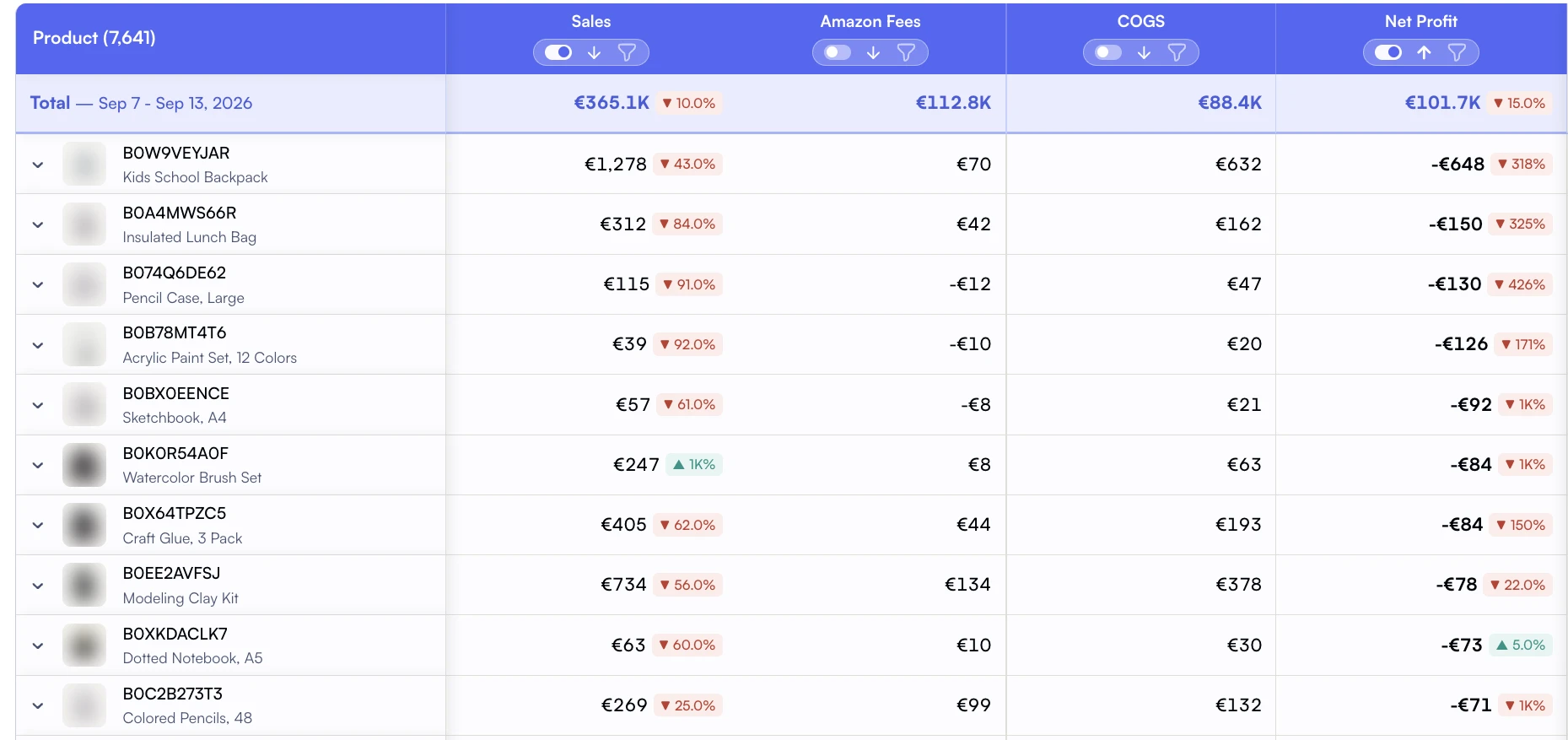
Product-level costs and net profit show which products contribute to your margin.
This guide sets out planning ranges for 10 major Amazon categories, built from Amazon's published referral and FBA rates plus the cost structure a private label seller in that category typically carries. Pressure on those margins is real: in Marketplace Pulse's 2026 Seller Index, 47% of sellers reported a year over year margin decline, with 49% naming marketplace fees as their main margin concern.
Whether you're evaluating a new category for expansion or auditing your current portfolio, these benchmarks give you a reference point. Pair them with your actual numbers to see where you stand.
TL;DR - Key Takeaways
•Median Amazon seller net margin is 15-20%, but ranges from 5% (Grocery) to 28% (Patio & Garden) depending on category
•Top-quartile sellers achieve 25%+ net margins regardless of category by controlling COGS and ad spend
•Referral fee differences alone create a 7-point margin gap between categories (8% Electronics vs. 15% most others)
•Ad spend as percentage of revenue varies 2x across categories, from 8% (Tools) to 22% (Beauty)
•Hidden costs like returns, storage, and promotions account for 4-8% of revenue that most sellers don't track
Median Net Margin
15-20%
Across all categories
Top Quartile
25%+
Best performers achieve
Bottom Quartile
<8%
At risk of unprofitability
Amazon Profit Margins by Category: 2026 Benchmark Data
This table shows typical ranges based on aggregated seller data and industry research. Your actual numbers will vary based on product price point, sourcing strategy, and competitive dynamics within your subcategory. Use these as directional benchmarks, not exact targets.
Category
Avg. Selling Price
Referral Fee
Avg. FBA Fee
Typical COGS %
Ad Spend % Rev.
Net Margin Range
Home & Kitchen
$20-45
15%
$4.50-6.50
25-35%
12-18%
12-22%
Health & Personal Care
$15-35
8-15%
$3.50-5.00
20-30%
15-20%
14-24%
Beauty
$12-30
8-15%
$3.50-4.80
15-25%
18-22%
10-22%
Pet Supplies
$15-40
15%
$4.00-6.00
25-35%
12-16%
14-22%
Kitchen
$18-50
15%
$4.50-7.00
25-35%
10-15%
15-25%
Sports & Outdoors
$20-55
15%
$5.00-8.00
30-40%
10-15%
12-20%
Tools & Home Improvement
$25-65
15%
$5.50-9.00
30-40%
8-12%
15-25%
Toys & Games
$15-40
15%
$4.00-6.50
25-35%
14-20%
10-20%
Patio, Lawn & Garden
$25-70
15%
$6.00-12.00
25-35%
8-12%
18-28%
Grocery & Gourmet
$8-25
8-15%
$3.00-5.00
40-55%
10-18%
5-15%
Cost inputs come from Amazon's official fee schedule and Statista's Amazon marketplace data. The margin ranges are directional planning bands for a typical private label seller in each category, not measured averages, so treat them as a reference point and check your own numbers against them.
Why Margins Vary So Much Between Categories
Four factors drive most of the margin variation between categories. Understanding them helps you evaluate whether a category is a good fit for your business model and sourcing capabilities.
1. Referral Fee Tiers
Amazon's referral fees aren't uniform. Most categories pay 15%, but some get better rates. Personal Computers pay 6-8%. Consumer Electronics pays 8%. Amazon Device Accessories pay just 4%. Meanwhile, Jewelry hits 20% and Amazon-specific programs can go higher. This single factor creates a 7-12 point margin spread before you even consider other costs.
2. Weight-Based FBA Fees
FBA fees are calculated by dimensional weight and product size tier. A 6 oz beauty product costs around $3.50 to fulfill. A 5 lb patio item costs $8-12. Heavy, oversized products in categories like Tools or Patio absorb a larger dollar amount per unit, but often have higher selling prices that offset the cost percentage-wise. Your total fee structure depends heavily on product dimensions.
3. Return Rates
Clothing and Shoes have return rates of 20-30%. Electronics sits at 10-15%. Home & Kitchen averages 5-8%. Each return costs you the original FBA fee, return processing fee, and often the product itself (unsellable returns). High return categories need higher gross margins just to break even. According to eMarketer research, e-commerce return rates have been climbing 2-3% annually.
4. Advertising Competition
Ad costs aren't equal across categories. Beauty and Supplements have some of the highest CPCs on Amazon because of intense competition and high lifetime value. Tools and Patio have lower CPCs because fewer sellers compete for the same keywords. Your TACoS target needs to reflect these category dynamics. A 12% TACoS might be excellent in Beauty but mediocre in Tools.
The Hidden Margin Killers Most Sellers Miss
Beyond the main cost lines (COGS, referral fees, FBA, and advertising), several "hidden" costs silently reduce your margins by 4-8% of revenue. These costs apply differently across categories.
Hidden Cost
Typical Impact
Worst-Hit Categories
How to Reduce
Long-term storage fees
1-3% of revenue
Toys (seasonal), Sports (seasonal)
Maintain 60-90 day supply; remove aged inventory
Returns & refunds
2-5% of revenue
Beauty, Health, Electronics
Improve listings; add video; fix sizing info
Coupons & promotions
1-3% of revenue
Grocery, Health, Beauty
Track coupon ROI; limit clip fees
Subscribe & Save discounts
1-2% of revenue
Health, Pet, Grocery (consumables)
Model margin at max discount tier
Inbound placement fees
0.5-1.5% of revenue
All categories (heavier items worst)
Use Amazon's minimal splits option; consolidate shipments
These costs compound. A seller in Health & Personal Care might face 3% returns, 2% coupons, 1.5% Subscribe & Save, and 1% storage fees. That's 7.5% of revenue that never shows up in a basic margin calculation. Track all of these in your P&L dashboard to get an accurate picture.
How to Calculate Your Real Margin by Category
The formula for true net margin on Amazon is more complex than most sellers realize. Here's the complete calculation:
Net Margin Formula
Net Margin = (Revenue - COGS - Referral Fee - FBA Fee - Storage - Ad Spend - Returns - Promotions - Other Fees) / Revenue x 100
Use our contribution margin calculator guide for a step-by-step walkthrough with worked examples. For category-specific analysis, adjust COGS % and ad spend % using the benchmark table above.
Don't estimate. Pull actual numbers from Seller Central for a 90-day period. Compare your figures against the benchmarks in this guide. If you're significantly below the category median, check for the fee reduction strategies that apply to your situation.
Category-Specific Margin Strategies
Home & Kitchen: Protect Margins Through Bundling
Home & Kitchen is Amazon's most competitive category by seller count. The key to maintaining 20%+ margins is bundling complementary products to increase average order value. A $12 silicone spatula has thin margins after fees. A $34 "kitchen essentials" bundle with spatula, whisk, and tongs delivers better per-unit economics because FBA fees don't scale linearly with item count. Focus on 2-3 item bundles in the $25-45 sweet spot.
Beauty: Control Ad Spend or It Controls You
Beauty has some of the highest CPCs on Amazon, with top keywords exceeding $3-5 per click. Sellers who maintain 20%+ margins in Beauty aggressively manage their TACoS ratio, targeting 12-15% maximum. The winning move: build organic rank through optimized listings and external traffic so you're not dependent on Amazon PPC for every sale. Beauty products with 40%+ organic sales ratio consistently outperform ad-dependent competitors on margin.
Tools & Home Improvement: Use Lower Competition
Tools consistently delivers some of the best margins on Amazon (15-25%) because of lower advertising competition and higher average selling prices. The category has fewer sellers chasing each keyword, keeping CPCs reasonable. The margin risk in Tools is dimensional weight: oversized products get hit with higher FBA fees. Focus on standard-size items under 5 lbs for the best unit economics. Check your KPI benchmarks against these targets.
When to Exit a Category
Warning Signs Your Category Isn't Working
Not every category is worth staying in. If you see these patterns consistently over 90+ days, it's time to evaluate whether your capital is better deployed elsewhere:
Net margin below 8% after all costs with no clear path to improvement
TACoS above 25% and rising, meaning advertising is eating your margin
Return rates above category average that you can't reduce through listing improvements
COGS increasing faster than selling price, compressing margins quarterly
CPC inflation outpacing conversion improvements, making each sale more expensive over time
Before exiting, run a full profitability analysis at the SKU level. Sometimes the category isn't the problem. It's specific products within the category dragging down your overall numbers. Nova's Winners & Losers view helps you separate category-level issues from product-level issues.
How Nova Helps You Track Margins by Category
Nova's Custom Breakdowns let you segment your catalog by category, brand, or any custom tag. You can compare contribution margins across categories in a single view, spot which categories are trending up or down, and make data-driven decisions about where to allocate inventory and ad spend. Combined with the Products Feed, you get per-SKU visibility within each category.
Frequently Asked Questions
Category benchmarks are your compass, not your destination. Use them to identify whether you're underperforming, on track, or outperforming your peers. Then dig into the specific cost drivers to understand why. The sellers who consistently beat category averages share one trait: they track real contribution margins at the product level, not estimates at the catalog level.
Ready to see where your margins actually stand? Start with the contribution margin calculator to get your baseline, then compare against the benchmarks above. For a broader view of which metrics matter most, check our complete KPI benchmarks guide.
Ready to Transform Your Amazon Business?
Join thousands of successful sellers who use Nova Analytics to make data-driven decisions and maximize their profits.