How to Switch Amazon Analytics Tools Without Losing Data
Step-by-step migration guide for Amazon sellers switching analytics tools. Import your full history in minutes with zero data loss using Nova's automated migration script.
You've outgrown your current Amazon analytics tool. The reports are slow, the data doesn't match Seller Central, and you're making decisions on numbers you don't fully trust. But switching feels risky. What happens to the 18 months of historical data you've built up? Will you start from scratch? The short answer: no. You can switch tools and keep every single day of your history. Here's exactly how.
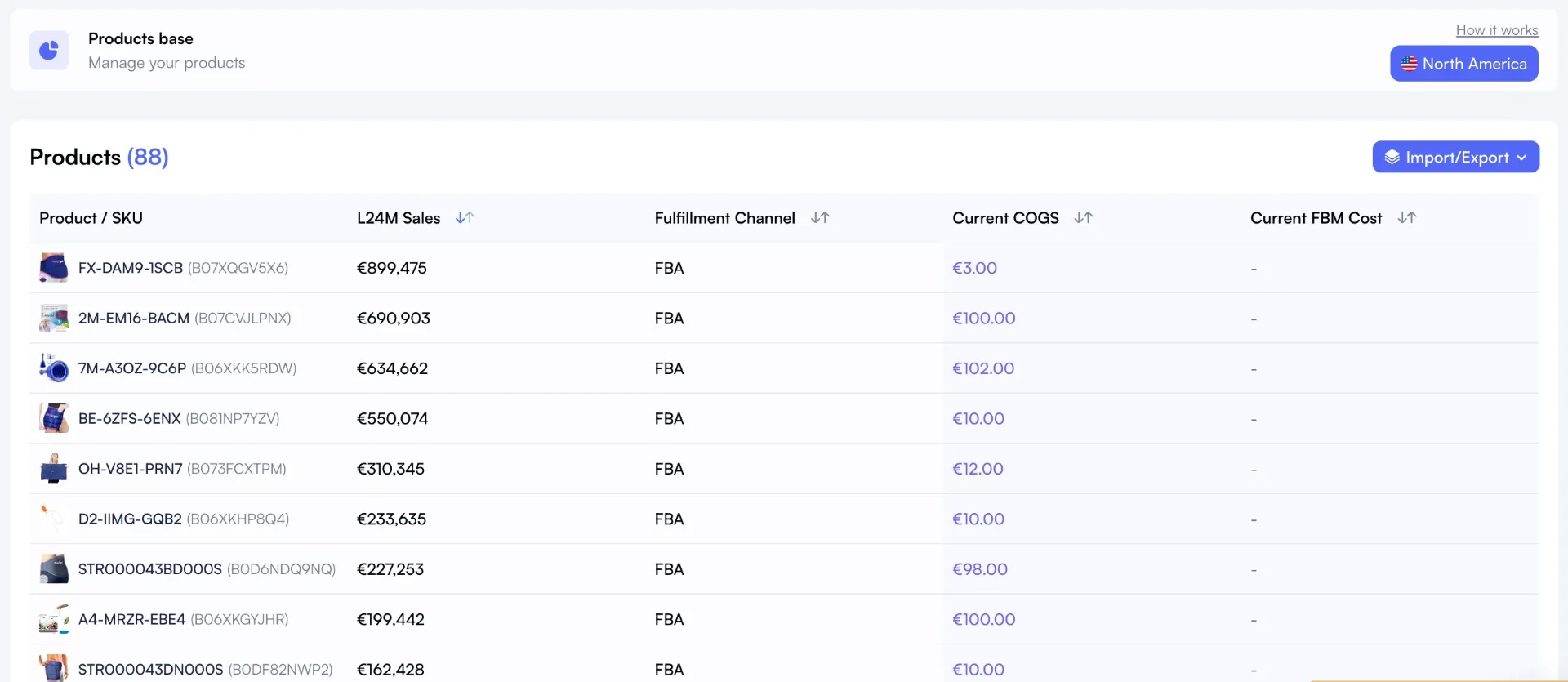
The COGS manager keeps product costs organized by period or inventory batch.
TL;DR - Key Takeaways
•You can migrate your full historical data (orders, fees, ad spend, COGS) from any analytics tool to Nova with zero data loss.
•Amazon's SP-API only provides 2 years of some report types, so your existing tool's data export may be your only copy of older history.
•Our team handles the entire data ingestion process. You give us access or share your exports, and we do the rest.
•Run both tools in parallel for 1-2 weeks to verify accuracy before canceling your old subscription.
Why Sellers Stay Too Long with the Wrong Tool
Switching analytics tools isn't like switching email providers. Your Amazon data tells the story of your business: seasonal trends, fee changes, ad performance over time, margin shifts by SKU. Losing that context means losing your ability to compare this quarter to last year.
Three forces keep sellers locked into tools that no longer serve them:
Sunk cost fallacy. You've spent months entering COGS, configuring dashboards, and learning the interface. Starting over feels wasteful.
API limitations. Amazon's SP-API only provides 2 years of historical reports for some data types. If your tool has 3+ years of data, that history exists nowhere else.
Perceived complexity. Most sellers assume migration means manually re-entering thousands of rows. It doesn't.
The result? Sellers stay with tools that give them delayed data, inaccurate fee calculations, or clunky interfaces, all because switching feels harder than it actually is.
The Real Cost of Not Switching
Sticking with an underperforming analytics tool isn't free. The costs compound quietly, month after month.
Delayed Data Impact
24h+
Some tools refresh data only once per day. That's a full business day of blind decisions on ad spend and pricing.
Margin Erosion
3-7%
Sellers using inaccurate P&L tools typically overestimate margins by 3-7%.
Opportunity Cost
$2K-8K
Monthly revenue left on the table from SKUs that look profitable but aren't, identified only with accurate unit economics.
The Compounding Problem
Every month you operate on inaccurate data, you're making reinvestment decisions based on wrong numbers. A SKU showing 22% margin might actually be at 15% after all fees. Over 12 months, that miscalculation compounds into thousands in misallocated ad spend and inventory purchases.
How Nova's Migration Works
We built a done-for-you migration process specifically to remove the switching barrier. You don't need to touch a spreadsheet or run any scripts. Here's how it works:
Step 1: Share Your Data
Give us access to your current analytics tool, or export your historical data as a CSV or Excel file. Every major platform (Sellerboard, Helium 10, Jungle Scout, Sellersprite) supports data exports. If you're not sure how, our team will walk you through it.
Step 2: We Handle the Ingestion
Our team reingests your entire history into Nova. We map every field to Nova's data model, handle date formats, currency conversions, and fee categorization. You don't need to do anything during this step.
Step 3: Verify and Go
Once the ingestion is complete, we'll confirm what was imported: total rows, date range, and any fields that needed special handling. Compare a few spot-check numbers against your old tool. Once you're satisfied, you're done. Your Profit & Loss dashboard shows your complete history from day one.
Unlike API-based syncs that can only pull what Amazon still has available, our ingestion process preserves data that may have already aged out of Amazon's reporting window.
Ready to switch? Talk to our team
We'll walk you through the process, answer your questions, and get your historical data migrated with zero hassle.
What Gets Migrated
Here's a breakdown of the core Amazon metrics we preserve during migration. Some come automatically from Amazon's API, while others depend on what you've tracked in your current tool.
Metric
Source
Notes
Orders and Revenue
Amazon SP-API + your exports
API covers last 2 years. Older history preserved from your exports.
Units Sold
Amazon SP-API + your exports
Per-SKU and per-ASIN breakdowns retained.
FBA, Referral, and Other Amazon Fees
Amazon SP-API + your exports
All fee types preserved, including storage and removal fees.
Advertising Spend (SP, SB, SD)
Amazon Ads API + your exports
API provides recent data. Older campaign history preserved from exports.
COGS / Landed Costs
Your exports
Critical to migrate. Amazon doesn't store your costs. We preserve every entry.
Refunds and Returns
Amazon SP-API + your exports
Full refund history including partial refunds and return reasons.
Promotions and Coupons
Amazon SP-API + your exports
Promotional discounts and coupon costs preserved for accurate P&L.
The key insight: COGS data is the most critical piece to migrate. Amazon's API doesn't provide your landed costs, so if you've spent months entering per-SKU costs into your current tool, that data lives only in their system. We preserve every COGS entry so your profit calculations remain accurate from day one.
Switching from a Specific Tool?
We've written detailed comparison guides for sellers switching from each major platform. These cover feature differences, pricing, and how the migration works for each tool:
Switching from Sellerboard
Sellerboard exports cover orders, fees, and COGS. Our team handles the full transfer.
Don't see your current tool? No problem. We'll build the data connector on demand. Contact our team and we'll have your migration path ready within 48 hours.
Your History Comes With You
Switching from another tool? Give us access to your current tool or share your data exports. Our team handles the rest. You start Nova with your full history on Day 1. No data loss, no hassle.
Works with exports from any analytics tool. Free for all new users. Talk to our team →
Frequently Asked Questions
Migration FAQ
Common questions about switching to Nova
No. Our team preserves all historical data from your exports, including orders, fees, advertising spend, and COGS entries. Every field is mapped to Nova's data model so nothing gets dropped. If any rows can't be mapped automatically, we'll flag them and resolve them before finalizing.
Every major Amazon analytics tool (Sellerboard, Helium 10, Jungle Scout, Sellersprite) provides CSV or Excel export functionality. If you're using a tool with limited export options, we can work with you to extract the data through alternative methods, including direct access to your current tool's account. Contact us for assistance.
No. We recommend running both tools in parallel for 1-2 weeks so you can verify that all your data matches. Once you're confident everything is accurate in Nova, you can cancel your previous subscription. There's no rush and no penalty for overlapping.
Yes. Data migration is free for all new Nova users. There's no setup fee and no hidden costs. Whether you have a single brand or a complex multi-marketplace operation, our team handles the entire process at no extra charge.
Just give us access to your current analytics tool or export your data as a CSV. Our team handles everything else: mapping, ingestion, and verification. You'll receive a confirmation once your full history is live in Nova.