Automate Amazon reporting in Microsoft Copilot: Excel, PowerPoint and Word
Copilot can build the weekly Amazon Excel, the monthly leadership deck and the quarterly memo itself, from live Seller Central and Vendor Central data through Nova.
Every Monday starts the same way: export the Amazon Seller Central reports, pivot them, paste them into last week's file. With Nova connected, Microsoft Copilot builds that file itself from live Amazon numbers, in the Excel, PowerPoint and Word formats your team already uses.
What does Copilot need to build my Amazon report?
Copilot already writes Word, Excel and PowerPoint files. Copilot Cowork has built-in skills to create and edit all three (Microsoft Learn, read 28 October 2026). What it lacks is your Amazon data with real costs behind it.
Nova supplies Seller Central, Vendor Central, Ads and DSP data with the full Amazon P&L, so the profit in the file is net of Amazon fees, advertising and cost of goods. That is the difference between an Amazon sales report and a report you can make decisions from.
Can it build my weekly Excel?
Ask for it in plain words: "Build an Excel file of my Amazon sales with one tab per marketplace, comparing this week with the prior week." Copilot pulls the numbers from Nova and builds the workbook you described.
You do not have to give up your template. Copilot can edit an existing Excel, Word or PowerPoint file stored in OneDrive or SharePoint and saves the result to that same file, with version history kept. The workbook holds the numbers as they were at the time of the run; next week's run writes next week's numbers.
Can it build the monthly deck for leadership?
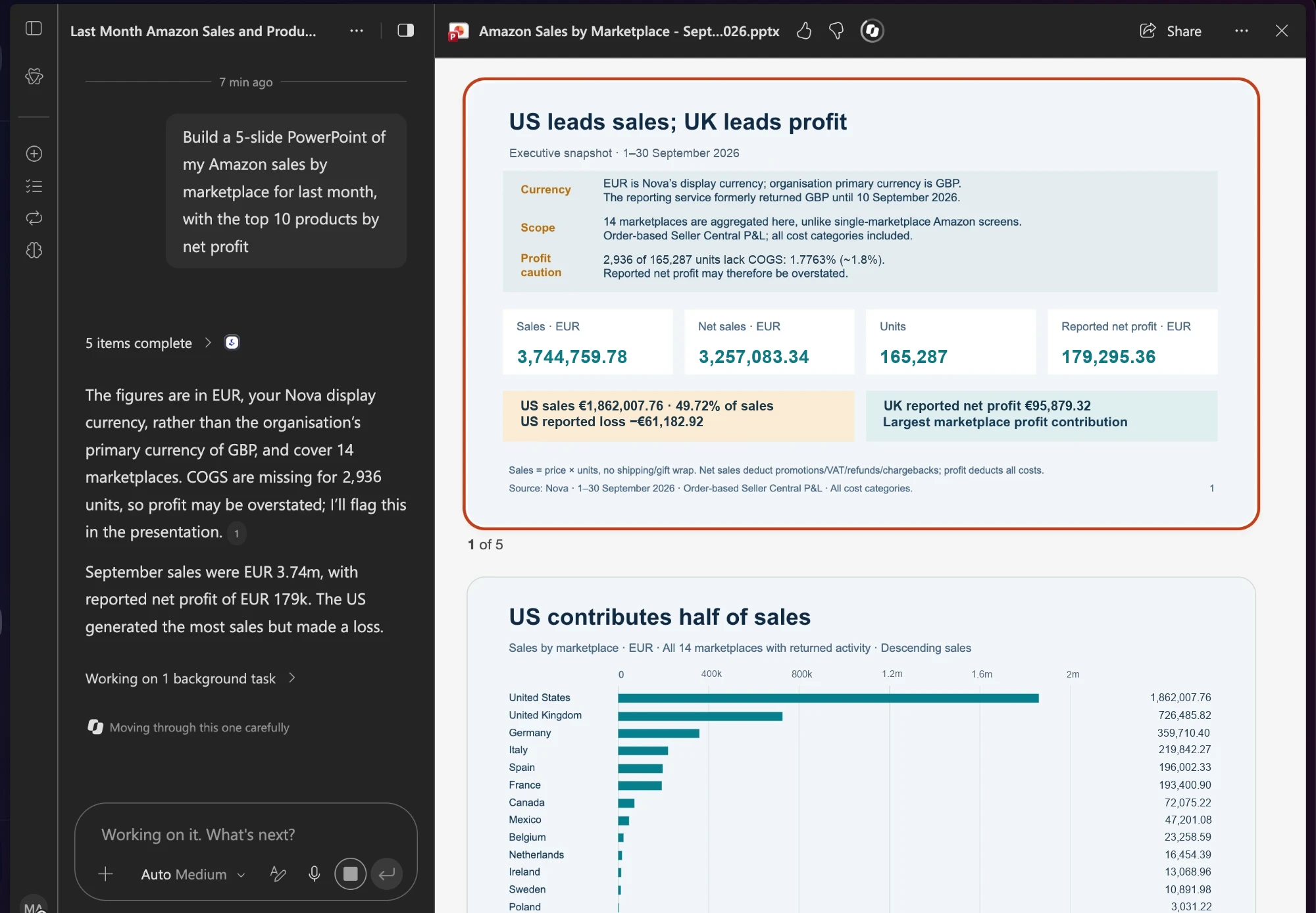
The screen above is this prompt: "Build a 5-slide PowerPoint of my Amazon sales by marketplace for last month, with the top 10 products by net profit." Copilot fetched the data from Nova, laid out the slides and wrote the takeaways.
Look at what the deck also says: some units had no cost of goods entered, so profit on those lines could be overstated. Nova tells Copilot what it does not know, and Copilot puts that on the slide instead of letting a clean chart hide it.
And the quarterly memo in Word?
A quarterly business review is a narrative, not a table: what moved, why it moved and what to do next quarter. Ask Copilot for a Word memo and it writes those three parts from the same Nova data as the deck, so the memo and the slides agree.
For 1P teams, the memo can follow Vendor Central reporting vocabulary: purchase orders received, shipped revenue and how the two compare. See what Nova reads on the Vendor Central analytics page.
Can it run every Monday without me?
Yes. Put the schedule in the message, for example "every Monday at 8am", and Copilot turns the prompt into a scheduled prompt. You can keep up to 25 of them and manage them on the Automations page (Microsoft Learn).
By default, Copilot asks for your approval before it sends an email or posts in Teams, so you review the report before it goes out. You can choose "Always allow" to skip those prompts for the rest of a session.
Can I trust the numbers?
Nova reconciles 40+ Amazon fee types at SKU level across 23 Amazon marketplaces, with 236 P&L measures behind every profit line. Orders and units reach Nova within seconds of the sale, with sales estimated until Amazon confirms the exact amounts. Ad spend refreshes hourly, search term data three times a day, Amazon finance transactions hourly, and the remaining reports daily.
Each person signs in with their own Nova login and sees only their own workspaces. Nova reads your data by default; Copilot builds files from it and changes nothing on Amazon.
How do I set it up?
You need a Microsoft 365 Copilot license with Copilot Cowork enabled; Cowork is billed on usage (Microsoft). It works in the browser, Outlook, Teams and the Copilot desktop and mobile apps (Microsoft Learn).
Then add Nova with a one-time sign-in, following the guide to connect Nova to Microsoft Copilot. Your admin may need to approve the connection first (Microsoft Learn). Nova starts at $49/mo with a 14-day free trial, no card required.
Which prompts can I copy?
Every week, build an Excel file of my Amazon sales with one tab per marketplace, comparing this week with the prior week.
Build a 5-slide PowerPoint of my Amazon sales by marketplace for last month, with the top 10 products by net profit.
Write a quarterly business review memo in Word on my Amazon business: what moved, why, and what to do next quarter.
Compare this week's Vendor Central purchase orders with shipped revenue, by ASIN, and flag the biggest gaps.
Show last month's ad spend against net profit by campaign, and list the campaigns that cost more than they earned.
Microsoft 365 Copilot with Copilot Cowork enabled. Cowork requires the Microsoft 365 Copilot license and is billed on usage. It runs in the browser, Outlook, Teams, the Copilot desktop app and the mobile app.
New files land in your OneDrive Cowork folder. If you point Copilot at an existing Excel, Word or PowerPoint file in OneDrive or SharePoint, it saves back to that same file and keeps the version history.
Yes. Nova reads Vendor Central purchase orders, shipped revenue and inventory alongside Seller Central, Ads and DSP data, so a 1P team can ask for the same reports a 3P team does.
Yes, with your approval. Copilot asks before it sends an email or posts in Teams, including when the report comes from a scheduled prompt.
No. Each person signs in with their own Nova login and sees only their own workspaces. A colleague who opens Copilot without connecting Nova sees no Amazon data.