Already on AWS? Redshift offers ecosystem consolidation for Amazon seller analytics. Architecture options, cost optimization, and when Redshift beats Snowflake/BigQuery.
AWS Redshift and Amazon Seller Central. Both Amazon. Different teams. No native integration. If you're already on AWS and want to consolidate your Amazon seller data with other company data, Redshift makes sense. Here's the $1 to making it work without the typical 12-month engineering project. Pulled from cross-account analysis, the metrics below are the ones we'd watch first.
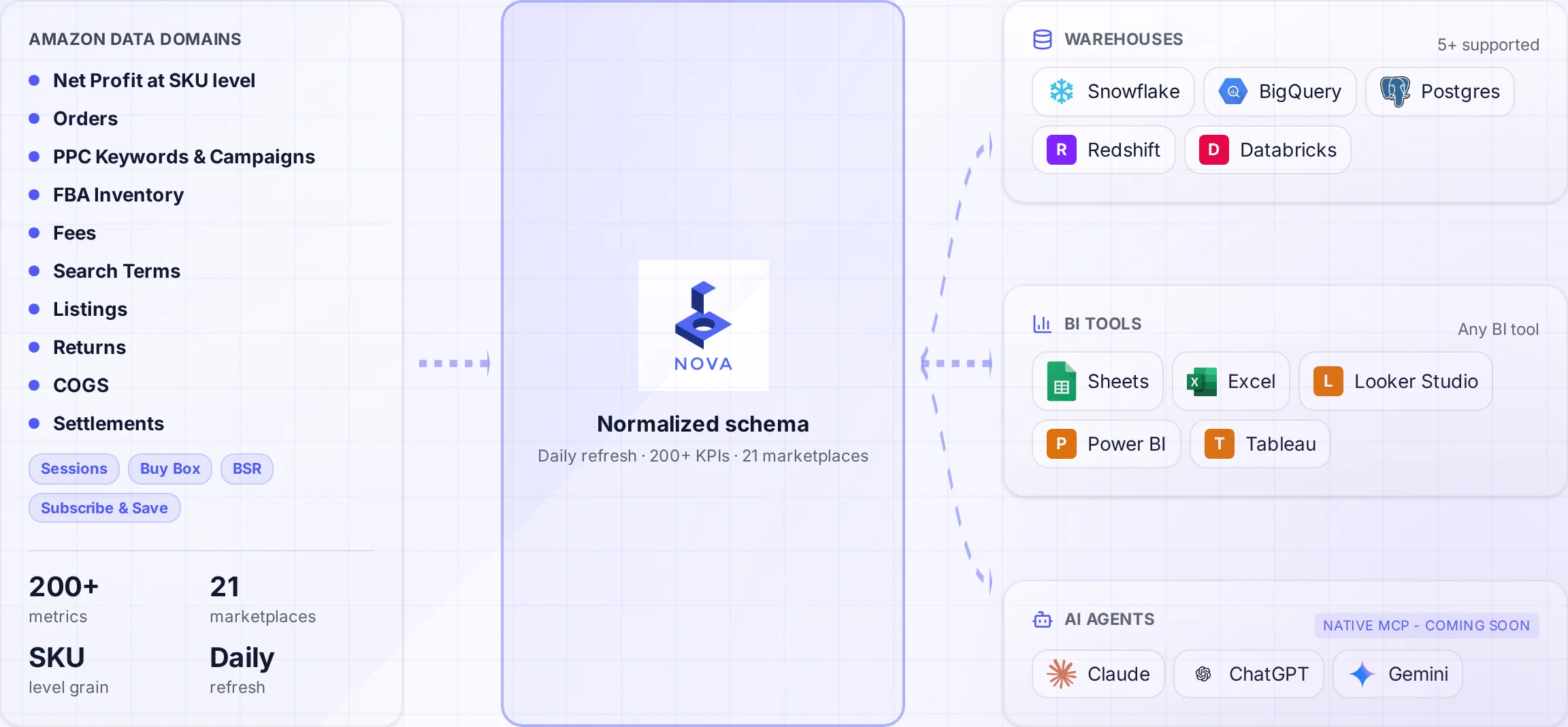
A normalized schema connects Amazon data to the warehouses and tools your team uses.
Amazon doesn't make it easy to get your seller data into Amazon's own data warehouse. The irony isn't lost on anyone. You'd think AWS would offer a one-click "Import Seller Central Data" button. They don't. You're left building custom pipelines through the Selling Partner API like everyone else.
That said, Redshift has distinct advantages for Amazon sellers already invested in AWS. This guide covers when Redshift makes sense, how to architect your pipeline, cost optimization strategies, and when to consider alternatives. Based on our experience helping 50+ AWS-native teams implement Amazon analytics.
Why Redshift for Amazon Seller Data
Redshift isn't the default recommendation for Amazon seller analytics. Snowflake and BigQuery have better ecosystem support and simpler pricing. But Redshift wins in specific scenarios.
AWS-Native Stack
If your company runs on AWS (S3, Lambda, Glue, Kinesis), Redshift integrates natively. No cross-cloud data movement, simplified IAM, unified billing.
Reserved Capacity Savings
Redshift Reserved Instances offer up to 75% discount. For predictable Amazon analytics workloads, this can beat BigQuery and Snowflake on-demand pricing significantly.
Redshift Serverless
Launched in 2022, Redshift Serverless offers auto-scaling without cluster management. Good for variable Amazon data workloads with bursty usage patterns.
Existing AWS Skills
Your team knows AWS Glue, Step Functions, and CloudWatch. Learning Snowflake or BigQuery has opportunity cost. Sometimes the known tool beats the optimal tool.
Honest Assessment
Redshift is not the easiest path for Amazon seller data. If you're starting fresh with no AWS investment, BigQuery or Snowflake will get you to value faster. Redshift makes sense when AWS consolidation matters more than time-to-value.
Architecture Options: Provisioned vs Serverless
Redshift offers two deployment models. Your choice impacts cost, performance, and operational complexity. See AWS Redshift pricing for current rates.
Redshift Serverless
Launched in 2022, Serverless removes cluster management. You pay for compute in Redshift Processing Units (RPUs) measured per second.
Base RPU
8 RPUs
Minimum, auto-scales to 512
Cost per RPU-hour
$0.36
US East, varies by region
Storage
$0.024/GB
Per month, managed storage
Best for: Variable Amazon analytics workloads, testing/development, teams without dedicated DBA resources.
Redshift Provisioned Clusters
Traditional Redshift with fixed node types. More control, more complexity.
Node Type
vCPU
Memory
Storage
On-Demand/hr
dc2.large
2
15 GB
160 GB SSD
$0.25
dc2.8xlarge
32
244 GB
2.56 TB SSD
$4.80
ra3.xlplus
4
32 GB
32 TB managed
$1.086
ra3.4xlarge
12
96 GB
128 TB managed
$3.26
Best for: Predictable workloads with Reserved Instance commitments, large data volumes benefiting from RA3 managed storage.
Cost Optimization Tip
For most Amazon sellers, start with Serverless. Monitor actual RPU usage for 3 months. If usage is consistent, calculate Reserved Instance pricing. A 2-node dc2.large cluster with 1-year RI costs ~$220/month versus ~$360 on-demand. But you're locked in.
Building the Amazon Data Pipeline
Getting Amazon seller data into Redshift requires a pipeline. Here are the three main approaches.
Option 1: AWS Glue + SP-API (DIY)
Build a custom pipeline using AWS native services. Maximum control, maximum effort. The AWS Glue documentation covers ETL patterns in detail.
Component
Purpose
Estimated Cost
Lambda
SP-API calls, orchestration
$5-50/month
S3
Raw data landing zone
$5-20/month
Glue
ETL transformations
$20-200/month
Step Functions
Workflow orchestration
$5-20/month
Secrets Manager
SP-API credentials
$5/month
DIY Reality Check
Building this pipeline takes 6-12 months of engineering time. The SP-API has 20+ endpoints with different rate limits, authentication flows, and data formats. Most DIY projects fail or deliver a fraction of intended functionality. Budget $150K-300K in engineering cost.
Option 2: Third-Party ETL Tools
Tools like Airbyte, Fivetran, or Stitch offer pre-built Amazon connectors with Redshift destinations.
Tool
Amazon Coverage
Redshift Support
Starting Price
Fivetran
Limited (Ads only)
Native
$1/credit (~$500+/mo)
Airbyte
Community connectors
Native
Open source / $750+
Stitch
Basic reports
Native
$100+/month
Limitation: most ETL tools have incomplete Amazon coverage. They handle basic order and ad data but miss settlement reports, FBA fees, inventory, and the 200+ data points needed for true P&L analytics.
Option 3: Nova Data API with Redshift Delivery
Nova handles the entire SP-API complexity and delivers clean, normalized data directly to your Redshift cluster.
Coverage
200+
KPIs and metrics
Refresh
30 min
Data freshness
Time to Value
Days
Not months
Skip the Pipeline Build
Nova delivers clean Amazon data directly to Redshift. No SP-API complexity. No Glue jobs to maintain. Get 900+ metrics flowing in days, not months.
Redshift performs best with specific schema patterns. Here's how to structure Amazon seller data. Learn more about warehouse architecture patterns in our detailed guide.
Sort keys optimize query performance for range scans. Amazon data queries typically filter by date.
Table
Recommended SORTKEY
Type
orders
purchase_date
COMPOUND
settlements
posted_date
COMPOUND
ad_performance
(date, campaign_id)
COMPOUND
inventory_snapshots
snapshot_date
COMPOUND
Schema Design Tip
Don't over-optimize early. Start with simple schemas and optimize based on actual query patterns. Redshift's EXPLAIN command shows whether your keys are being used effectively. Premature optimization wastes time on queries that never run.
Performance Optimization
Redshift requires more tuning than Snowflake or BigQuery. Here are the key optimizations for Amazon data workloads.
Workload Management (WLM)
WLM queues let you prioritize different query types. Critical for mixed workloads.
CREATE MATERIALIZED VIEW mv_daily_sales AS
SELECT
    date_trunc('day', purchase_date) as sale_date,
    marketplace_id,
    sum(order_total) as revenue,
    count(distinct amazon_order_id) as orders,
    count(distinct buyer_email) as customers
FROM orders
WHERE purchase_date >= dateadd(year, -2, current_date)
GROUP BY 1, 2;

-- Refresh daily after ETL
REFRESH MATERIALIZED VIEW mv_daily_sales;
BI Tool Integration
Redshift works with all major BI tools, but some integrate more smoothly than others.
Amazon QuickSight
Native AWS integration. Serverless, pay-per-session pricing. Best for AWS-native shops. QuickSight connects directly to Redshift without additional configuration.
QuickSight Pros
Native Redshift connector
Embedded analytics support
Pay-per-session pricing
SPICE in-memory acceleration
QuickSight Cons
Less flexible than Tableau/Looker
Limited custom visualizations
Weaker data modeling
AWS lock-in
Tableau and Power BI
Both connect to Redshift via native drivers. Performance depends on your WLM configuration and query patterns.
BI Tool Performance Tip
Create a dedicated WLM queue for BI tools with higher concurrency. BI tools generate many small queries simultaneously. Without proper WLM, dashboards feel sluggish even on powerful clusters.
Cost Comparison: Redshift vs Alternatives
How does Redshift compare for typical Amazon seller workloads? Here's a realistic breakdown.
Seller Size
Redshift Serverless
Snowflake
BigQuery
$50K/mo revenue
$100-200
$80-150
$30-80
$500K/mo revenue
$300-600
$300-600
$150-400
$5M/mo revenue
$1,500-3,000
$1,500-4,000
$800-2,500
$5M/mo (RI pricing)
$800-1,500
N/A
N/A
Key insight: Reserved Instance pricing makes Redshift competitive for predictable workloads. But factor in engineering time. Redshift requires more tuning than alternatives.
Frequently Asked Questions
Conclusion: When Redshift Makes Sense
Redshift is the right choice when:
You're all-in on AWS: Unified billing, IAM, and native service integration matters
Reserved pricing fits: Predictable workloads benefit from 1-3 year commitments
Your team knows AWS: Glue, Lambda, and Step Functions experience transfers
Data lake integration: Redshift Spectrum for S3 data lake queries
Redshift is probably not the right choice when:
Starting fresh: Snowflake or BigQuery get you to value faster
Multi-cloud requirements: Snowflake works across AWS, Azure, and GCP
Google ecosystem: BigQuery's native GA4/Ads integration wins
Minimal ops preference: Snowflake and BigQuery require less tuning
Whatever warehouse you choose, the hardest part is getting Amazon data in reliably. The SP-API is complex, rate-limited, and constantly changing. That's the problem Nova solves with our Data API.