Snowflake or BigQuery? For Amazon sellers moving beyond Seller Central's reports, this decision shapes your analytics stack. Real cost comparisons, ecosystem integration, and decision framework.
Snowflake or BigQuery? For Amazon sellers moving beyond Seller Central's limited reports, this decision shapes your analytics stack for years. Both handle Amazon data well. Both connect to your BI tools. But they excel in different scenarios. This guide breaks down the real differences that matter for e-commerce analytics.
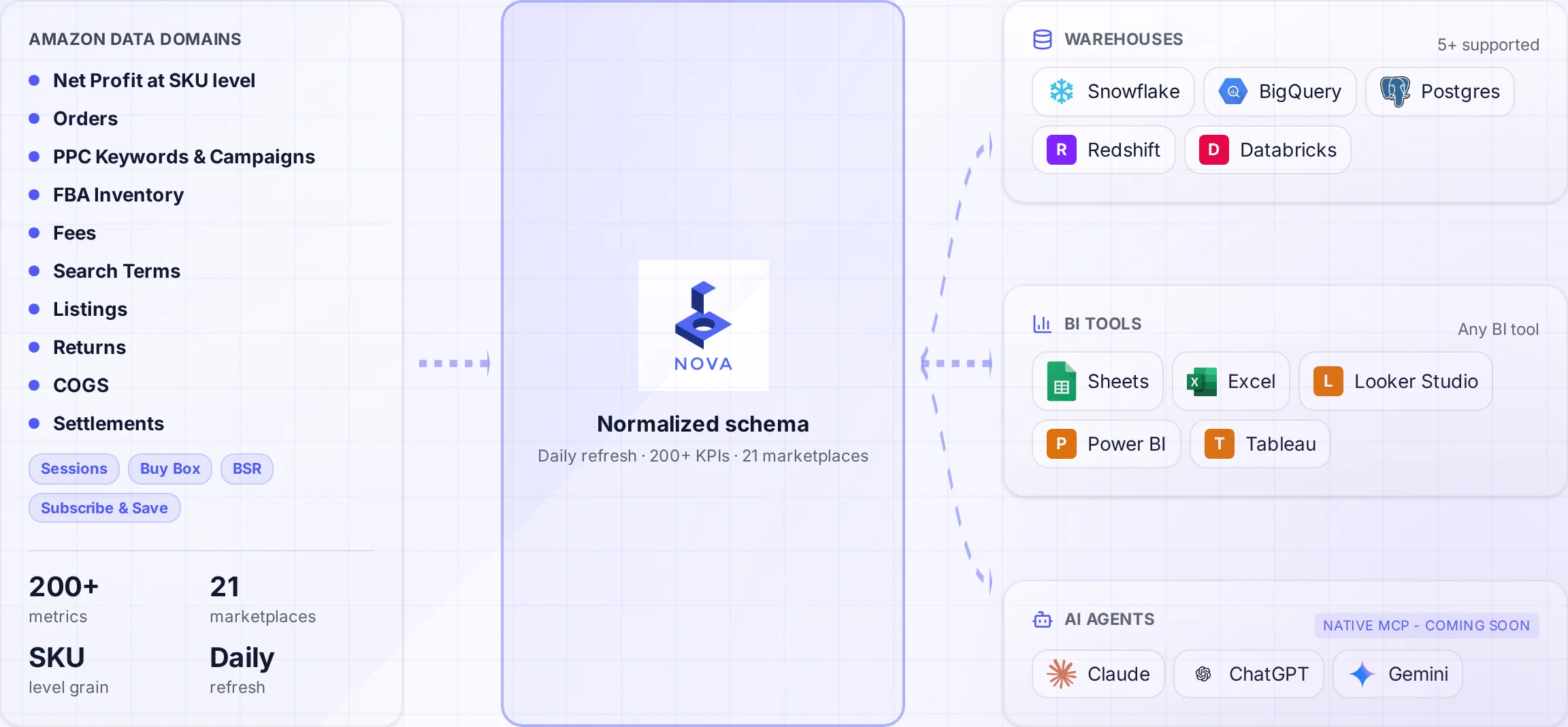
A normalized schema connects Amazon data to the warehouses and tools your team uses.
Your Amazon data needs a home. A real home, not another spreadsheet or Seller Central's 60-day data retention prison. The two leading cloud data warehouses, Snowflake and Google BigQuery, both promise to solve this problem. But the "best" choice depends entirely on your existing stack, team skills, and how you plan to use the data.
A tool that wins on paper can lose in practice. This comparison focuses on the practical differences that actually impact Amazon seller analytics workflows.
Quick Comparison: Snowflake vs BigQuery for Amazon Data
Factor
Snowflake
BigQuery
Winner For
Pricing Model
Compute + storage separate
Per-query + storage
Depends on usage pattern
Best For
Heavy concurrent workloads
Ad-hoc analysis, ML
Different use cases
dbt Support
Excellent, most popular
Excellent
Tie
Google Ecosystem
Third-party integrations
Native Looker, GA4, Ads
BigQuery
Multi-Cloud
AWS, Azure, GCP
GCP only
Snowflake
Learning Curve
Standard SQL, more concepts
Standard SQL, serverless
BigQuery (simpler)
The Real Question
Don't ask "which is better." Ask "what does my team already use?" If your company runs on Google Cloud with Looker dashboards, BigQuery wins. If your data engineers live in Snowflake and dbt, that's your answer. Switching costs exceed any marginal performance difference.
Pricing Deep Dive: The $10K Difference Nobody Talks About
Both platforms advertise competitive pricing. The reality? Your bill depends entirely on how you use Amazon data. Compare both platforms with your own workload because architecture and usage determine the bill.
Snowflake Pricing Model
Snowflake charges separately for compute (credits) and storage. You pay for warehouse runtime in credits, regardless of query complexity. According to Snowflake's pricing documentation, credit costs vary by cloud provider and region.
XS Warehouse
$2/hour
1 credit/hour, good for small queries
Medium Warehouse
$16/hour
8 credits/hour, dashboard workloads
Storage
$23/TB
Per month, compressed data
Snowflake Cost Optimization Tip
Set aggressive auto-suspend (60 seconds) on warehouses. Amazon data workloads are typically bursty: heavy during ETL, light during reporting. A warehouse running 24/7 at XS costs $1,440/month. The same warehouse with proper auto-suspend might cost $50-100.
BigQuery Pricing Model
BigQuery charges per query based on data scanned. Storage is separate. The first 1TB of queries per month is free. See BigQuery's pricing page for current rates.
On-Demand
$6.25/TB
Pay per TB scanned
Flat-Rate
$2,000/mo
100 slots, unlimited queries
Storage
$20/TB
Active storage per month
BigQuery Cost Optimization Tip
Partition your Amazon data by date. A query scanning 2 years of orders at 50GB costs $0.31. The same query partitioned and filtered to last 30 days at 2GB costs $0.01. That's a 31x difference on the same data.
Real Cost Comparison: $50K Amazon Business
Let's model actual costs for an Amazon seller doing $50K/month with 500 SKUs and a 3-person analytics team running daily reports.
Cost Component
Snowflake
BigQuery
Storage (10GB Amazon data)
$0.23
$0.20
Daily ETL (1 hour XS)
$60/month
$15/month (queries)
Dashboard queries (ad-hoc)
$30/month
$25/month
Total Monthly
~$90
~$40
For small to mid-size Amazon businesses with light analytics workloads, BigQuery's on-demand pricing typically wins. But this flips at scale. Let's see the $5M seller scenario.
Real Cost Comparison: $5M Amazon Business
A $5M annual seller with 5,000 SKUs, 15-person analytics team, and heavy concurrent dashboard usage.
Cost Component
Snowflake
BigQuery
Storage (500GB)
$11.50
$10
Daily ETL (4 hours Medium)
$1,920/month
$400/month
Heavy dashboard queries
$500/month
$2,500/month
Total Monthly
~$2,430
~$2,910
At this scale, the cost difference is negligible. The decision should be based on team expertise and ecosystem fit, not pricing.
Ecosystem Integration: Where Each Shines
BigQuery Wins: Google Ecosystem
If you're running Google Ads, using GA4, and building Looker dashboards, BigQuery is the obvious choice. The native integrations are seamless. According to Google's Analytics Hub documentation, data sharing between Google properties is automatic.
Native Google Integrations
Google Analytics 4 export (free)
Google Ads data transfer
Looker Studio direct connect
Looker semantic layer
Google Sheets live queries
ML & Analytics
BigQuery ML (built-in ML)
Vertex AI integration
Gemini-powered analytics
Natural language queries
Auto-ML for forecasting
For Amazon sellers running significant Google Ads alongside their Amazon advertising, BigQuery lets you build unified CAC and ROAS dashboards without complex data movement. Learn more about advertising cost tracking that works across platforms.
Snowflake Wins: Enterprise Data Mesh
Snowflake dominates in multi-cloud enterprise environments where data needs to flow between AWS, Azure, and GCP. The Snowflake Marketplace provides access to third-party datasets for enrichment.
Multi-Cloud Excellence
Run on AWS, Azure, or GCP
Cross-cloud data sharing
Snowflake Marketplace data
Native Iceberg support
Data Clean Rooms
BI Tool Ecosystem
Tableau certified partner
Power BI DirectQuery
Sigma Computing native
ThoughtSpot optimized
Mode Analytics partner
For aggregators managing portfolios across multiple brands, Snowflake's data sharing capabilities enable secure cross-brand analytics without data duplication. See how aggregators use Nova to centralize portfolio analytics.
Need Help Choosing Your Data Warehouse?
Our data engineering team has implemented Amazon analytics on both Snowflake and BigQuery. Get a personalized recommendation based on your existing stack.
Both platforms handle Amazon data fine. But some Amazon-specific requirements favor one over the other.
Data Freshness Requirements
Amazon's SP-API has rate limits and reporting delays. Most data is available within 15-30 minutes. Both warehouses can handle this refresh cadence, but the ingestion architecture differs.
Data Type
Snowflake Approach
BigQuery Approach
Orders for orders and units
Snowpipe continuous loading
Streaming inserts or batch
Settlement reports
Daily batch via COPY
Daily batch load jobs
Ad performance
Incremental merge
Partition overwrite
Settlement Report Complexity
Amazon settlement reports are notoriously complex with 200+ transaction types. Both warehouses handle this fine, but the transformation approach matters more than the warehouse choice. Check out our guide on data warehouse architecture patterns for Amazon data.
Settlement Report Tip
Don't try to parse settlement reports with warehouse SQL alone. Use a transformation layer like dbt to categorize the 200+ fee types into actionable categories (referral fees, FBA fees, advertising, adjustments). The warehouse doesn't care about this complexity. Your data model does.
dbt Implementation: The Great Equalizer
Both Snowflake and BigQuery have excellent dbt support. In fact, dbt makes the warehouse choice less important because your transformation logic becomes portable. Learn more from the dbt documentation on supported platforms.
dbt Community Packages
Snowflake has a larger dbt community overall, but both platforms support the packages relevant to Amazon sellers:
Package
Snowflake
BigQuery
Amazon Relevance
dbt-utils
Full support
Full support
Essential for all projects
dbt-date
Full support
Full support
Date spine for gaps
dbt-expectations
Full support
Full support
Data quality tests
fivetran/amazon_ads
Native
Native
Ad data models
Performance Optimization Differences
While dbt code is portable, optimization strategies differ:
Snowflake Optimizations
Clustering keys for large tables
Warehouse size selection
Result caching use
Transient tables for staging
BigQuery Optimizations
Partitioning (required for cost control)
Clustering for filter performance
Slot reservations for predictable cost
Materialized views for repeated queries
Migration Considerations
Already on one platform and considering switching? Here's the migration reality.
Migration Warning
Warehouse migrations are expensive. Plan for 3-6 months of parallel running, extensive testing, and hidden costs. The 20% cost savings you're chasing will be consumed by migration effort. Only migrate if there's a compelling ecosystem reason, not marginal cost savings.
Migration Effort Estimate
Component
Snowflake → BigQuery
BigQuery → Snowflake
Schema migration
1-2 weeks
1-2 weeks
dbt model conversion
2-4 weeks
2-4 weeks
BI dashboard rebuild
4-8 weeks
2-4 weeks (if Tableau)
ETL pipeline updates
2-4 weeks
2-4 weeks
Testing & validation
4-8 weeks
4-8 weeks
Total
3-6 months
3-5 months
Decision Framework: Make the Right Choice
Use this framework to decide. Answer honestly, not aspirationally.
Choose BigQuery If:
You run Google Ads alongside Amazon PPC
Your team uses Looker or Looker Studio
You want true serverless (no cluster management)
Your analytics workload is light and ad-hoc
You're already on GCP for other workloads
Choose Snowflake If:
You need multi-cloud flexibility
Your team has Snowflake experience
You use Tableau, Power BI, or Sigma
You need data sharing with partners
Heavy concurrent dashboard usage
You're an aggregator managing multiple brands
Consider Alternatives If:
All-in on AWS: Consider Redshift for ecosystem consolidation
ML-heavy workloads: Consider Databricks for advanced analytics
Just need dashboards: Consider Nova's Custom Analytics without warehouse complexity
Frequently Asked Questions
Conclusion: The Best Warehouse Is the One Your Team Uses
After all the benchmarks and cost comparisons, the best data warehouse is the one your team actually uses. A perfectly architected Snowflake implementation gathering dust is worse than a scrappy BigQuery setup driving daily decisions.
For most Amazon sellers starting fresh, we recommend Snowflake for its ecosystem breadth and dbt community. If you're already in Google's ecosystem, BigQuery is the obvious choice. Both will serve you well for years.
The harder problem is getting Amazon data into your warehouse reliably. That's where most projects fail. Whether you choose Snowflake or BigQuery, consider how you'll solve the data ingestion challenge before committing to a warehouse.