Most Amazon data warehouse projects fail because of architecture, not technology. Three-layer patterns, dbt project structure, and the models that scale from $1M to $100M+ revenue.
Most Amazon data warehouse projects fail because of architecture, not technology. The warehouse works fine. The pipeline breaks. This guide covers proven architecture patterns for Amazon seller data: dimensional modeling, dbt project structure, and the staging/mart patterns that scale from $1M to $100M+ in revenue.
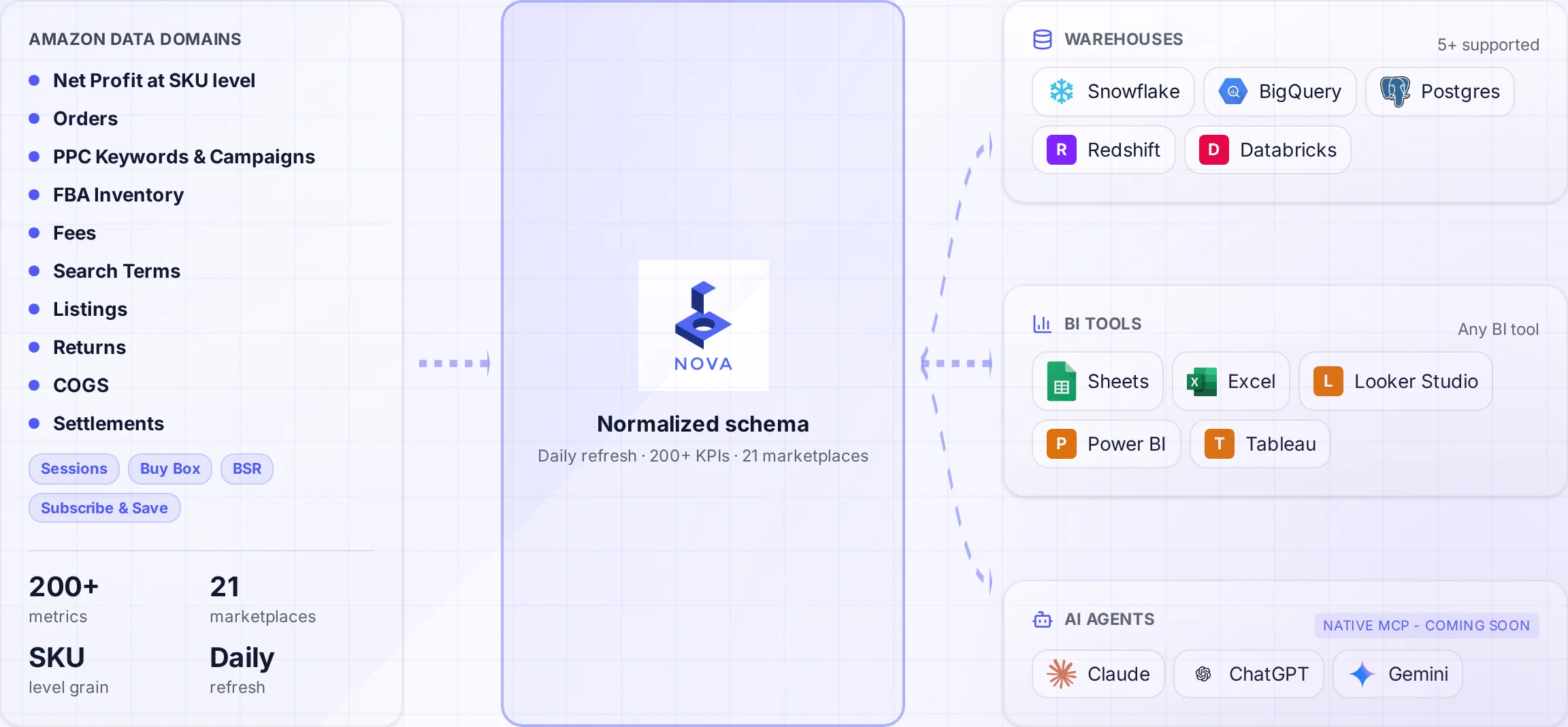
A normalized schema connects Amazon data to the warehouses and tools your team uses.
A data warehouse implementation can fail even when the team picks a capable warehouse (Snowflake, BigQuery, Redshift), builds custom SP-API pipelines, and then struggles with transformations. Three months later, they have raw data sitting in tables that nobody trusts or uses.
Architecture is the difference between a warehouse that drives decisions and one that becomes another unused data silo. This guide shares the patterns we use at Nova for our own data infrastructure and recommend to clients.
The Three-Layer Architecture
Every successful Amazon data warehouse follows a variation of this structure. This pattern is well-documented in the dbt best practices guide.
1. Staging Layer
Raw data cleaned and typed. 1:1 mapping with source systems. No business logic.
2. Intermediate Layer
Cleaned, deduplicated, joined. Business entities emerge. Light transformations.
Each layer has a specific job. Staging handles source system quirks. Intermediate handles data quality. Marts handle business logic. When something breaks, you know exactly where to look. When requirements change, you know exactly what to modify.
Staging Layer: Taming Amazon's Chaos
Amazon's data is messy. Different reports use different identifiers. Dates come in multiple formats. Fee names change across API versions. The staging layer normalizes this chaos.
Staging Layer Principles
1:1 source mapping: One staging table per source report/API endpoint
Minimal transformation: Type casting, column renaming, nothing else
Full history: Never delete staging data; use incremental loads
Source tracking: Include metadata columns (_loaded_at, _source_file)
Amazon-Specific Staging Tables
Source
Staging Table
Key Columns
Update Frequency
Orders API
stg_amazon__orders
amazon_order_id, purchase_date
Hourly
Order Items API
stg_amazon__order_items
order_item_id, asin, sku
Hourly
Settlement Reports
stg_amazon__settlements
settlement_id, posted_date
Daily (bi-weekly)
FBA Inventory
stg_amazon__fba_inventory
fnsku, fulfillment_center
Daily
Sponsored Products
stg_amazon__sp_campaigns
campaign_id, date
Daily
Catalog Items
stg_amazon__catalog
asin, marketplace_id
Weekly
dbt Staging Model Example
-- models/staging/amazon/stg_amazon__orders.sql

with source as (
    select * from {{ source('amazon_raw', 'orders') }}
),

renamed as (
    select
        -- Primary key
        amazon_order_id,

        -- Foreign keys
        marketplace_id,

        -- Dates (standardize to timestamp)
        cast(purchase_date as timestamp) as purchase_date,
        cast(last_update_date as timestamp) as last_update_date,

        -- Order details
        order_status,
        fulfillment_channel,
        sales_channel,
        ship_service_level,

        -- Financials (cast to numeric)
        cast(order_total_amount as numeric(18,2)) as order_total,
        order_total_currency_code as currency,

        -- Metadata
        _loaded_at,
        _source_file

    from source
)

select * from renamed
Intermediate Layer: Data Quality & Integration
The intermediate layer handles the messy work: deduplication, data quality checks, and joining related entities.
Key Intermediate Models for Amazon Data
Model
Purpose
Key Transformations
int_orders_enriched
Orders + items + products
Join order-item-product, calculate totals
int_financial_transactions
Unified fee tracking
Categorize 200+ fee types into groups
int_product_master
Single product truth
Resolve ASIN/SKU/FNSKU conflicts
int_inventory_snapshots
Point-in-time inventory
SCD Type 2 for inventory history
int_ad_performance
Cross-ad-type metrics
Unify SP, SB, SD, DSP data
The Product Identity Problem
Amazon uses three different product identifiers: ASIN (Amazon's ID), SKU (your ID), and FNSKU (FBA-specific). They don't always map cleanly. The intermediate layer resolves this.
Product Identity Challenges
One ASIN, multiple SKUs: Different bundles or color variations
One SKU, multiple FNSKUs: Different FBA shipment batches
SKU changes: Sellers rename SKUs over time
Marketplace differences: same product, different ASINs per country
Product Master Model
-- models/intermediate/int_product_master.sql

with catalog as (
    select * from {{ ref('stg_amazon__catalog') }}
),

inventory as (
    select distinct sku, fnsku, asin
    from {{ ref('stg_amazon__fba_inventory') }}
),

orders as (
    select distinct sku, asin
    from {{ ref('stg_amazon__order_items') }}
),

-- Build comprehensive mapping
product_mappings as (
    select
        coalesce(c.asin, i.asin, o.asin) as asin,
        coalesce(i.sku, o.sku) as sku,
        i.fnsku,
        c.item_name as product_name,
        c.brand,
        c.item_type as category,
        c.marketplace_id
    from catalog c
    full outer join inventory i on c.asin = i.asin
    full outer join orders o on c.asin = o.asin
),

-- Deduplicate and pick best values
final as (
    select
        asin,
        sku,
        fnsku,
        first_value(product_name ignore nulls) over (
            partition by asin order by product_name
        ) as product_name,
        first_value(brand ignore nulls) over (
            partition by asin order by brand
        ) as brand,
        marketplace_id
    from product_mappings
    qualify row_number() over (
        partition by asin, sku, marketplace_id order by fnsku
    ) = 1
)

select * from final
Fee Categorization
Amazon charges 200+ different fee types. The intermediate layer groups them into actionable categories for P&L reporting.
Category
Includes
Typical % of Revenue
Referral Fees
Commission, digital services tax
8-15%
FBA Fulfillment
Pick, pack, ship, handling
15-25%
FBA Storage
Monthly, long-term, aged inventory
1-5%
Advertising
SP, SB, SD, DSP
5-25%
Adjustments
Refunds, chargebacks, reimbursements
1-5%
Skip the Architecture from Scratch
Nova provides pre-built dbt models with 50+ staging tables and 20+ mart models. Get production-ready architecture in days, not months.
Marts are the tables your BI tools query. They follow dimensional modeling principles: facts (measures) and dimensions (attributes).
Core Amazon Seller Marts
Fact Tables
fct_orders: Order-level transactions
fct_order_items: Line-item detail
fct_financial_transactions: all money movement
fct_ad_performance: Daily ad metrics
fct_inventory_movements: Stock changes
Dimension Tables
dim_products: Product master with hierarchy
dim_dates: Date spine with fiscal periods
dim_marketplaces: Region and currency info
dim_campaigns: Ad campaign structure
dim_fee_types: Fee categorization lookup
Daily P&L Mart Example
The most valuable mart for Amazon sellers: daily profit and loss by product.
Daily P&L Model
-- models/marts/finance/fct_daily_pnl.sql

with orders as (
    select * from {{ ref('int_orders_enriched') }}
),

fees as (
    select * from {{ ref('int_financial_transactions') }}
),

ads as (
    select * from {{ ref('int_ad_performance') }}
),

daily_revenue as (
    select
        date_trunc('day', purchase_date) as date,
        sku,
        marketplace_id,
        sum(item_price) as gross_revenue,
        sum(item_tax) as tax_collected,
        count(distinct amazon_order_id) as orders,
        sum(quantity) as units_sold
    from orders
    where order_status not in ('Cancelled', 'Pending')
    group by 1, 2, 3
),

daily_fees as (
    select
        date_trunc('day', posted_date) as date,
        sku,
        marketplace_id,
        sum(case when fee_category = 'referral' then amount else 0 end) as referral_fees,
        sum(case when fee_category = 'fba_fulfillment' then amount else 0 end) as fba_fees,
        sum(case when fee_category = 'fba_storage' then amount else 0 end) as storage_fees,
        sum(case when fee_category = 'refund' then amount else 0 end) as refunds
    from fees
    group by 1, 2, 3
),

daily_ads as (
    select
        date,
        sku,
        marketplace_id,
        sum(spend) as ad_spend,
        sum(sales) as attributed_sales,
        sum(impressions) as impressions,
        sum(clicks) as clicks
    from ads
    group by 1, 2, 3
),

final as (
    select
        coalesce(r.date, f.date, a.date) as date,
        coalesce(r.sku, f.sku, a.sku) as sku,
        coalesce(r.marketplace_id, f.marketplace_id, a.marketplace_id) as marketplace_id,

        -- Revenue
        coalesce(r.gross_revenue, 0) as gross_revenue,
        coalesce(r.units_sold, 0) as units_sold,
        coalesce(r.orders, 0) as orders,

        -- Fees
        coalesce(f.referral_fees, 0) as referral_fees,
        coalesce(f.fba_fees, 0) as fba_fees,
        coalesce(f.storage_fees, 0) as storage_fees,
        coalesce(f.refunds, 0) as refunds,

        -- Ads
        coalesce(a.ad_spend, 0) as ad_spend,
        coalesce(a.attributed_sales, 0) as attributed_sales,

        -- Calculated metrics
        coalesce(r.gross_revenue, 0)
            - coalesce(f.referral_fees, 0)
            - coalesce(f.fba_fees, 0)
            - coalesce(f.storage_fees, 0)
            - coalesce(f.refunds, 0)
            - coalesce(a.ad_spend, 0) as contribution_margin

    from daily_revenue r
    full outer join daily_fees f
        on r.date = f.date and r.sku = f.sku and r.marketplace_id = f.marketplace_id
    full outer join daily_ads a
        on r.date = a.date and r.sku = a.sku and r.marketplace_id = a.marketplace_id
)

select * from final
dbt Project Structure
Organize your dbt project for maintainability. Here's the structure we recommend for Amazon seller analytics:
Amazon data grows quickly. Full refreshes become expensive. Use incremental models to process only new data.
Incremental Order Model
-- models/staging/amazon/stg_amazon__orders.sql

{{
    config(
        materialized='incremental',
        unique_key='amazon_order_id',
        incremental_strategy='merge'
    )
}}

with source as (
    select * from {{ source('amazon_raw', 'orders') }}
    {% if is_incremental() %}
    where _loaded_at > (select max(_loaded_at) from {{ this }})
    {% endif %}
),

-- rest of transformation...
When to Use Which Materialization
Materialization
Use Case
Amazon Example
View
Light transformations, infrequent queries
Staging models during development
Table
Small datasets, dimension tables
dim_products, dim_marketplaces
Incremental
Large, append-only datasets
fct_orders, fct_ad_performance
Ephemeral
CTEs used by multiple models
Shared fee categorization logic
Data Quality Testing
Amazon data has known quality issues. Build tests into your pipeline to catch problems early.
Essential Tests for Amazon Data
Schema Tests
unique: amazon_order_id in orders
not_null: sku, purchase_date, order_status
accepted_values: order_status list
relationships: order_items → orders
Custom Tests
Revenue is positive
Settlement totals balance
No duplicate order-item combinations
Date ranges are reasonable
dbt Test Configuration
# models/staging/amazon/_amazon__models.yml

version: 2

models:
  - name: stg_amazon__orders
    description: Cleaned Amazon orders from SP-API
    columns:
      - name: amazon_order_id
        description: Unique order identifier
        tests:
          - unique
          - not_null

      - name: purchase_date
        description: When the order was placed
        tests:
          - not_null
          - dbt_utils.recency:
              datepart: day
              field: purchase_date
              interval: 3

      - name: order_status
        description: Current order status
        tests:
          - accepted_values:
              values: ['Pending', 'Shipped', 'Cancelled', 'Unshipped']

      - name: order_total
        description: Total order value
        tests:
          - dbt_utils.expression_is_true:
              expression: ">= 0"
Frequently Asked Questions
Conclusion: Architecture Over Technology
The right architecture matters more than the warehouse choice. A well-architected PostgreSQL database outperforms a poorly designed Snowflake implementation.
Key takeaways:
Three layers: Staging, intermediate, mart. Each has a job.
dbt for transformations: Version control, testing, documentation built in.
Product identity matters: Solve ASIN/SKU/FNSKU mapping in the intermediate layer.
Test everything: Amazon data quality issues are predictable. Build tests for them.
Incremental for scale: Full refreshes don't scale. Use incremental models.
The hardest part isn't the warehouse architecture. It's getting clean Amazon data in the first place. The SP-API is complex, rate-limited, and constantly changing. That's the problem Nova's Data API solves.