The wrong data warehouse choice means months of migration pain. This comparison covers Snowflake, BigQuery, Redshift, and Databricks with real Amazon seller workload benchmarks.
Snowflake, BigQuery, Redshift, or Databricks? Every Amazon seller moving beyond Seller Central's limited reports faces this question. The wrong choice means months of migration pain later. This comparison cuts through marketing hype and shows which warehouse actually fits your business.
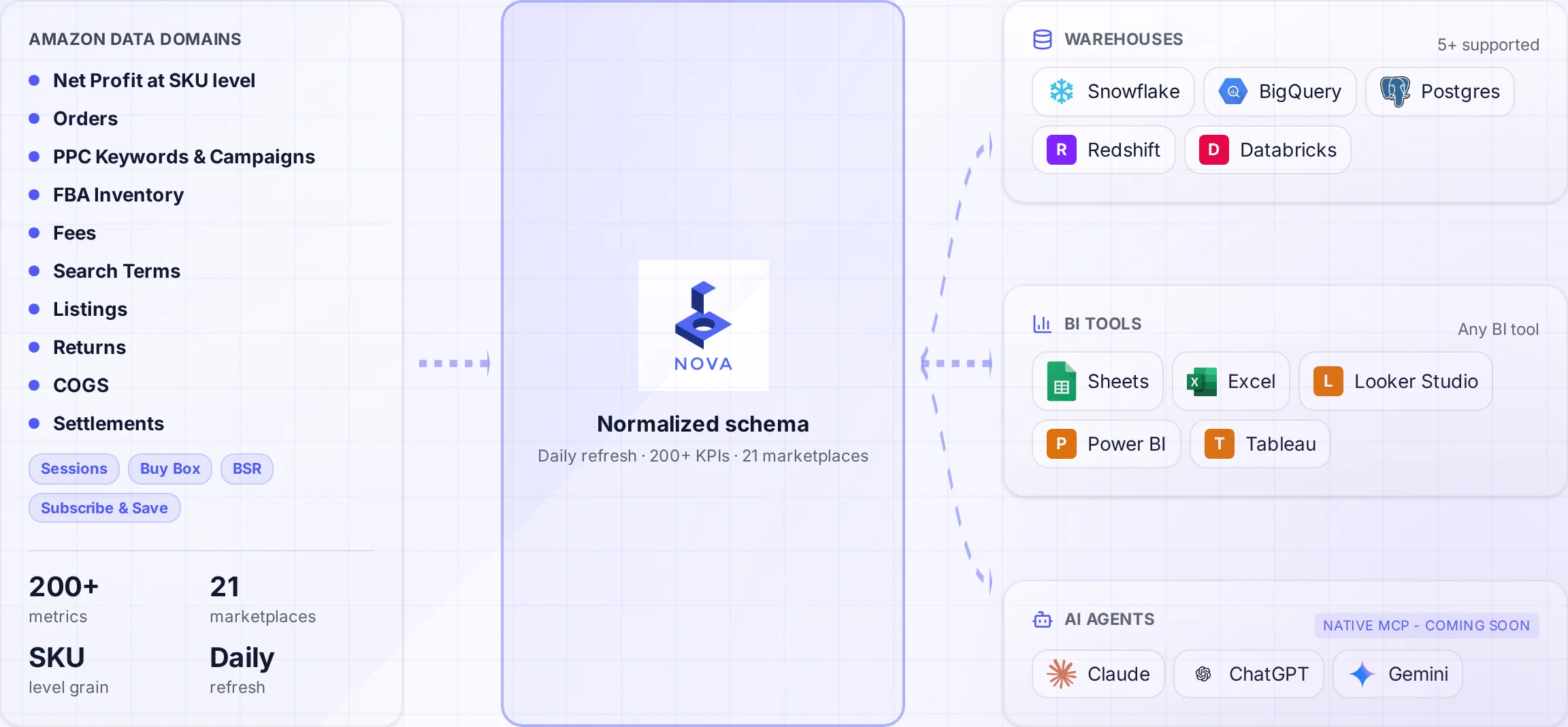
A normalized schema connects Amazon data to the warehouses and tools your team uses.
After helping 200+ Amazon sellers implement data warehouses, we've learned that the "best" choice depends on factors that vendor comparison charts ignore: your existing tech stack, team skills, and actual analytics needs.
This guide compares the four major options across the dimensions that matter for e-commerce data. No theoretical benchmarks. Real-world performance with Amazon seller data. Honest cost breakdowns including hidden fees.
TL;DR: Quick Recommendations
Best Overall: Snowflake
Easiest to use, best dbt ecosystem, works with any BI tool. The default choice unless you have specific requirements for alternatives.
Best for Google Stack: BigQuery
If you run Google Ads, use GA4, and build Looker dashboards, BigQuery's native integrations win. Simpler serverless model too.
Best for AWS Shops: Redshift
Already all-in on AWS with Glue, Lambda, and S3? Redshift consolidates billing and IAM. Reserved pricing can beat alternatives.
Best for ML: Databricks
Building demand forecasting or pricing models? Databricks excels at ML workloads. Overkill for standard reporting.
Feature Comparison
Feature
Snowflake
BigQuery
Redshift
Databricks
Serverless
Hybrid
Yes
Optional
Yes
Pricing Model
Compute + Storage
Per Query + Storage
Node Hours
DBU + Cloud
dbt Support
Excellent
Excellent
Good
Good
ML Capabilities
Snowpark ML
BigQuery ML
SageMaker
Native (Best)
Multi-Cloud
AWS/Azure/GCP
GCP Only
AWS Only
AWS/Azure/GCP
Learning Curve
Low
Low
Medium
High
Concurrency
Excellent
Good
Limited
Good
Data Sharing
Native
Analytics Hub
Data Sharing
Delta Sharing
Snowflake: The Default Choice
Snowflake has become the standard for cloud data warehousing. For Amazon sellers without strong preferences toward other platforms, it's the safest bet.
Why Snowflake Wins for Most Sellers
Strengths
Largest dbt community and packages
Works with any BI tool equally well
Instant scaling for concurrent users
Time travel for debugging
Zero-copy cloning for development
Snowflake Marketplace for enrichment
Weaknesses
No native Google ecosystem integration
Pricing complexity (compute vs storage)
ML capabilities lag behind Databricks
Requires warehouse management knowledge
Snowflake Pricing for Amazon Data
Snowflake charges separately for compute (credits) and storage. Here's what Amazon sellers typically pay. See Snowflake pricing for current rates.
Small Seller ($50K/mo)
$80-150
Per month, XS warehouse
Mid-Size ($500K/mo)
$300-600
Per month, S/M warehouse
Enterprise ($5M+/mo)
$1,500-4,000
Per month, multiple warehouses
Snowflake Cost Tip
Set auto-suspend to 60 seconds. Amazon analytics workloads are bursty. A warehouse running 24/7 costs 10x more than one that auto-suspends between queries. This single setting can save thousands annually.
BigQuery: Best for Google Ecosystem
If your marketing runs through Google (Ads, Analytics, Looker), BigQuery's native integrations provide significant advantages.
Why BigQuery Wins for Google Users
Strengths
Native GA4 and Google Ads integration
Looker Studio direct connect
True serverless (no cluster management)
BigQuery ML for SQL-based models
Generous free tier (1TB queries/month)
Gemini-powered natural language queries
Weaknesses
GCP-only (no multi-cloud)
Query costs can surprise at scale
Smaller dbt community than Snowflake
Less intuitive for non-Google BI tools
BigQuery Pricing for Amazon Data
BigQuery charges per TB of data scanned. Storage is separate. The first 1TB of queries per month is free. See BigQuery pricing for details.
Small Seller ($50K/mo)
$30-80
Per month, on-demand
Mid-Size ($500K/mo)
$150-400
Per month, on-demand
Enterprise ($5M+/mo)
$800-2,500
Per month, flat-rate better
BigQuery Cost Tip
Always partition Amazon data by date. A query scanning 2 years of orders costs 30x more than the same query filtered to last 30 days. Partitioning is free and automatic. Just add a date column as the partition key.
Redshift: Best for AWS Shops
If your infrastructure runs on AWS (EC2, S3, Lambda, Glue), Redshift offers ecosystem consolidation that matters more than feature comparisons suggest.
Why Redshift Wins for AWS Users
Strengths
Native AWS service integrations
Unified IAM and billing
Reserved Instance savings (up to 75%)
Spectrum for S3 data lake queries
Redshift Serverless option
ML integration with SageMaker
Weaknesses
More operational overhead
Concurrency limits on provisioned clusters
AWS-only (no multi-cloud)
Steeper learning curve
Vacuum/analyze maintenance needed
Redshift Pricing for Amazon Data
Redshift offers both provisioned (fixed nodes) and serverless (pay-per-use) options.
Small Seller (Serverless)
$100-200
Per month, variable usage
Mid-Size (2-node dc2)
$360
Per month, on-demand
Enterprise (RA3)
$1,500-5,000
Per month, managed storage
Skip the Warehouse Setup Complexity
Nova delivers clean Amazon data to any warehouse. Focus on analysis, not pipeline maintenance. Get 900+ metrics flowing in days.
The warehouse choice matters less than how you get Amazon data into it. The Selling Partner API is complex, rate-limited, and constantly changing.
Approach
Timeline
Coverage
Maintenance
DIY SP-API Pipeline
6-12 months
As built
High ongoing
ETL Tools (Fivetran, Airbyte)
2-4 weeks
Limited
Medium
Nova Data API
Days
900+ metrics
None
Data Pipeline Reality Check
Most warehouse projects fail at data ingestion, not analysis. The SP-API has 20+ endpoints with different authentication flows, rate limits, and data formats. Settlement reports alone have 200+ transaction types to parse. Budget 80% of your effort for data ingestion, 20% for analysis.
Architecture Recommendations
Whatever warehouse you choose, follow these architecture patterns for Amazon seller data. For detailed implementation guides, see our warehouse architecture guide.
Recommended Layers
1. Staging Layer
Raw data, minimal transformation. 1:1 with source systems. Never delete staging data.
2. Intermediate Layer
Cleaned, deduplicated, joined. Business entities emerge. Light transformations.
dbt works with all four warehouses and makes your transformation logic portable. Key benefits:
Version control: Git-based change management
Testing: built-in data quality tests
Documentation: Auto-generated data catalog
Portability: Switch warehouses without rewriting logic
Frequently Asked Questions
Conclusion: Make a Decision and Move On
Analysis paralysis costs more than picking the "wrong" warehouse. All four platforms handle Amazon data competently. The differences matter less than getting started.
Our recommendations:
Default choice: Snowflake. Best ecosystem, easiest to learn, works with everything.
Google ecosystem: BigQuery. Native integrations save significant effort.
AWS shops: Redshift. Ecosystem consolidation and Reserved Instance savings.
ML workloads: Databricks. But only if you have data science resources.
No infrastructure preferred: Nova's SaaS dashboards. Get insights without building pipelines.
Whatever you choose, the hardest part is getting Amazon data in reliably. The warehouse is just a container. The real value comes from clean, accurate, timely data. That's the problem Nova's Data API solves.