Databricks is overkill for basic Amazon reporting. But for demand forecasting, pricing optimization, and inventory ML, it's unmatched. Implementation guide for data science teams.
Databricks is overkill for basic Amazon reporting. But if you're building ML models for demand forecasting, pricing optimization, or inventory prediction, it's the right tool. This guide covers when Databricks makes sense for Amazon seller data and how to implement it without wasting months on unnecessary complexity.
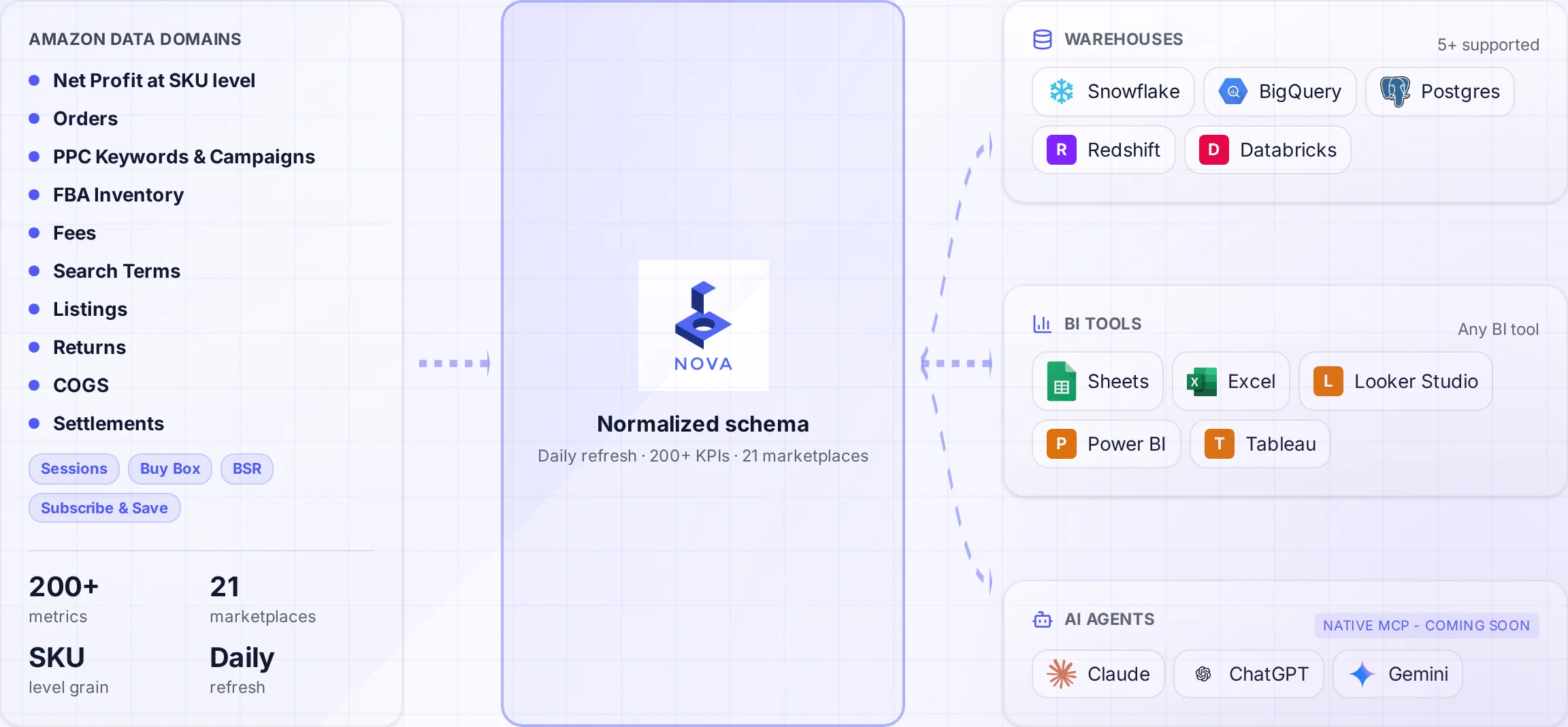
A normalized schema connects Amazon data to the warehouses and tools your team uses.
Let's be clear upfront: most Amazon sellers don't need Databricks. If your goal is dashboards, P&L reports, and basic analytics, use Snowflake or BigQuery. They're simpler, cheaper, and faster to implement.
But some Amazon analytics problems require more than SQL. Demand forecasting across 10,000 SKUs. Dynamic pricing models that react to competitor changes. Inventory optimization that accounts for seasonality, lead times, and storage costs. These are machine learning problems. And Databricks excels at ML workloads.
This guide is for data teams who need advanced analytics capabilities. We'll cover the architecture, implementation patterns, and realistic cost expectations for running Amazon seller analytics on Databricks.
When Databricks Makes Sense for Amazon Data
Databricks is not a replacement for a data warehouse. It's a complement for specific use cases.
If you're reading this guide to figure out if you need Databricks, you probably don't. Teams that need Databricks usually know it because they've hit the limits of SQL-based analytics. If your current tools work but feel slow, upgrade your warehouse tier. Don't add Databricks complexity.
Architecture: Databricks + Amazon Seller Data
The recommended architecture uses Databricks alongside a traditional warehouse, not as a replacement. The medallion architecture pattern provides structure.
Medallion Architecture for Amazon Data
Databricks promotes the "medallion" (bronze/silver/gold) architecture. Here's how it applies to Amazon seller data:
Layer
Amazon Data Contents
Format
Refresh
Bronze
Raw SP-API responses, exactly as received
JSON/Parquet
Hourly or daily
Silver
Cleaned, deduplicated, typed data
Delta Lake
Hourly
Gold
Business-ready aggregations, KPIs
Delta Lake
Daily
ML Features
Feature store for models
Feature Store
On-demand
Hybrid Architecture Pattern
Most successful implementations use this pattern:
Data Ingestion
Nova API
Clean data delivered to S3/ADLS
Reporting
Snowflake/BigQuery
BI dashboards, SQL analytics
ML Workloads
Databricks
Forecasting, optimization
This hybrid approach lets you use the right tool for each job. SQL analysts use the warehouse. Data scientists use Databricks. Both work from the same underlying data. Learn more about data warehouse architecture patterns.
ML Use Cases for Amazon Seller Data
1. Demand Forecasting
The most common ML use case for Amazon sellers. Predict future sales to optimize inventory. Industry research shows ML-based forecasting can reduce stockouts by 50% and inventory costs by 20-30%.
Databricks AutoML for Forecasting
Databricks AutoML can train demand forecasting models across thousands of SKUs without custom code:
from databricks import automl

# Load historical sales from silver layer
sales_df = spark.table("silver.daily_sales")

# Train forecasting model
summary = automl.forecast(
    dataset=sales_df,
    target_col="units_sold",
    time_col="date",
    identity_col=["sku", "marketplace"],
    horizon=30,  # 30-day forecast
    frequency="d"
)

# Best model is automatically registered
print(summary.best_trial)
Key features for Amazon demand forecasting:
Seasonality handling: Prime Day, Q4 peaks, category-specific patterns
For brands with repeat purchase products, understanding customer lifetime value drives strategy.
Customer Segmentation Features
RFM metrics: Recency, frequency, monetary value
Purchase patterns: Category mix, bundle behavior
Subscription signals: Subscribe & Save enrollment
Review behavior: Engagement, sentiment
Return patterns: Return rate, reasons
Implementation Guide
Step 1: Data Ingestion to Databricks
Get Amazon data into your Databricks environment. Three options:
Option
Timeline
Maintenance
Coverage
DIY SP-API
6-12 months
High ongoing
As built
ETL Tools
2-4 weeks
Medium
Limited
Nova Data API
Days
None
900+ metrics
Nova can deliver directly to S3, Azure Data Lake, or GCS. Set up Auto Loader in Databricks to incrementally process new files:
Auto Loader Example
# Auto Loader for Nova data files
df = (spark.readStream
    .format("cloudFiles")
    .option("cloudFiles.format", "parquet")
    .option("cloudFiles.schemaLocation", "/checkpoints/nova_schema")
    .load("s3://your-bucket/nova-data/orders/")
)

# Write to Delta Lake bronze layer
(df.writeStream
    .option("checkpointLocation", "/checkpoints/nova_orders")
    .trigger(availableNow=True)
    .toTable("bronze.amazon_orders")
)
Step 2: Feature Engineering
Transform raw data into ML-ready features. Databricks Feature Store manages this.
Feature Store Example
from databricks.feature_store import FeatureStoreClient

fs = FeatureStoreClient()

# Define feature table
feature_df = spark.sql("""
    SELECT
        sku,
        marketplace_id,
        date,
        -- Sales features
        avg(units_sold) OVER (
            PARTITION BY sku ORDER BY date
            ROWS BETWEEN 30 PRECEDING AND 1 PRECEDING
        ) as units_sold_30d_avg,
        -- Seasonality features
        dayofweek(date) as day_of_week,
        month(date) as month,
        -- Inventory features
        days_of_inventory,
        stockout_flag_30d
    FROM silver.daily_metrics
""")

# Create feature table
fs.create_table(
    name="features.sku_daily_features",
    primary_keys=["sku", "marketplace_id", "date"],
    df=feature_df,
    description="Daily SKU features for demand forecasting"
)
Step 3: Model Training
Train models using MLflow for experiment tracking.
Databricks is powerful. It's also complex and expensive. The decision comes down to whether you have ML problems that justify the investment.
Use Databricks if: you're building demand forecasting models, pricing optimization, or inventory ML. You have data science resources. Your Amazon business is large enough ($5M+ revenue) to justify the platform cost.
Skip Databricks if: you need dashboards and reports. Your team is business analysts, not data scientists. You're under $5M in revenue. Standard analytics tools (Snowflake, BigQuery, or Nova's dashboard software) will serve you better.
Whatever platform you choose, the hardest part is getting clean Amazon data. The SP-API is complex, rate-limited, and constantly evolving. That's the problem Nova solves with our Data API.