NovaClaudeMCP

Free for lifeClaim your lifetime free access to Nova MCP for Claude before 07/31!

Back to Blog
FBA Guide
Featured
Updated Apr 1, 2026

Amazon Accounting 101: Complete Guide for FBA Sellers

Master Amazon accounting fundamentals: P&L statements, COGS tracking, tax considerations, and automation strategies. Essential guide for profitable FBA business management.

A
·CEO at Nova AnalyticsLinkedIn

Antoine founded Nova Analytics to empower Amazon sellers with enterprise-grade analytics. He specializes in data architecture and building scalable solutions for e-commerce businesses.

Oct 25, 2025·15 min

Amazon FBA accounting is fundamentally different from traditional retail or ecommerce bookkeeping. Between nine distinct fee categories, marketplace facilitator tax rules, FBA-specific costs, and complex contribution margin calculations, sellers need a specialized understanding of how to track, report, and optimize their Amazon financials. The patterns below are what we see drive results across cohorts, not what reads well in a benchmark report.

This guide covers everything Amazon sellers need to know about accounting fundamentals, from building your first P&L statement to understanding tax obligations and implementing automation that saves 10+ hours weekly.

Why Amazon Accounting Is Different

Traditional accounting assumes you control pricing, shipping, customer service, and payment processing. Amazon sellers operate under a completely different model where:

  • Amazon controls the customer relationship: you don't see customer contact info, Amazon processes payments, and they own the shopping experience.
  • Fee complexity is extreme: 9 different fee categories (referral, FBA fulfillment, storage, long-term storage, removal, disposal, returns processing, high-volume listing, rental book service) that vary by size tier, category, and season.
  • Inventory lives offsite: your products sit in Amazon warehouses across multiple locations. You don't ship individual orders; Amazon handles all fulfillment.
  • Returns happen automatically: Amazon accepts returns without consulting you. You pay return processing fees and often don't get products back.
  • Sales tax is mostly handled by Amazon: as a marketplace facilitator, Amazon collects and remits sales tax in most states. But you still have obligations in some jurisdictions.
  • Cash flow is unpredictable: Bi-weekly disbursements, reserve holds, and fee variability make cash forecasting complex.

This unique model means you can't simply plug Amazon data into QuickBooks or Xero and expect accurate results. You need specialized systems or significant manual work to categorize transactions correctly.

Cash vs. Accrual Accounting for Amazon Sellers

The first fundamental decision is your accounting method. Most small Amazon sellers default to cash basis, but larger operations benefit from accrual accounting.

Cash Basis Accounting

Records: Revenue when Amazon deposits money; expenses when you pay bills.

Best for:

  • Annual revenue under $500K
  • Simple business structure
  • Low inventory levels
  • Solo operators

Advantages:

  • Simple to understand and maintain
  • Clear cash position visibility
  • Lower accounting costs
  • Tax-favorable (defer income recognition)

Disadvantages:

  • Poor matching of revenue and expenses
  • Inventory not properly valued
  • Difficult to analyze true profitability
  • Doesn't meet GAAP standards

Accrual Basis Accounting

Records: Revenue when products ship; expenses when incurred (not paid).

Best for:

  • Annual revenue over $500K
  • Inventory-heavy businesses
  • Multiple team members
  • Growth/fundraising plans

Advantages:

  • Accurate profit measurement
  • Proper inventory valuation
  • Revenue/expense matching
  • Investor/lender preferred

Disadvantages:

  • More complex to maintain
  • Requires accounting knowledge
  • Higher accounting costs
  • Can pay tax on unpaid receivables

Recommendation: Start with cash basis if you're under $250K annual revenue. Switch to accrual by $500K or when you raise capital. Most accounting software (including Nova) supports both methods with a settings toggle.

Essential Financial Statements for Amazon Sellers

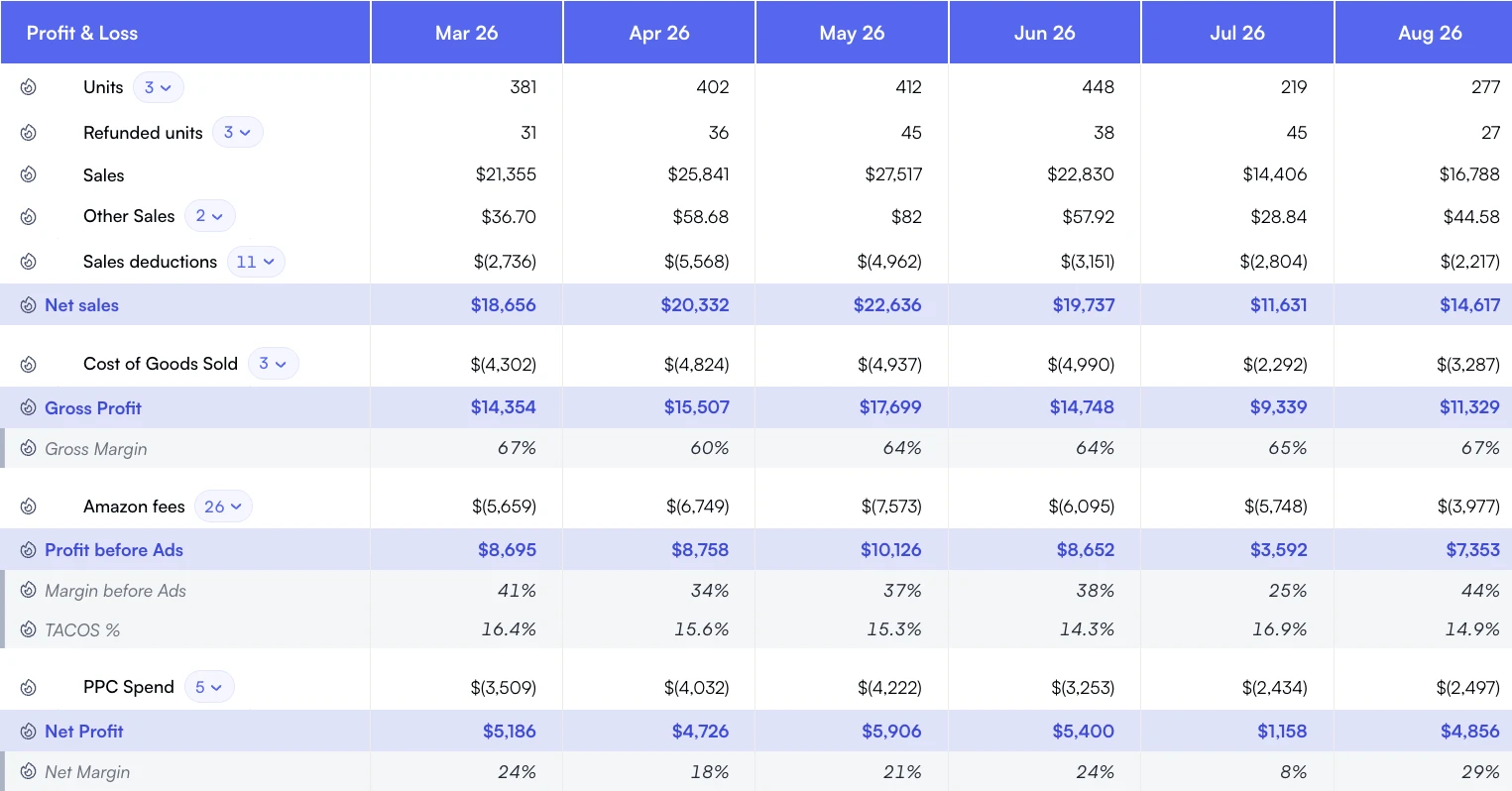
1. Profit & Loss Statement (P&L / Income Statement)

Your P&L statement shows profitability over a period (month, quarter, year). For Amazon sellers, the structure should be:

Revenue
Gross Product Sales: $100,000
- Refunds: ($5,000)
- Promotions/Discounts: ($2,000)
= Net Revenue: $93,000
Cost of Goods Sold (COGS)
- Product Cost: ($35,000)
- Shipping to Amazon: ($3,000)
- Customs/Duties: ($1,500)
- Prep/Labeling: ($500)
= Total COGS: ($40,000)
Gross Profit (CM1): $53,000 (57%)
Marketing & Advertising
- Amazon PPC: ($12,000)
- External Ads: ($2,000)
= Total Marketing: ($14,000)
Contribution Margin 2 (CM2): $39,000 (42%)
Amazon Fees
- Referral Fees (15%): ($13,950)
- FBA Fulfillment: ($8,000)
- Storage Fees: ($1,200)
- Other Fees: ($500)
= Total Amazon Fees: ($23,650)
Contribution Margin 3 (CM3): $15,350 (17%)
Operating Expenses
- Software/Tools: ($400)
- Salaries/Contractors: ($3,000)
- Professional Services: ($500)
- Other OpEx: ($300)
= Total OpEx: ($4,200)
NET PROFIT: $11,150 (12%)

2. Balance Sheet

Your balance sheet shows assets, liabilities, and equity at a specific date. For inventory-heavy Amazon businesses, this is critical for understanding financial health:

ASSETS
Cash: $25,000
Accounts Receivable (Amazon): $15,000
Inventory (FBA + Warehouse): $80,000
Prepaid Expenses: $2,000
Total Current Assets: $122,000
Equipment/Computers: $5,000
Total Assets: $127,000
LIABILITIES & EQUITY
Accounts Payable (Suppliers): $30,000
Credit Card: $8,000
Business Loan: $20,000
Total Liabilities: $58,000
Owner's Equity: $50,000
Retained Earnings: $19,000
Total Equity: $69,000
Total Liab + Equity: $127,000

Key insight: This seller has 68% of assets tied up in inventory and receivables (typical for FBA). Working capital (current assets - current liabilities) is $64K, providing a comfortable buffer.

3. Cash Flow Statement

Your cash flow statement tracks actual cash in and out. Critical for Amazon sellers because profit ≠ cash. You might be profitable on paper but cash-poor due to inventory purchases.

  • Operating Activities: Cash from sales, less payments for COGS, fees, expenses
  • Investing Activities: Equipment purchases, software investments
  • Financing Activities: Loans received/repaid, owner distributions

Net Change in Cash = Beginning Cash + Operating + Investing + Financing

Amazon-specific challenge: your cash is tied up in inventory for 60-120 days (order → ship → sell → disburse). Strong cash flow management prevents stockouts during growth phases.

Understanding Contribution Margin (CM1, CM2, CM3)

Contribution margin shows profitability at different stages of your P&L. This metric is more valuable than gross profit or net profit alone because it reveals where Money is made or lost.

Contribution Margin 1 (CM1)

Revenue - COGS

This is your gross profit. It shows how much you have left after paying for the product itself plus landed costs.

Good CM1 Benchmarks:

  • Private label: 60-70%
  • Wholesale: 30-40%
  • Retail arbitrage: 40-50%

Contribution Margin 2 (CM2)

CM1 - Marketing

Shows profitability after advertising spend. Critical for understanding if your PPC is sustainable.

Good CM2 Benchmarks:

  • Mature products: 40-55%
  • New launches: 20-35%
  • High competition: 25-40%

Contribution Margin 3 (CM3)

CM2 - Amazon Fees

Your true profitability after Amazon takes their cut. This is what you actually have for operations and profit.

Good CM3 Benchmarks:

  • Healthy: 15-25%
  • Acceptable: 10-15%
  • Danger zone: <10%

Why This Matters:

A product with 45% gross margin (CM1) might look profitable, but after 20% marketing costs and 20% Amazon fees, you're left with just 5% CM3, barely covering operating expenses. Contribution margin analysis reveals your real economics and helps you prioritize winners.

Tracking All 9 Amazon Fee Categories

Amazon charges nine different fee types. Accurate accounting requires tracking each separately to understand true costs and identify optimization opportunities:

1. Referral Fees

Percentage of sale price (usually 15%, varies by category). Your largest fee expense.

Example: $100 sale × 15% = $15

2. FBA Fulfillment Fees

Per-unit fee for pick, pack, ship based on size tier and weight.

Example: Small standard: $3.22, Large standard: $5.32+

3. Monthly Storage Fees

Cubic foot per month. Increases Oct-Dec (peak season).

Example: $0.87/cu ft (Jan-Sep), $2.40/cu ft (Oct-Dec)

4. Long-Term Storage Fees

Additional charge for inventory stored 271-365 days ($3.45/cu ft) or 365+ days ($6.90/cu ft).

Example: 100 cu ft × 365+ days = $690/month

5. Removal/Disposal Fees

Fee to return or dispose of inventory.

Example: $0.78 per unit (return), $0.45 per unit (disposal)

6. Returns Processing Fees

Charged when customer returns an item (apparel/shoes categories).

Example: Usually equal to FBA fulfillment fee

7. High-Volume Listing Fees

Charged if you have over 100K+ parent SKUs (rare for most sellers).

Example: $0.005 per SKU over 100K

8. Rental Book Service Fees

Specific to textbook rental program (niche category).

Example: Varies by rental period

9. Refund Administration Fee

Amazon keeps referral fee (or $5, whichever is less) on refunded orders.

Example: Customer refund: $100, you lose $5

Manual vs. Automated: Categorizing these fees manually takes 3-5 hours monthly for a small seller, 10-15 hours for larger catalogs. Specialized software like Nova automatically categorizes all nine fee types with 99.8% accuracy.

Tax Considerations for Amazon Sellers

Federal Income Tax

Amazon income is business income subject to federal tax. Most sellers operate as sole proprietors (Schedule C), LLCs (pass-through), or S-Corps (combination of salary + distributions). Key considerations:

  • Quarterly estimated taxes: required if you'll owe $1,000+ annually
  • Self-employment tax: 15.3% on net profit (Social Security + Medicare)
  • Deductions: COGS, fees, ads, software, home office, mileage, professional services

Sales Tax (State)

Amazon is a marketplace facilitator in all US states, meaning they collect and remit sales tax on your behalf in most jurisdictions. However:

  • • You may still have nexus obligations in your home state
  • • Some states require marketplace seller registration
  • • Off-Amazon sales (your website, other channels) are your responsibility

International VAT (For Global Sellers)

Selling in UK, EU, or other international markets triggers VAT obligations. Requirements vary by country but generally include:

  • • VAT registration thresholds (UK: £85K, varies in EU)
  • • Quarterly VAT filings
  • • EORI numbers for customs
  • • Fiscal representatives in some countries

Recommendation: Hire an international accountant if you're selling globally.

Tax Software & Professional Help:

  • Under $100K revenue: TurboTax or H&R Block with Schedule C
  • $100K-$500K: Ecommerce-focused accountant (quarterly reviews)
  • $500K+: Dedicated CFO or accounting firm with Amazon expertise

Automation: From 15 Hours to 2 Hours Weekly

Manual Amazon accounting consumes 10-15 hours weekly for a seller doing $500K+ annual revenue. Tasks include:

❌ Manual Process (10-15 hrs/week)

  • • Download settlement reports from Seller Central
  • • Categorize 100s of transactions by type
  • • Allocate PPC spend by product (complex)
  • • Track COGS for each SKU in spreadsheets
  • • Calculate fees by size tier manually
  • • Reconcile refunds, reimbursements
  • • Build P&L reports in Excel
  • • Generate product-level margin analysis

✓ Automated Process (2 hrs/week)

  • • Software syncs data hourly - 24 hrs
  • • Automatic categorization (99.8% accurate)
  • • PPC allocated by ASIN automatically
  • • COGS tracked per product with period management
  • • All fees calculated and categorized
  • • Reconciliation happens automatically
  • • Near real-time P&L dashboard
  • • Product-level profitability built-in

ROI Calculation

Time saved: 10 hours/week = 40 hours/month
Your hourly value: $50/hr (conservative)
Monthly value: 40 hrs × $50 = $2,000
Software cost: ~$69-$169/month
Net monthly savings: $1,831 - $1,931
Annual ROI: 1,000%+ on time savings alone

7 Common Amazon Accounting Mistakes (And How to Avoid Them)

1. Not tracking COGS accurately

Impact: Overstating profit by 10-20%, making bad pricing decisions

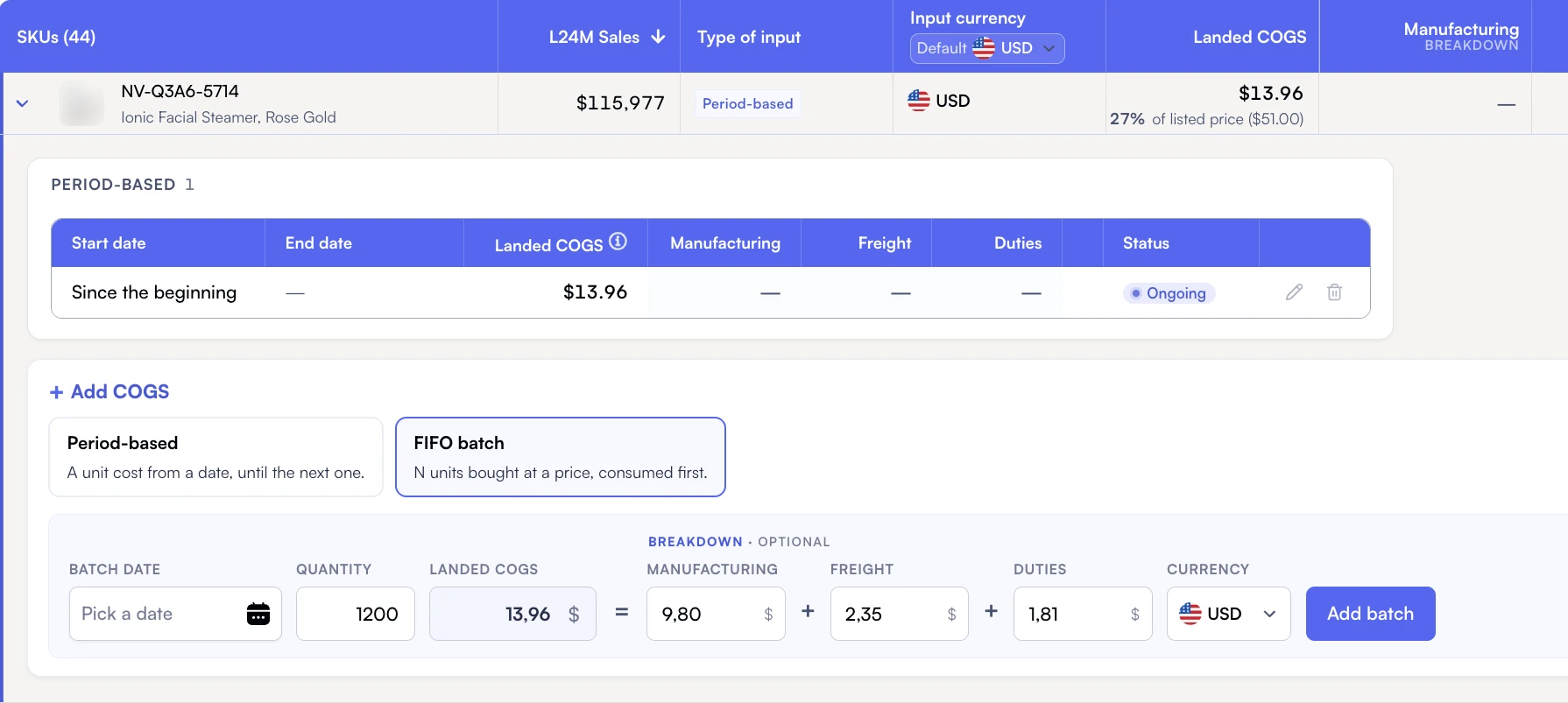
Fix: Use period-based COGS management to handle price changes and currency fluctuations. Include ALL costs: product, shipping to Amazon, customs, prep fees.

2. Ignoring product-level profitability

Impact: Subsidizing losers with winners, unclear prioritization

Fix: Track P&L by ASIN. Cut or optimize products with CM3 under 10%. Double down on 20%+ CM3 performers.

3. Miscategorizing Amazon fees

Impact: Can't optimize fee structure, inaccurate margin analysis

Fix: Separate all 9 fee types. Automated software handles this perfectly; manual tracking requires detailed settlement report analysis.

4. Not allocating PPC by product

Impact: Can't calculate true ROAS per ASIN, overinvesting in poor performers

Fix: Use attribution to assign ad spend to specific products. Essential for multi-product portfolios.

5. Forgetting return processing fees and refund admin fees

Impact: Margins look 1-3% better than reality

Fix: Track returns separately. High-return categories (apparel, electronics) need different profitability thresholds.

6. Not separating marketing from COGS

Impact: Can't see CM1 vs CM2, unclear optimization path

Fix: Build three-tiered contribution margin analysis: CM1 (after COGS), CM2 (after marketing), CM3 (after fees).

7. Cash basis when you need accrual

Impact: Poor inventory valuation, misleading profitability

Fix: Switch to accrual accounting by $500K revenue or when inventory exceeds $50K value.

Master Your Amazon Accounting

Stop spending 10+ hours weekly on manual bookkeeping. Get near real-time P&L, contribution margins, and product-level profitability automatically.

Related read

Amazon Seller Calculator: forecast fees and margin per SKU