




NovaClaudeMCP

Nova MCP for Claude goes live in

--Days
--Hrs
--Min
--Sec
FBA vs FBM Analytics

FBA vs FBM: Compare Performance Across Your Catalog

Track margins, spot trends, and compare performance by fulfillment type for every SKU. Nova filters your entire analytics suite by FBA or FBM so you can make data-driven fulfillment decisions.

Try for Free
Rated 4.9/5 · 14-day free trial
Nova P&L dashboard filtered by FBA fulfillment type showing waterfall cost breakdown per product

Try the free FBA vs FBM calculator

Enter your selling price, weight, and product cost to compare net profit and margin for both fulfillment models.

FBA vs FBM Cost Calculator

Compare profitability for your product

Enter your email to unlock the full calculator and compare unlimited products.

Why sellers can't compare FBA vs FBM performance

Seller Central doesn't split analytics by fulfillment type. Without that visibility, you're making fulfillment decisions blind.

01

Seller Central doesn't split P&L

Seller Central doesn't split P&L by fulfillment type. You see total revenue, total fees, total profit. There's no way to isolate FBA margins from FBM margins without exporting data and building your own spreadsheet.

02

FBM trends are invisible

You can't see which FBM SKUs are gaining or losing margin over time. Without trend data by fulfillment type, you won't notice a product slowly becoming unprofitable under FBM until it's too late.

03

No daily KPI split

No way to compare daily KPIs between FBA and FBM products. CM3%, TACoS, and contribution margin should be tracked separately for each model. Seller Central blends everything together.

04

Performance drivers are invisible

You don't know if your FBA products or FBM products are dragging overall numbers. Without a breakdown, you can't act on what's actually driving margin changes.

See Nova in action

Filter your entire analytics by fulfillment type. See which model performs better across margins, fees, and daily KPIs.

P&L by Fulfillment Type

Filter your P&L by FBA or FBM. See waterfall breakdown per model.

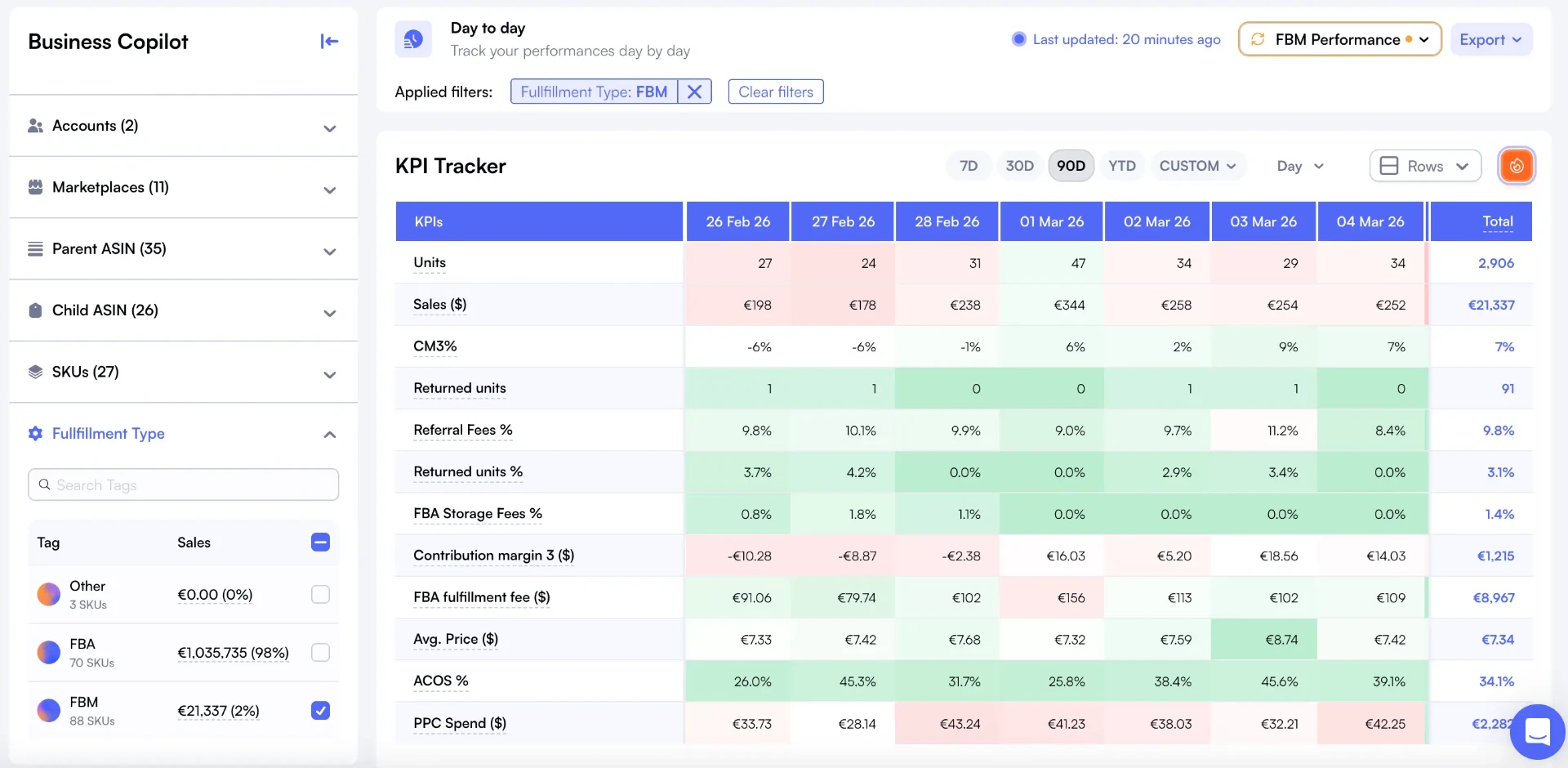
Daily KPI Tracking

Track CM3%, TACoS, and margins daily for FBA and FBM separately.

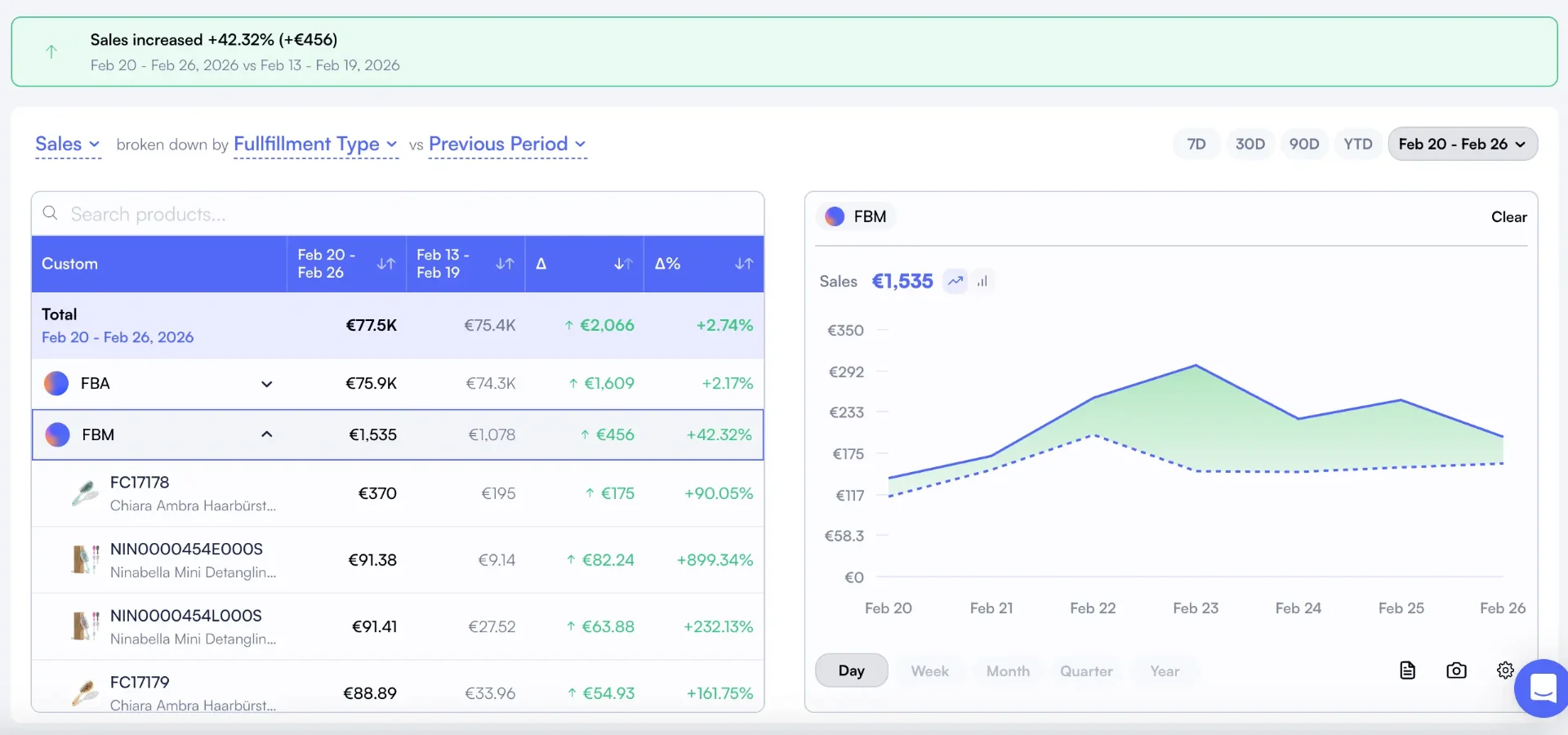
Performance Drivers

See which fulfillment type is driving margin gains or losses.

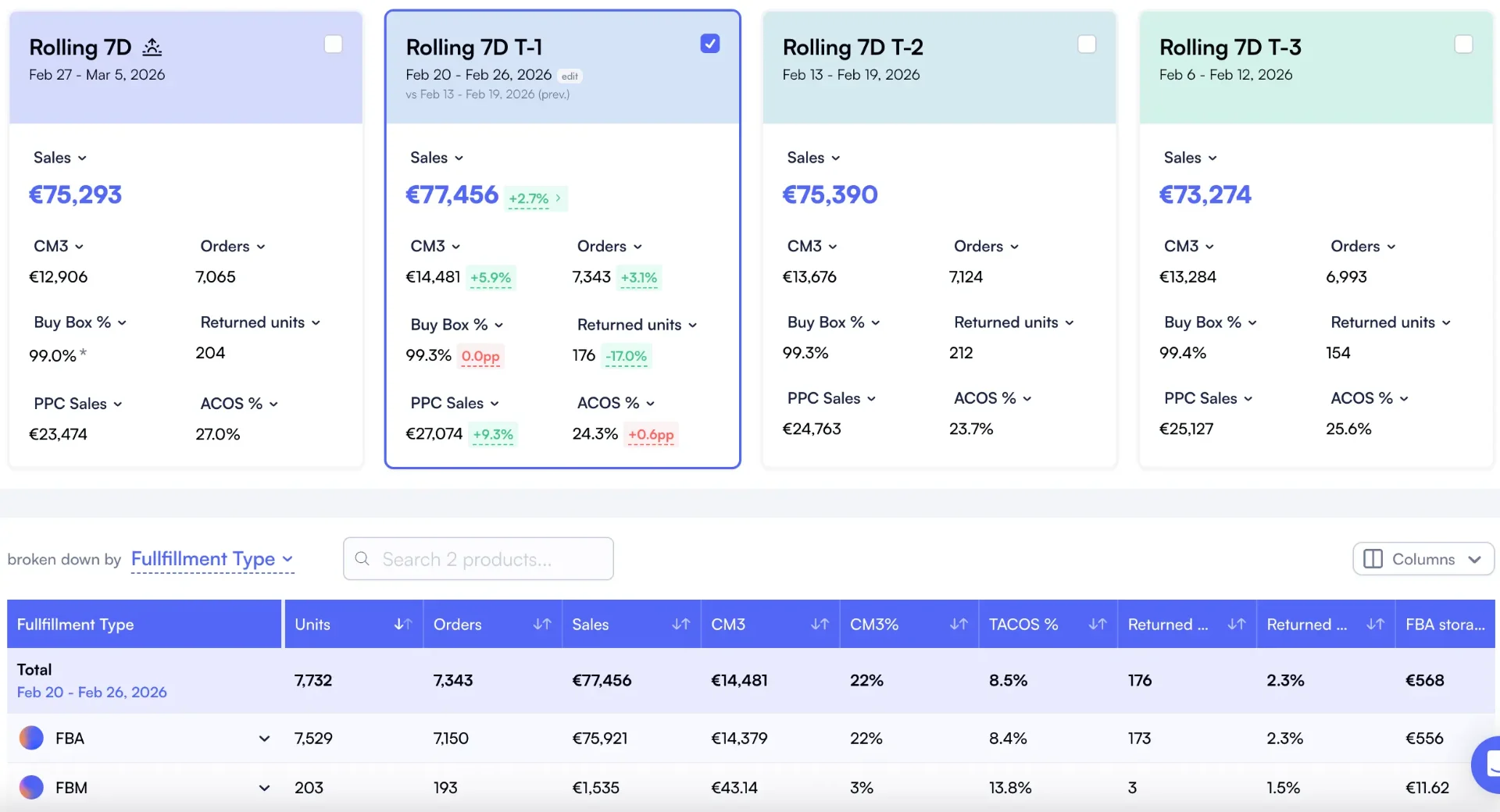
Product Cockpit Filter

Rolling 7-day cockpit with FBA/FBM breakdown per product.

Custom Metrics Comparison

Select 10+ KPIs and compare them side by side by fulfillment type.

Multi-Marketplace Performance

Compare fulfillment performance across 21 Amazon marketplaces.

Nova Day-to-Day dashboard filtered by FBM showing CM3%, referral fees, and storage costs
Nova Product Cockpit with rolling 7-day view and FBA vs FBM breakdown table
Nova Performance Drivers broken down by Fulfillment Type with FBM expanded showing per-SKU delta

40+

Fee Types Tracked

Every referral, FBA, storage, and return fee. Automatically.

99.8%

Accuracy

Verified against Amazon Settlement Reports.

21

Marketplaces

All Amazon regions. Automatic currency conversion.

Compare FBA vs FBM Performance in 5 Minutes

Connect your Seller Central account and see how each fulfillment type performs across margins, fees, and daily KPIs. No spreadsheets, no guessing. Start your 14-day free trial today.

Start Free Trial

Nova vs Seller Central vs Spreadsheets

Three approaches to comparing FBA and FBM performance. Only one gives you fulfillment-level analytics in real time.

CapabilitySpreadsheetsSeller CentralNova
P&L by fulfillment typeManual pivot tablesNot availableOne-click filter
Daily KPI split (FBA vs FBM)Manual calculationNot availableAutomatic, daily
Performance drivers by fulfillmentNot possibleNot availablePer-SKU delta breakdown
Margin trend by modelTime-consuming chartsNo trend dataBuilt-in trend analysis
Product cockpit with filterSeparate sheetsNo cockpit viewRolling 7D with FBA/FBM
Custom KPI columnsManual setupFixed columns10+ selectable metrics
PPC included in marginsSeparate trackingNoYes, automatic
Multi-marketplaceSeparate sheetsOne marketplace21 marketplaces
Catalog-wide analysisImpractical at scaleOne ASIN at a timeEntire catalog
Accuracy vs Settlement~75-85%Estimate only99.8%

How it works

From zero to full FBA vs FBM performance comparison in 5 minutes. No spreadsheets needed.

1

Connect Your Amazon Account

Link your Seller Central account through Amazon's official SP-API. Nova pulls your orders, fees, returns, and ad data automatically. Takes under 2 minutes.

2

Filter by Fulfillment Type

Instantly filter your P&L, cockpit, and performance drivers by FBA or FBM. See margins, fees, and KPIs isolated by fulfillment model.

3

Spot Winners & Losers

Identify which FBM products are gaining margin and which FBA products need attention. Use performance drivers to see per-SKU deltas by fulfillment type.

Who uses Nova's FBM calculator?

From hybrid sellers optimizing fulfillment to operators scaling FBM-first brands.

$10K - $200K/mo

FBM-First Sellers

  • Track true FBM costs: shipping, labor, packaging
  • Compare margins against FBA for each product
  • Identify when to switch products to FBA
  • Factor in return processing costs
Most popular: Starter plan

$100K - $500K/mo

Hybrid FBA/FBM Sellers

  • Side-by-side fulfillment cost comparison per SKU
  • Optimize fulfillment mix for peak vs off-peak
  • Track seasonal shipping rate changes
  • COGS tracking across both fulfillment models
Most popular: Professional plan

$500K+/mo

Agencies & Multi-Brand Operators

  • Consolidate FBM cost tracking across 100+ accounts
  • Per-client fulfillment profitability dashboards
  • Compare FBM strategies across different brands
  • Multi-marketplace FBM cost analysis
Most popular: Enterprise plan

Nova connects to your entire Amazon ecosystem. Explore our P&L Analytics, Fees Calculator, and Profit Calculator for complete cost visibility. Compare across regions with marketplace analytics.

What Is FBA vs FBM Performance Comparison?

FBA vs FBM performance comparison means analyzing your Amazon business metrics separately for each fulfillment model. Instead of looking at blended numbers, you filter your P&L, daily KPIs, and product-level data by FBA or FBM. This reveals which fulfillment type drives better margins, where you're losing money, and which products should switch models.

Seller Central doesn't offer this. Amazon's Revenue Calculator estimates FBA fees for a single ASIN. It doesn't track performance over time, compare daily KPIs across fulfillment types, or show you which model is actually delivering better results across your catalog. Without fulfillment-level analytics, sellers make gut-feel decisions about where to fulfill each product.

Nova solves this by letting you filter every analytics view by fulfillment type. Your P&L, Day-to-Day dashboard, Product Cockpit, and Performance Drivers all support FBA/FBM filtering. You see exactly how each model performs across margins, fees, and trends. That's how you make data-driven fulfillment decisions instead of guessing.

Why Sellers Choose Nova for FBA vs FBM Analytics

"We moved 40% of our catalog from FBA to FBM after Nova showed us the real performance difference. Our margins improved by $8K/month."

Hybrid FBA/FBM Seller

120 SKUs, $180K/month revenue

"I was losing margin on FBM for my heavy items without realizing it. Nova's fulfillment filter made the switch to FBA obvious for those products."

Home & Garden Seller

65 SKUs across US and UK

Simple, transparent pricing

Start free. Scale when you're ready.

14-day free trial • No credit card required • Cancel anytime

Sellers & Brand Owners

Full analytics. All marketplaces.

Starting at$29/month
Start 14-day free trial
  • Profit & loss analytics
  • PPC Analytics
  • Custom breakdowns
  • Buy Box %
  • BSR Tracker
  • Returns Analytics
  • Consolidated Data Exports
  • Priority support
Enterprise & Agency

Unlimited accounts. Dedicated support.

Custom
  • Unlimited orders
  • Unlimited accounts
  • Unlimited team seats
  • Advanced User Management System
  • Client-first view
  • Dedicated account manager
  • Custom data exports
  • SLA guarantees

Amazon FBM Calculator: Frequently Asked Questions

Everything you need to know about comparing FBA vs FBM performance through Nova's analytics.

Nova lets you filter your entire analytics suite by fulfillment type. Open any dashboard (P&L, Day-to-Day, Product Cockpit, Performance Drivers) and select FBA or FBM from the fulfillment filter. You'll instantly see margins, fees, and KPIs isolated by fulfillment model. No manual calculations needed.
You can compare CM3%, TACoS, contribution margin, referral fees, storage costs, ad spend, revenue, units sold, and 30+ other metrics. Nova's column selector lets you pick exactly which KPIs to display side by side. Filter by FBA or FBM to see how each fulfillment type performs across every metric.
Yes. Nova's Performance Drivers view breaks down margin changes by fulfillment type. You can expand the FBM section to see per-SKU deltas: which products improved, which declined, and what drove the change. This helps you spot FBM products that need attention before they drag overall numbers.
Yes. Nova's P&L dashboard lets you filter by FBA or FBM to see a complete waterfall breakdown of revenue, fees, COGS, and profit for each fulfillment model. Seller Central doesn't offer this. You can also view the Day-to-Day dashboard filtered by fulfillment type to track daily trends.
Amazon's Revenue Calculator estimates FBA fees for a single ASIN. It doesn't compare performance across your catalog, doesn't track trends over time, and doesn't split KPIs by fulfillment type. Nova gives you a full analytics suite with fulfillment filtering across P&L, daily KPIs, product cockpit, and performance drivers.
Yes. Nova's Day-to-Day view lets you filter by fulfillment type. You'll see daily CM3%, referral fees, storage costs, and other KPIs for just your FBA or FBM products. This makes it easy to spot trends and compare how each model performs over time.
Nova offers a 14-day free trial with full access to all analytics features, including fulfillment type filtering across every dashboard. No credit card required. You'll see real performance data for both FBA and FBM products from day one.
The answer depends on your product-level data. Nova shows you exactly which SKUs perform better under each model by comparing margins, fees, and KPIs side by side. Use Performance Drivers to identify FBA products losing margin and FBM products gaining. Data beats guessing.

Stop Guessing. Compare FBA vs FBM Performance.

Join 2,000+ Amazon sellers who use Nova to compare fulfillment performance. Connect your account in 5 minutes, filter by FBA or FBM, and see which model drives better margins.