Your data team already uses Snowflake. Getting Amazon seller data in shouldn't require 18 months of engineering. Learn 3 paths: DIY SP-API, ETL tools, or Nova's pre-built Snowflake delivery with orders and units arriving in real time.
Your data team already runs on Snowflake. You have dbt models, Tableau dashboards, and years of institutional knowledge. The last thing you need is another data silo. Nova bridges the gap between Amazon's chaotic APIs and your existing data stack, delivering clean, normalized seller data directly to Snowflake. Use the checks below in a margin review.
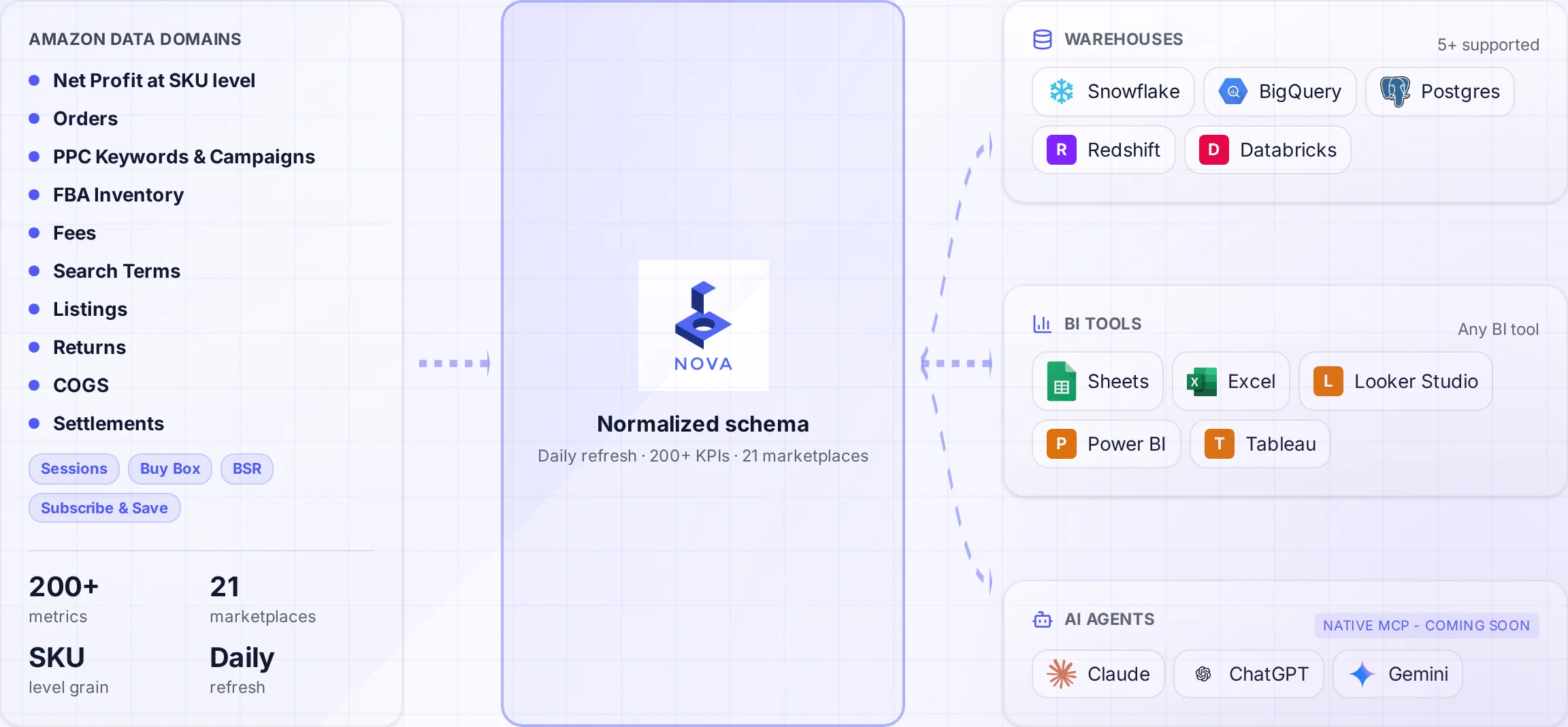
A normalized schema connects Amazon data to the warehouses and tools your team uses.
Building an Amazon data pipeline from scratch takes 12-18 months and costs $300K+ in engineering time. Most projects fail before they deliver anything useful. The Selling Partner API is a maze of 20+ endpoints, aggressive rate limits, and constant schema changes.
This guide covers three paths to getting Amazon seller data into Snowflake: the hard way (DIY with SP-API), the medium way (ETL tools), and the fast way (pre-built solutions like Nova). Enterprise data teams with existing Snowflake investments will learn how to skip the pipeline build and start analyzing Amazon data in days instead of months.
Why Snowflake for Amazon Seller Analytics
Snowflake has become the data warehouse of choice for enterprise teams. For Amazon sellers and aggregators managing large portfolios, Snowflake offers distinct advantages:
Enterprise Security
SOC 2 Type II, HIPAA, and PCI DSS compliance. Role-based access control and data masking for sensitive seller information.
Native dbt Integration
Your existing dbt models work . Add Amazon data as a new source without changing your transformation workflow.
Snowflake Marketplace
Access third-party datasets to enrich Amazon analytics: market data, competitor insights, and category benchmarks.
Multi-Cloud Flexibility
Run on AWS, Azure, or GCP. Keep Amazon data close to your existing infrastructure without migration headaches.
The teams getting the most from Snowflake aren't just storing Amazon data. They're integrating it with other data sources: Shopify sales, warehouse inventory, marketing spend across channels. Snowflake makes this integration seamless.
The Amazon API Chaos: Why Building Your Own Pipeline Fails
Let's be honest about what "build it yourself" actually means. According to industry research, 80% of data projects fail to deliver business value. Amazon data pipelines are particularly brutal.
The SP-API Complexity Problem
Building a complete Amazon data pipeline requires handling:
20+ API endpoints each with different authentication, rate limits, and data formats
Throttling limits that vary by marketplace, seller tier, and time of day
Schema changes Amazon makes quarterly without warning
Data reconciliation across reports that don't always match (Orders API vs Settlement Reports)
Historical backfills that take weeks for large catalogs
200+ fee types Coded differently across different report types
Multiple identifiers (ASIN, SKU, FNSKU) that need mapping
A realistic timeline for a DIY Amazon-to-Snowflake pipeline:
Phase
Timeline
Cost (Engineer Time)
SP-API authentication & setup
2-4 weeks
$15,000-30,000
Core report ingestion
3-6 months
$100,000-200,000
Data transformation & modeling
2-4 months
$80,000-150,000
Testing & validation
1-2 months
$40,000-80,000
Ongoing maintenance (annual)
Continuous
$100,000+/year
Total (Year 1)
12-18 months
$335,000-560,000
These numbers come from aggregators and brands who've tried it. The ones who succeed usually have dedicated data engineering teams of 3+ people. Solo sellers or small teams? The math doesn't work.
What Amazon Data You Can Load to Snowflake
Amazon's SP-API provides access to hundreds of data points across four main categories. With the right pipeline (or Nova), you get access to all of it:
Growth Metrics
Sessions & page views by ASIN
Conversion rates (unit session percentage)
Buy Box percentage over time
Search rank by keyword
Sales velocity & trends
New-to-brand metrics
Organic vs paid traffic split
Profitability Data
200+ fee types (referral, FBA, storage)
Returns & refunds by reason code
Reimbursements claimed/pending
Advertising spend by campaign
Promotional discounts
Currency conversion for global
Settlement reconciliation
Operations Data
Inventory levels by fulfillment center
Inbound shipment status
FBA fees by SKU with size tier
Stranded inventory alerts
Aged inventory reports
Removal orders
Reserved inventory breakdown
CX & Market Data
Review ratings & counts over time
Seller feedback scores
A-to-Z claims
Category best seller rank
Brand analytics (if enrolled)
Return reasons by product
Customer questions
Pro Tip: Start with P&L Data
Most sellers export everything and get overwhelmed. Start with the data that directly impacts decisions: revenue, fees, and advertising spend. That's your P&L foundation. Everything else is optimization.
3 Ways to Get Amazon Data into Snowflake
Your options range from full DIY to fully managed. Here's an honest comparison:
Option 1: Build with SP-API (Hard)
This is the path described above. You build everything from scratch using Amazon's Selling Partner API documentation.
Pros
Cons
Full control over data models
12-18 month build time
No vendor dependency
$300K+ first-year cost
Custom transformations
Ongoing maintenance burden
Best for: Aggregators with $100M+ GMV and dedicated data engineering teams of 5+ people.
Option 2: ETL Tools Like Fivetran or Stitch (Medium)
ETL (Extract, Transform, Load) tools provide pre-built connectors for common APIs. They handle authentication and basic data extraction.
Pros
Cons
Faster setup (weeks vs months)
Limited Amazon-specific transformations
Native Snowflake connectors
Still need data modeling expertise
Handles API authentication
Raw data requires significant cleanup
Best for: Brands with existing data teams and Fivetran/Stitch subscriptions who want to accelerate the build.
Option 3: Pre-Built Solutions Like Nova (Easy)
Instead of building or configuring pipelines, you connect your Amazon accounts and receive clean, modeled data in Snowflake with orders and units arriving in real time.
What Nova Delivers to Snowflake
All Amazon data points Available through SP-API, normalized and ready for analysis
700+ metrics (no transformation needed)
Real-time orders and units for live dashboards
Multi-marketplace support with automatic currency normalization
Historical backfills Included (2+ years depending on data availability)
Schema documentation so your team knows exactly what each field means
Best for: any seller who wants Amazon data in Snowflake without the engineering overhead. Especially agencies managing multiple brands and aggregators who need data fast.
Snowflake vs BigQuery for Amazon Data
Both are excellent choices. Your decision should depend on your existing stack, not Amazon-specific requirements:
Factor
Snowflake
BigQuery
Best for
Enterprise teams with existing Snowflake investment
Teams starting fresh or using Google Cloud
Pricing model
Compute credits (predictable costs)
Pay-per-query (can spike unexpectedly)
dbt integration
Native, excellent
Good, requires more configuration
BI tool support
Tableau, Looker, Power BI, Sigma
Looker Studio (free), Tableau, Looker
Multi-cloud
AWS, Azure, GCP
GCP only
Nova delivery
Yes, native
Yes, native
If you're already using Snowflake for other data sources, keep Amazon data there too. The value of a single source of truth outweighs any marginal differences between platforms. See our BigQuery guide if you're evaluating both options.
Building Analytics in Snowflake with Amazon Data
Once your Amazon data is in Snowflake, you can run any SQL query. Here are examples of analyses that aren't possible in Seller Central:
Example 1: True P&L by SKU
This query calculates net profit per SKU by combining revenue, all Amazon fees, and advertising spend. Essential for profit analysis:
SELECT
  sku,
  SUM(revenue) AS gross_revenue,
  SUM(fba_fees + referral_fees + storage_fees) AS total_amazon_fees,
  SUM(ad_spend) AS advertising_cost,
  SUM(revenue) - SUM(fba_fees + referral_fees + storage_fees + ad_spend) AS contribution_margin
FROM your_database.amazon_data.daily_sku_metrics
WHERE date >= DATEADD(day, -30, CURRENT_DATE())
GROUP BY sku
ORDER BY contribution_margin DESC
LIMIT 50;
Example 2: Conversion Rate by Day of Week
Identify which days drive the highest conversion for bid adjustments:
SELECT
  DAYNAME(date) AS day_of_week,
  AVG(unit_session_percentage) AS avg_conversion_rate,
  SUM(sessions) AS total_sessions,
  SUM(units_ordered) AS total_units
FROM your_database.amazon_data.traffic_metrics
WHERE date >= DATEADD(day, -90, CURRENT_DATE())
GROUP BY DAYNAME(date)
ORDER BY avg_conversion_rate DESC;
Example 3: Cross-Marketplace TACoS Comparison
Compare TACoS performance across US, UK, DE, and other marketplaces:
SELECT
  marketplace,
  COUNT(DISTINCT asin) AS active_asins,
  SUM(revenue_usd) AS total_revenue_usd,
  AVG(profit_margin) AS avg_profit_margin,
  DIV0(SUM(ad_spend_usd), SUM(revenue_usd)) * 100 AS tacos_percentage
FROM your_database.amazon_data.marketplace_summary
WHERE date >= DATEADD(day, -30, CURRENT_DATE())
GROUP BY marketplace
ORDER BY total_revenue_usd DESC;
Snowflake Performance Tip
Use Snowflake's clustering keys on high-cardinality columns like `date` and `sku` for optimal query performance. A well-clustered table can reduce query costs by 10-50x for large datasets.
Integrating Amazon Data with dbt
If your team uses dbt (data build tool), Amazon data becomes just another source in your existing workflow. Here's how to structure your dbt project:
Example dbt Model: Amazon P&L Mart
-- models/marts/amazon/fct_amazon_daily_pnl.sql
{{ config(
    materialized='incremental',
    unique_key=['date', 'sku', 'marketplace'],
    cluster_by=['date']
) }}

WITH orders AS (
    SELECT * FROM {{ ref('stg_amazon__orders') }}
),

fees AS (
    SELECT * FROM {{ ref('stg_amazon__fees') }}
),

advertising AS (
    SELECT * FROM {{ ref('stg_amazon__advertising') }}
)

SELECT
    o.date,
    o.sku,
    o.marketplace,
    o.revenue,
    o.units_sold,
    COALESCE(f.total_fees, 0) AS amazon_fees,
    COALESCE(a.ad_spend, 0) AS ad_spend,
    o.cogs,
    o.revenue - COALESCE(f.total_fees, 0) - COALESCE(a.ad_spend, 0) - o.cogs AS net_profit
FROM orders o
LEFT JOIN fees f ON o.date = f.date AND o.sku = f.sku
LEFT JOIN advertising a ON o.date = a.date AND o.sku = a.sku

{% if is_incremental() %}
WHERE o.date >= (SELECT MAX(date) FROM {{ this }})
{% endif %}
dbt Best Practice
Use incremental models for Amazon data. Full refreshes on large historical datasets are expensive. Nova's schema is designed to work well with incremental dbt models out of the box.
Connecting Snowflake to Tableau, Looker & Power BI
With Amazon data in Snowflake, connecting to visualization tools is straightforward:
Tableau
Tableau has native Snowflake integration with optimized performance. See our Amazon Tableau Dashboard Guide for templates and visualization best practices:
Direct connection using Snowflake ODBC driver
Live queries or extracts for dashboard performance
Row-level security passes through Snowflake roles
Looker
Looker connects natively to Snowflake. Define your LookML models once, and your team can explore Amazon data through a governed semantic layer.
Power BI
Microsoft Power BI connects to Snowflake using the certified connector:
Import or DirectQuery modes available
Single sign-on with Azure AD integration
Scheduled refresh for automated updates
If you're building custom dashboards from scratch, check our Amazon Looker Studio Dashboard Guide for templates and best practices that apply to any BI tool.
Getting Started: Your Next Steps
1
Assess Your Needs
Define which Amazon data you need and how it fits into your existing Snowflake models.
2
Choose Your Path
DIY (18 months), ETL tools (3-6 months), or pre-built (days).
3
Connect to dbt
Integrate Amazon data into your existing transformation workflow and BI stack.
Ready to Skip the Pipeline Build?
Nova delivers all Amazon data points to Snowflake with orders and units arriving in real time. Connect your seller accounts, get clean data in your warehouse, and start building custom reports in days instead of months. Explore Nova's API for data teams, agencies, and aggregators.