
Back to Blog
FBA Guide
Updated Oct 8, 2026|Next review Jan 2027
Amazon FBA Restock Limits 2026
Capacity Manager explained: how limits are calculated, bidding for additional space, and 6 strategies to maximize your FBA storage allocation.
Capacity Manager explained: how limits are calculated, bidding for additional space, and 6 strategies to maximize your FBA storage allocation.
Mar 11, 2026 · 13 min · 3,400 words
Amazon FBA restock limits cap how much inventory you can send to fulfillment centers. Hit your limit, and you can't create new shipments. For growing sellers, this is one of the most frustrating bottlenecks: you've got demand, you've got stock, but Amazon won't let you send it in. Use the checks below to manage the constraint.
In 2024, Amazon replaced the old ASIN-level restock limits with the Capacity Manager System. Limits are now set at the storage type level (standard, oversized, apparel, footwear) and determined by your IPI score, sales velocity, and fulfillment center capacity. This guide explains exactly how the new system works and how to maximize your allocation.
Restock limits are calculated per storage type, not per ASIN. Your IPI score is the primary lever: sellers above 400 get unlimited standard storage. Below 400, Amazon caps your cubic footage. The Capacity Manager lets you request additional capacity by bidding a reservation fee, but maintaining high sell-through is the cheapest path to more space.
Amazon's Capacity Manager replaced the previous restock limit system in March 2023. According to Amazon's Capacity Manager documentation, the system now works on a monthly cycle where Amazon announces your capacity limits for the upcoming month on the third week of the prior month.
Your capacity limit represents the maximum cubic feet of inventory you can have on hand plus in transit to Amazon at any given time. It's not a monthly allowance you can "use up." It's a ceiling. If you're at capacity, you need to sell through existing stock before you can send more.
3rd Week
Of the prior month
Cubic Feet
Per storage type (not per ASIN)
400+
For unrestricted capacity
Amazon hasn't published the exact formula, but seller testing and industry analysis confirms these factors matter most:
Before Capacity Manager, Amazon used ASIN-level restock limits that changed weekly. Sellers had to play a cat-and-mouse game sending small shipments to "claim" limit space. The new system is more predictable: you know your monthly capacity in advance and can plan shipments accordingly.
When your estimated capacity isn't enough, you can request additional space through Capacity Manager. Here's how the bidding process works:
| Step | Action | Details |
|---|---|---|
| 1 | View estimated capacity | Seller Central > Inventory > FBA Dashboard > Capacity Monitor |
| 2 | Request additional capacity | Specify how much extra cubic footage you need |
| 3 | Set reservation fee | Bid a per-cubic-foot fee (higher bids = higher chance) |
| 4 | Amazon approves/denies | Results announced with capacity limits |
| 5 | Performance credit | Earn back reservation fee if you generate enough sales |
Amazon's reservation fee isn't necessarily a cost. If you generate enough sales from the additional capacity, Amazon credits the fee back. The threshold is roughly $0.15 in revenue per cubic foot of additional capacity used. For most sellers with decent sell-through, the fee is fully rebated. Think of it as a deposit, not a charge.
When your on-hand plus in-transit inventory reaches your capacity limit, Amazon blocks new shipment creation for that storage type. This creates several downstream problems:
The worst time to hit your limit is August-September, when you're trying to stock up for Q4. If your IPI dropped below 400 during the Q2 evaluation (April-June), you enter Q3 with restricted capacity. You literally can't send enough inventory for Black Friday. This is why maintaining your IPI score year-round matters, not just during evaluation windows.
The 400 threshold prevents limits, but sellers with 500+ IPI consistently receive higher capacity allocations. Amazon's algorithm rewards sellers who demonstrate efficient inventory management. The strategies in our IPI improvement guide (clearing stranded listings, reducing DOI to 45 days, removing dead SKUs) directly increase your capacity allocation.
Amazon Warehousing and Distribution (AWD) stores bulk inventory outside your FBA capacity limit. AWD units don't count toward your capacity ceiling. Ship pallet quantities to AWD, then let Amazon's auto-replenishment system transfer stock to FBA as you sell through. This effectively gives you unlimited storage without impacting your FBA limits.
The pattern worth copying: hold the bulk of your cover in AWD and keep only a few weeks of it in FBA. Because AWD units sit outside the FBA capacity ceiling, the same total stock consumes far less of your limit, and auto-replenishment refills FBA as you sell through. Split 90 days of cover as 60 in AWD and 30 in FBA and you use a third of the FBA capacity that holding all 90 there would have cost, without going short into Q4.
Not all SKUs deserve FBA space equally. Use DOI tracking to identify products consuming disproportionate capacity relative to their revenue contribution. A product occupying 15% of your capacity but generating 3% of revenue is a candidate for removal or SKU rationalization.
Instead of sending 60 days of stock in one shipment, send 15-day batches every two weeks. This keeps your on-hand inventory lower (more capacity headroom) while maintaining in-stock rates. The trade-off is higher inbound shipping frequency, but for sellers near their capacity limit, the math works. eComEngine makes the same case for smaller, more frequent replenishment cycles as a way to keep FBA stock lean.
Capacity Manager requests for Q4 months should be submitted as early as possible. Amazon processes requests on a first-come, first-served basis within bid tiers. Don't wait until October to request November capacity. Submit your Q4 requests in August when competition for bids is lower.
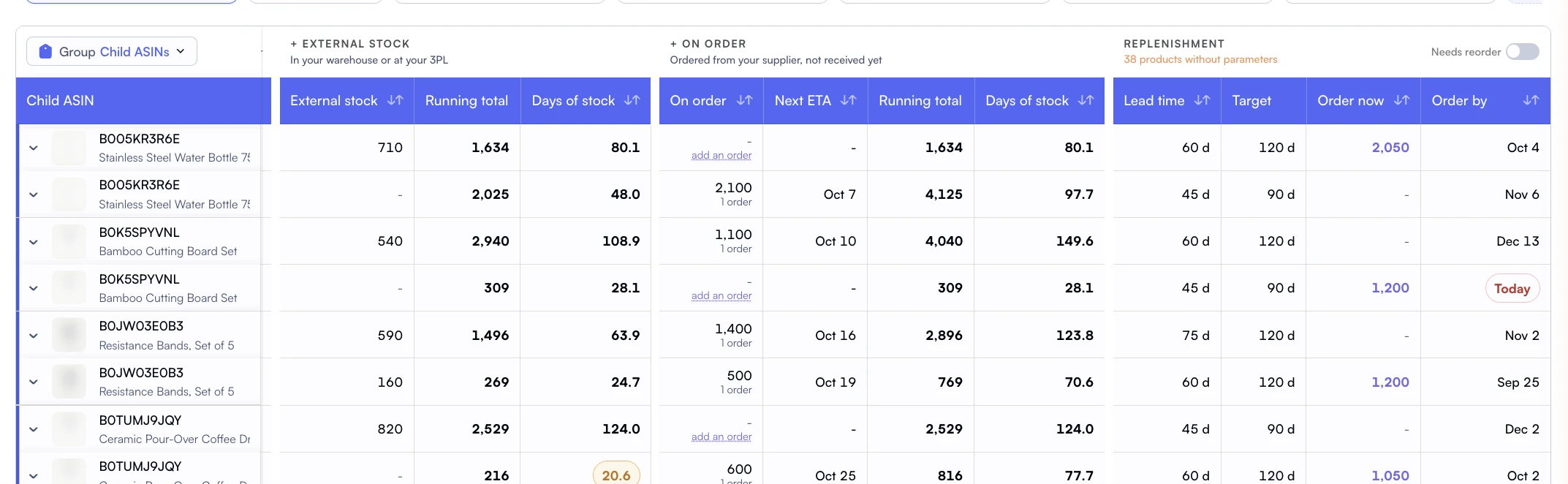
Knowing your current utilization isn't enough. You need to project when you'll hit your limit based on inbound shipments and sell-through velocity. Nova's pipeline projections show when inbound stock will arrive and how that changes your capacity headroom. Pair this with a disciplined demand model (see how to forecast Amazon inventory) to time removal orders and new shipments to stay under your ceiling.
Nova's FBA Inventory dashboard tracks DOI, demand velocity, stock position, and pipeline status for every ASIN. Color-coded indicators flag overstocked products eating capacity, while pipeline projections show exactly when inbound shipments arrive. Combined with Winners & Losers analysis, you can quickly identify which SKUs to prioritize and which to pull from FBA to free up space.
Restock limits and storage fees are related but distinct constraints. Limits control how much you can Store. Fees determine how much you pay to store it. Smart inventory management optimizes for both simultaneously.
| Dimension | Restock Limits | Storage Fees |
|---|---|---|
| What it controls | How much you can store | How much you pay to store |
| Primary driver | IPI score + sales velocity | Volume × rate × time |
| When it hurts most | Pre-Q4 (blocking restocks) | During Q4 (3x rates) |
| Best lever | Improve IPI, use AWD | Reduce DOI, clear aged stock |
| Resolution speed | Monthly cycle (capacity review) | Immediate (sell or remove) |
How IPI is calculated, score thresholds, and 7 strategies to improve it fast.
Complete breakdown of monthly rates, Q4 surcharges, and aged inventory penalties.
DOI formula, category benchmarks, and reorder point strategies.
Cash flow strategies, demand forecasting, and reorder systems.
Join thousands of successful sellers who use Nova Analytics to make data-driven decisions and maximize their profits.
Explore more expert insights to grow your Amazon business
Every FBA storage fee explained: monthly rates, Q4 surcharges, aged inventory penalties, AWD comparison, and 5 strategies to cut costs by 25-40%.
Your IPI score controls how much you can store in FBA. Learn the 4 factors, current thresholds, and 7 strategies to improve your score fast.
2026 FBA storage fee rates, monthly cost calculator, and long-term storage penalty thresholds. Plus 5 strategies that save sellers $5K-$20K per year. IPI score guide included.