Your Amazon IPI score is a number between 0 and 1,000 that determines how much inventory you're allowed to store in FBA warehouses. Drop below 400, and Amazon caps your storage capacity. Drop further, and you can't send in new shipments at all. For sellers doing $50K+/month, a low IPI score isn't just a dashboard metric. It's a revenue limiter.
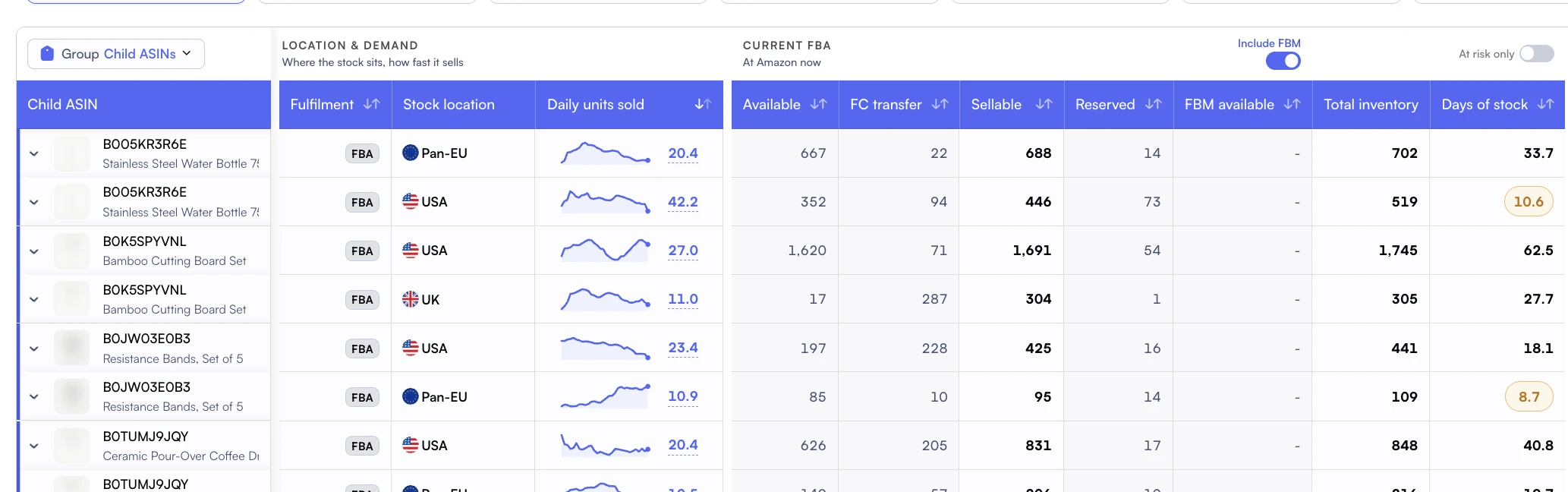
Days of stock links available inventory to the daily demand it needs to cover.
This guide explains exactly how Amazon calculates your IPI score in 2026, what each factor weighs, the current thresholds, and the specific actions that move your score fastest. We've also included the connection between IPI and storage fees, because your score directly affects what you pay to store inventory.
Key Takeaway
IPI is calculated from four factors: excess inventory %, sell-through rate, stranded inventory %, and in-stock rate. The first two carry the most weight. Maintaining 45-day DOI across your catalog and resolving stranded listings within 48 hours is the fastest path to a 500+ IPI score.
What Is the Amazon IPI Score?
The Inventory Performance Index (IPI) is Amazon's composite metric for evaluating how efficiently you manage FBA inventory. Amazon introduced IPI in 2018 to encourage sellers to maintain healthy inventory levels: not too much (driving up storage costs), not too little (creating stockouts).
According to Amazon's IPI documentation, the score updates weekly and is visible in Seller Central under Inventory > Inventory Planning > Performance. Amazon checks your IPI at two evaluation periods: the last 6 weeks of each quarter, with limits applied the following quarter if you're below threshold.
Below Threshold
0-399
Storage limits enforced next quarter
Above Threshold
400-549
No limits, room to improve
Strong Performance
550+
Optimal inventory management
Did You Know?
Amazon's IPI threshold has changed multiple times since launch. It started at 350, moved to 500 in 2020 during COVID, then settled back to 400 in 2021. Amazon reserves the right to change the threshold based on fulfillment center capacity, so maintaining a buffer above 400 (ideally 500+) protects against future changes.
The 4 Factors That Determine Your IPI Score
Amazon doesn't publish the exact IPI formula, but they do reveal the four components. Based on seller testing and Amazon's IPI documentation, here's how they're weighted:
1
Excess Inventory Percentage (Highest Weight)
This measures what percentage of your FBA units Amazon considers "excess." Amazon defines excess as units where the cost of holding them exceeds the cost of reducing the price or removing them. If you're holding 90+ days of supply for slow movers, this metric suffers.
Target: Under 5% of your FBA units flagged as excess
2
FBA Sell-Through Rate (High Weight)
Calculated as units sold and shipped over the last 90 days divided by average FBA inventory during the same period. Higher sell-through = better IPI. This is the flip side of excess inventory. If you're selling through stock efficiently, both metrics improve.
Target: Sell-through rate above 5 (units sold ÷ average units in stock)
3
Stranded Inventory Percentage (Medium Weight)
Stranded inventory sits in FBA but isn't listed for sale. Common causes: listing suppression, pricing errors, expired products, or catalog issues. Stranded units cost you storage fees without any possibility of generating revenue.
Target: 0% stranded (resolve within 48 hours)
4
FBA In-Stock Rate (Lower Weight)
Measures what percentage of your replenishable FBA ASINs have been in stock over the last 30 days. Frequent stockouts on popular items hurt this metric. It's weighted lower than excess inventory but still matters, especially for brands with high-velocity products.
Target: Above 90% in-stock rate for replenishable ASINs
Pro Tip: The IPI Paradox
Here's the tension: Amazon wants you to have low excess inventory (send less) AND high in-stock rate (never run out). You can't optimize both by guessing. You need precise DOI tracking to maintain the sweet spot: enough stock to avoid stockouts, not so much that you're flagged as excess.
What Happens When Your IPI Falls Below 400
If your IPI drops below 400 during an evaluation period, Amazon enforces storage volume limits for the following quarter. These limits cap the total cubic feet of inventory you can store in FBA, calculated separately for standard-size and oversized items.
Impact
IPI 400+
IPI Below 400
Storage Capacity
Unlimited
Capped (volume limit)
Shipment Creation
No restrictions
Blocked when at capacity
Overage Fees
None
$10/cu ft/month for excess
Product Launches
Send inventory freely
May not have capacity
Peak Season Prep
Stock up for Q4
Limited Q4 inventory
Warning: The Q4 Trap
If your IPI drops below 400 during the Q2 evaluation period (April-June), storage limits apply for Q3. That means you enter Q4 with restrictions. You can't stock up for Black Friday and holiday sales. This is how low IPI scores cost sellers tens of thousands in lost revenue, not just storage fees.
7 Strategies to Improve Your IPI Score Fast
IPI improvements compound. Fixing excess inventory also improves sell-through rate. Resolving stranded listings immediately removes dead weight. Here are the strategies ordered by impact speed.
Go to Inventory > Fix Stranded Inventory in Seller Central. Resolve every stranded listing today. Common fixes: relist the product, match to an existing ASIN, or create a removal order. Stranded inventory has zero revenue potential but counts against your IPI. Fixing it is the fastest IPI boost because it removes dead weight from the calculation.
2. Clear Excess Inventory with Targeted Promotions (1-2 Week Impact)
Amazon flags ASINs as "excess" when holding costs exceed the expected revenue from selling at current velocity. For each excess ASIN, you have three options: run a Lightning Deal, reduce price by 10-20%, or create a removal order. Running a targeted promotion is usually better than removal because you recover some margin and improve sell-through rate simultaneously.
Worked example: what an excess clear-out costs (illustrative)
The arithmetic below is an illustration, not a customer result. Say a quarter of your catalogue is flagged excess. Coupon the twenty highest-volume of those ASINs at 15% and the cost is 15% of whatever revenue those units generate, paid once. Remove the genuinely dead SKUs and the cost is the removal fee per unit, also paid once. Set that against monthly storage on the same units, plus the aged-inventory surcharge that starts compounding, plus the restock capacity you free before Q4. The clear-out is almost always cheaper than holding, and both sides of that comparison are numbers you can pull for your own catalogue in an afternoon.
3. Reduce DOI to 45 Days Across Your Catalog (2-4 Week Impact)
Days of Inventory (DOI) is the most practical lever for IPI improvement. If your average DOI is 90 days, you're holding twice as much stock as necessary. Reduce restock quantities to target 45-day supply. This simultaneously reduces excess inventory percentage and improves sell-through rate. Two IPI factors improved with one action.
4. Remove Dead SKUs (Immediate Impact)
Sort your FBA inventory by units sold in the last 90 days. Any SKU with zero or near-zero sales is dragging your IPI down. Create removal orders for truly dead inventory. The removal fee ($1.04-$1.53/unit) is always cheaper than months of storage fees plus the IPI penalty. Use Nova's Winners & Losers analysis to identify which SKUs aren't earning their shelf space.
5. Increase Sell-Through with PPC on Slow Movers (2-3 Week Impact)
For ASINs flagged as excess that still have demand potential, launch a targeted Sponsored Products campaign to accelerate sales velocity. Even a modest increase in daily sales (2-3 extra units) can move an ASIN from "excess" to "healthy" within 2-3 weeks. Track the TACoS impact to ensure the ad spend doesn't exceed the storage fee savings.
6. Maintain 90%+ In-Stock Rate on Top Sellers (Ongoing)
While in-stock rate carries less IPI weight, consistent stockouts on your best sellers still hurt. Set up restock alerts for your top 20 revenue-generating ASINs. Use Nova's pipeline projections to ensure inbound shipments arrive before you hit zero units. The goal is never running out on high-velocity products.
7. Use AWD as a Buffer for Bulk Inventory (Ongoing)
Amazon Warehousing and Distribution (AWD) stores bulk inventory outside FBA. Units in AWD don't count against your FBA storage volume or IPI calculations. By keeping 60-90 days of stock in AWD and replenishing FBA with 30-day batches, you improve both IPI and storage costs simultaneously. Read our restock limits guide for more on capacity management.
How Nova Helps
Nova's FBA inventory tracker shows DOI, demand velocity, and stock position for every ASIN. Color-coded indicators flag excess stock (60+ days), at-risk inventory (under 14 days), and pipeline projections showing when inbound shipments arrive. For the full Amazon inventory management software view, storage fees and aging inventory tie straight into P&L analytics, so you can calculate the true cost of holding inventory vs. Running promotions to clear it.
IPI Evaluation Timeline: When Amazon Checks Your Score
Amazon evaluates IPI scores during specific windows each quarter. Understanding this timeline lets you plan inventory actions proactively instead of reacting to limit notifications.
Evaluation Period
IPI Check Window
Limits Applied
Critical For
Q1 (Jan-Mar)
Last 6 weeks of Q1
Q2 (Apr-Jun)
Summer inventory
Q2 (Apr-Jun)
Last 6 weeks of Q2
Q3 (Jul-Sep)
Q4 prep season
Q3 (Jul-Sep)
Last 6 weeks of Q3
Q4 (Oct-Dec)
Holiday season
Q4 (Oct-Dec)
Last 6 weeks of Q4
Q1 (Jan-Mar)
Post-holiday clearance
Pro Tip: The Q2 Evaluation Is the Most Critical
The Q2 check determines your Q3 limits. If you fail, you enter Q4 prep season with restricted capacity. Start cleaning up excess inventory in April, not June. By mid-May, your actions from April start showing in the IPI calculation. Give yourself a full evaluation cycle of clean performance.
IPI and Storage Fees: The Double Penalty
Low IPI doesn't just limit your storage capacity. It creates a vicious cycle with storage fees:
The Downward Spiral
Excess inventory Lowers IPI score
Low IPI Triggers storage limits
Storage limits Prevent restocking best sellers
Stockouts on best sellers reduce revenue
Lower revenue means slower sell-through on remaining stock
Slower sell-through Further lowers IPI
The Upward Spiral
Clear excess inventory improves IPI
Higher IPI Removes storage limits
No limits means you stock best sellers adequately
In-stock best sellers drive higher revenue
Higher revenue improves sell-through rate
Better sell-through Further boosts IPI
The key insight: IPI improvement is a flywheel, not a one-time fix. Once you break into the upward spiral, maintaining a high IPI becomes easier because all four factors reinforce each other. The hard part is the initial cleanup. Focus your first two weeks on stranded inventory and dead SKUs (fastest impact), then shift to DOI optimization for sustained improvement.
Frequently Asked Questions
A score of 550+ is considered strong. The minimum threshold to avoid storage limits is 400. Most well-managed accounts score between 450 and 700. Scores above 800 are rare and typically belong to sellers with very lean, fast-turning catalogs.
IPI scores update weekly. However, the score reflects a rolling period of inventory performance, so changes you make today may take 2-4 weeks to fully reflect in your score. Amazon evaluates your score during the last 6 weeks of each quarter to determine storage limits for the following quarter.
Amazon doesn't reveal the exact formula or weights. They show the four contributing factors (excess inventory, sell-through, stranded inventory, in-stock rate) with individual ratings. Community testing suggests excess inventory and sell-through carry approximately 60-70% of the weight combined.
Fix stranded inventory (same-day impact), then clear dead SKUs via removal orders (1-week impact). These two actions often boost IPI by 50-100 points within 2-3 weeks. For sustained improvement, reduce your average DOI to 45 days and run promotions on excess-flagged ASINs.
No. Inventory stored in Amazon Warehousing and Distribution (AWD) does not count toward your FBA storage volume or IPI calculation. This makes AWD an effective strategy for maintaining high IPI while still having bulk inventory available for FBA replenishment.