A practical guide for analytics teams working with Amazon seller data. SP-API complexity, evaluation criteria, integration patterns, and dashboard examples.
A practical guide for analytics teams working with Amazon seller data. From SP-API complexity to warehouse-ready datasets, here's how to get Amazon data into your analytics stack.
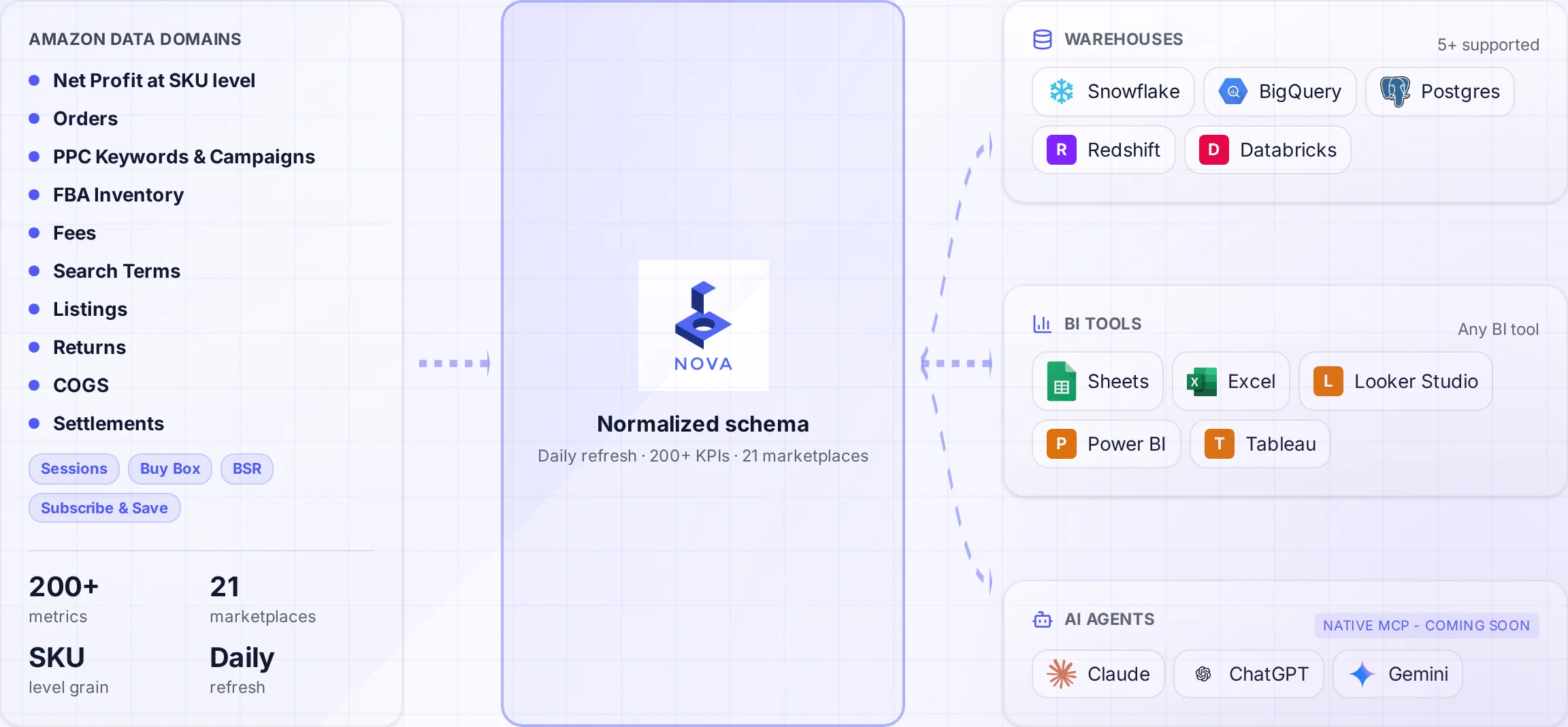
A normalized schema connects Amazon data to the warehouses and tools your team uses.
Your analytics team knows SQL, dbt, and Tableau. They've built dashboards for Salesforce, Shopify, and internal systems. But Amazon data is different. The complexity catches even experienced teams off guard.
This guide is written for analytics professionals tasked with getting Amazon seller data into existing data infrastructure. We'll cover what makes Amazon data uniquely challenging, how to evaluate solutions, and practical patterns for integrating with your analytics stack.
Why Amazon Data Is Different
Before diving into solutions, understand what makes Amazon data challenging. This isn't standard e-commerce data.
The Amazon Data Complexity Stack
40+ API endpoints: Different authentication, rate limits, and response schemas
200+ fee types: FBA fees, referral fees, storage fees, advertising fees, each with variations
Asynchronous reports: Request → Poll → Download pattern, not simple GET requests
Data reconciliation issues: Orders, settlements, and fees don't naturally align
Multi-marketplace complexity: Different currencies, timezones, and data formats per region
Best for: Large organizations with unique requirements
Build Reality Check
Most analytics teams underestimate Amazon pipeline complexity. A McKinsey study found that 70% of data projects exceed budget and timeline. Amazon pipelines are particularly prone to this due to API complexity.
Schema stability: Changes communicated and managed gracefully
Integration Patterns
Pattern 1: Direct Warehouse Sync
The simplest pattern for analytics teams. Data lands directly in your warehouse.
-- Example: Nova data in Snowflake
-- Data arrives in schema: nova_amazon

SELECT
  o.order_date,
  o.sku,
  o.net_revenue,
  f.total_fees,
  a.ad_spend,
  o.net_revenue - f.total_fees - a.ad_spend as contribution_margin
FROM nova_amazon.orders o
LEFT JOIN nova_amazon.fees_by_order f ON o.order_id = f.order_id
LEFT JOIN nova_amazon.ad_performance a ON o.sku = a.sku AND o.order_date = a.date
WHERE o.order_date >= DATEADD(day, -30, CURRENT_DATE)
Pattern 2: dbt Transformation Layer
For teams using dbt, add a transformation layer on top of provider data:
-- dbt model: models/amazon/fct_amazon_profitability.sql

WITH orders AS (
  SELECT * FROM {{ source('nova_amazon', 'orders') }}
),

fees AS (
  SELECT * FROM {{ source('nova_amazon', 'fees_by_order') }}
),

ads AS (
  SELECT * FROM {{ source('nova_amazon', 'ad_performance') }}
),

cogs AS (
  SELECT * FROM {{ ref('dim_product_costs') }}  -- Your internal COGS data
)

SELECT
  o.order_id,
  o.sku,
  o.order_date,
  o.net_revenue,
  COALESCE(f.total_fees, 0) as amazon_fees,
  COALESCE(a.ad_spend, 0) as ad_spend,
  COALESCE(c.unit_cost * o.units, 0) as cogs,
  o.net_revenue - COALESCE(f.total_fees, 0) - COALESCE(a.ad_spend, 0) - COALESCE(c.unit_cost * o.units, 0) as net_profit
FROM orders o
LEFT JOIN fees f ON o.order_id = f.order_id
LEFT JOIN ads a ON o.sku = a.sku AND o.order_date = a.date
LEFT JOIN cogs c ON o.sku = c.sku
Pattern 3: Multi-Source Unification
Combine Amazon data with other channels:
-- Unified e-commerce view across channels

WITH amazon_orders AS (
  SELECT
    'amazon' as channel,
    order_id,
    order_date,
    sku,
    revenue,
    fees,
    ad_spend
  FROM {{ ref('fct_amazon_profitability') }}
),

shopify_orders AS (
  SELECT
    'shopify' as channel,
    order_id,
    order_date,
    sku,
    revenue,
    fees,
    ad_spend
  FROM {{ ref('fct_shopify_profitability') }}
),

combined AS (
  SELECT * FROM amazon_orders
  UNION ALL
  SELECT * FROM shopify_orders
)

SELECT
  channel,
  DATE_TRUNC('month', order_date) as month,
  COUNT(DISTINCT order_id) as orders,
  SUM(revenue) as total_revenue,
  SUM(fees + ad_spend) as total_costs,
  SUM(revenue - fees - ad_spend) as contribution_margin
FROM combined
GROUP BY 1, 2
Common Pitfalls to Avoid
Analytics Team Mistakes
Underestimating transformation work: Raw API data requires 60-80 hours of modeling
Currency assumptions: Multi-marketplace data needs explicit currency handling
Timezone mismatches: Amazon uses seller timezone, not UTC
Missing reconciliation: Orders and settlements don't automatically match
Historical data gaps: SP-API has 2-year rolling window limits
Pro Tip: Validation First
Before building dashboards, validate data quality. Sum order revenue for a known month and compare to Seller Central. If numbers don't match within 1%, investigate before proceeding. Data quality issues compound in downstream analytics.
Ready to Get Amazon Data in Your Warehouse?
Our team specializes in helping analytics teams get clean, query-ready Amazon data flowing to Snowflake, BigQuery, and Redshift. Let's discuss your specific requirements.
How long does it take to get Amazon data into our warehouse?
With a specialized provider, hours to days. With general ETL tools, days plus weeks of transformation work. Building custom pipelines takes months.
Should we use dbt with Amazon data?
Yes. Even with pre-normalized data, dbt helps you combine Amazon data with internal sources (COGS, customer data), enforce business logic, and maintain documentation. It's particularly valuable for multi-channel retailers.
What refresh frequency do we need?
Daily is minimum for operational decisions. Hourly is preferred for PPC optimization. Real-time is rarely necessary for Amazon data given the platform's inherent delays in reporting.
How do we validate Amazon data quality?
Compare monthly totals to Seller Central reports. Check order counts, revenue, and fee totals. Discrepancies should be under 1%. If larger, investigate before building dashboards.
Can we combine Amazon data with Shopify/other channels?
Yes. This is a common pattern. Use dbt to create unified e-commerce models with consistent schemas across channels. Specialized Amazon providers often deliver schemas designed for this use case.
Getting Started
For most analytics teams, the fastest path to value is a specialized Amazon data provider with warehouse delivery. You skip months of pipeline development and get query-ready data in days.
The key is choosing a provider that delivers data clean enough for your existing analytics stack. Look for pre-normalized schemas, fee attribution, and multi-marketplace support.
Next Steps for Analytics Teams
Document your specific data requirements and use cases
Evaluate 2-3 providers with warehouse delivery options
Run a trial and validate data quality against Seller Central
Plan your dbt model structure before connecting
Start with core metrics, expand coverage iteratively