The Buy Box drives 82% of Amazon sales. Learn what the algorithm rewards, how to check your Buy Box percentage, and 8 strategies to win it consistently in 2026.
The Buy Box (now officially called the "Featured Offer") controls roughly 82% of all Amazon sales. If you don't own it, your product is practically invisible. This guide breaks down exactly how the algorithm decides who wins, what disqualifies you, and 8 strategies that actually move the needle in 2026.
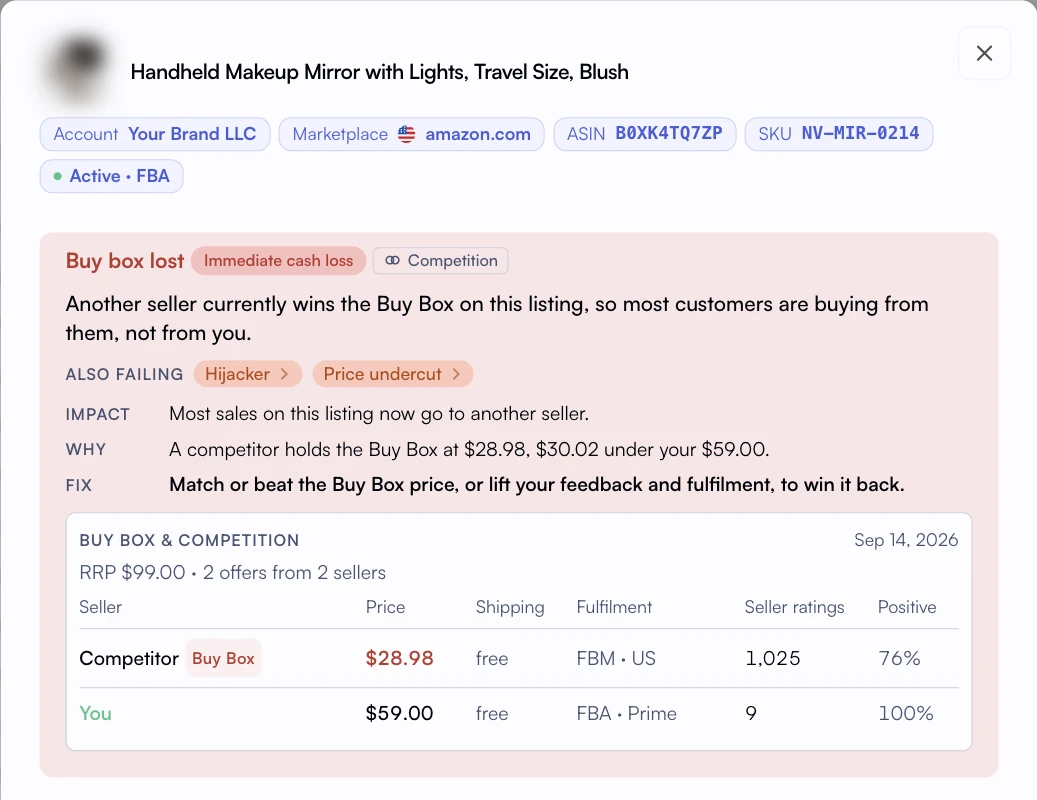
A lost Buy Box alert adds price context to an eligibility and listing review.
TL;DR - Key Takeaways
•The Buy Box drives 82% of Amazon desktop sales and an even higher share on mobile where the 'Other Sellers' link is harder to find.
•Amazon's algorithm weighs landed price, fulfillment method, seller metrics, and inventory depth. FBA sellers get a significant edge.
•Private label sellers with Brand Registry can still lose the Buy Box to unauthorized resellers if pricing and metrics slip.
•You can track Buy Box ownership percentage in Seller Central's Business Reports or through Nova's performance analytics.
•Account health (ODR under 1%, late shipment under 4%) is a hard gate. Fail these and you're disqualified entirely.
What Is the Amazon Buy Box?
The short answer
The Amazon Buy Box (Featured Offer) is the "Add to Cart" and "Buy Now" section on a product detail page. When multiple sellers offer the same product, Amazon's algorithm selects one seller to "win" this placement. The winning seller captures the majority of sales for that listing. Losing it is usually the first sign something changed on the listing, which is why Amazon listing health monitoring watches the Buy Box alongside suppressions.
Every product detail page on Amazon has one Buy Box. When a shopper clicks "Add to Cart," they're buying from whoever currently holds it. Other sellers are buried under a tiny "Other Sellers on Amazon" link that most buyers never click.
On mobile (where over 60% of Amazon traffic now comes from), the Buy Box is even more dominant. There's no visible link to other sellers without scrolling. You either own the Buy Box or you don't exist.
Amazon rebranded the Buy Box to "Featured Offer" in 2023, but the seller community still calls it the Buy Box. We'll use both terms interchangeably in this guide. The mechanics haven't changed. Only the name did.
Desktop Sales Share
82%
Of purchases go through the Buy Box
Mobile Impact
90%+
Estimated Buy Box capture on mobile
Rotation Window
15 min
Typical rotation cycle between eligible sellers
How the Buy Box Algorithm Works
Amazon doesn't publish the exact formula, but years of seller data and Amazon's own documentation reveal the core factors. The algorithm balances price competitiveness with seller reliability. It's not a simple "lowest price wins" system.
Think of it as a scoring system. Amazon assigns a weight to each factor, calculates a composite score, and the seller with the highest score wins the Buy Box for that rotation window. Here are the factors, roughly ordered by impact:
FBA and Seller Fulfilled Prime get a structural advantage over FBM.
Order Defect Rate (ODR)
High
Must stay under 1%. Includes A-to-Z claims, chargebacks, negative feedback.
Late Shipment Rate
High
Must stay under 4%. FBA sellers get 0% by default (Amazon ships).
Shipping Time
Medium
Faster promised delivery = higher score. Prime-eligible is king.
Inventory Depth
Medium
Amazon avoids giving Buy Box to sellers about to go out of stock.
Seller Feedback Score
Medium
90-day and lifetime feedback ratings. Higher is better.
Customer Response Time
Low
Responding to messages within 24 hours helps. Under 12 hours is ideal.
Pro Tip: Price Isn't Everything
Amazon's algorithm doesn't simply pick the lowest price. An FBA seller priced 5% higher than an FBM seller will often win. The algorithm values reliability (fulfillment, metrics, stock depth) alongside price. Race-to-the-bottom pricing destroys margins without guaranteeing the Buy Box.
Buy Box Eligibility Requirements
Before Amazon even considers you for the Buy Box, you need to meet baseline eligibility criteria. These are hard gates. Fail any one and you're disqualified regardless of price.
Requirement
Threshold
Notes
Professional Seller Account
Required
Individual accounts cannot win the Buy Box. $39.99/month Professional plan is mandatory.
Account Age
Typically 90+ days
New sellers may need to build sales history before becoming eligible.
Order Defect Rate
Under 1%
Includes negative feedback, A-to-Z claims, and credit card chargebacks.
Late Shipment Rate
Under 4%
FBA sellers automatically meet this. FBM sellers must ship on time consistently.
Product Condition
New
Used and refurbished items have separate Buy Box competition (lower traffic).
In-Stock Status
Must have inventory
Zero stock = immediate Buy Box loss. Low stock can reduce rotation share.
You can check your eligibility status in Seller Central's Account Health dashboard. Look for the "Featured Offer eligible" status on your product listings. If you see "Not Featured Offer eligible," one of these baseline criteria is failing.
How to Check Your Buy Box Percentage
Your Buy Box percentage tells you what share of page views you held the Featured Offer for. It's the single most important metric for understanding your competitive position on shared listings.
Method 1: Seller Central Business Reports
Go to Reports → Business Reports → Detail Page Sales and Traffic by ASIN. The "Buy Box Percentage" column shows your share. You can filter by date range and compare week-over-week trends.
Method 2: Nova Analytics
Nova pulls Buy Box data automatically and correlates it with your revenue, profit, and advertising metrics. Instead of checking raw percentages in Seller Central, you can see exactly how Buy Box changes affect your bottom line. A 5% drop in Buy Box ownership on a high-margin SKU might cost you more than a 20% drop on a low-margin one. Nova's P&L dashboard connects these dots.
You can also track Buy Box percentage as a KPI in Nova. Check the Buy Box Ownership KPI for benchmarks and formulas.
8 Strategies to Win the Buy Box in 2026
These strategies are ordered by impact. Start with the ones at the top if you're building from scratch. If you're already competitive, the later strategies help you squeeze out incremental gains.
1. Use FBA (or Seller Fulfilled Prime)
This is the single biggest lever. FBA sellers win the Buy Box at higher prices than FBM sellers because Amazon trusts its own fulfillment network. The algorithm gives FBA a structural advantage on shipping speed, reliability, and customer experience scores.
If you can't use FBA (oversized items, hazmat, margin constraints), Seller Fulfilled Prime is the next best option. It gives you the Prime badge and similar algorithmic treatment. Not sure which is right for you? Read our FBA vs FBM comparison guide for a detailed breakdown.
Real Example
A home goods seller switched 12 SKUs from FBM to FBA. Buy Box ownership jumped from 34% to 87% within two weeks. Revenue on those SKUs increased 142% despite a 3% price increase to cover FBA fees. The math was clear: higher Buy Box share more than offset the fulfillment cost.
2. Optimize Your Landed Price
Your "landed price" is item price plus shipping. For FBA sellers, Amazon calculates this as your item price (since shipping is included in Prime). For FBM, it's item price plus your shipping charge.
You don't need the absolute lowest price, but you need to be within the competitive range. If the lowest FBA offer is $24.99 and you're at $25.49, you'll likely still rotate into the Buy Box. At $29.99, you probably won't. Track your pricing against competitors and use Nova's Winners and Losers analysis to identify SKUs where price adjustments would move the needle.
3. Keep Your Order Defect Rate Under 1%
The Order Defect Rate (ODR) is your most important health metric. It includes negative feedback (1-2 star ratings with comments about the seller), A-to-Z Guarantee claims, and credit card chargebacks. Amazon's threshold is 1%. Go above that and you lose Buy Box eligibility entirely.
Practical steps: respond to all customer messages within 12 hours, proactively refund when there's a legitimate complaint (it's cheaper than an A-to-Z claim), and monitor your daily analytics for spikes in returns or negative feedback.
4. Maintain Sufficient Inventory Depth
Amazon doesn't want to award the Buy Box to a seller who's about to run out of stock. The algorithm considers your available inventory relative to your sales velocity. If you're selling 50 units/day and have 30 units left, your Buy Box share will decline before you actually stock out.
Use Days of Inventory (DOI) tracking to monitor stock levels proactively. Aim for 30-60 days of inventory coverage on your top sellers. Nova's FBA inventory analytics helps you monitor stock levels relative to reorder thresholds.
Stockout Warning
A stockout doesn't just lose you sales today. It resets your Buy Box momentum, can drop your BSR ranking, and takes 1-3 weeks to recover from even after restocking. The true cost of a stockout is 3-5x the lost revenue during the out-of-stock period.
5. Optimize Shipping Speed
For FBM sellers, the promised handling time matters. If you're promising 3-5 day shipping while competitors offer 1-2 day, you're at a disadvantage. Set realistic but competitive handling times. If you can consistently ship within 1 business day, set your handling time to 1 day. Under-promising and over-delivering doesn't help here because the algorithm uses your promised time, not actual.
6. Build a Strong Feedback Profile
Your seller feedback score (different from product reviews) influences Buy Box eligibility. Aim for 95%+ positive feedback over the trailing 90 days. Request feedback from satisfied customers using Amazon's built-in "Request a Review" button. Don't use third-party tools that violate Amazon's TOS for soliciting reviews.
7. Respond to Customer Messages Quickly
Amazon tracks your customer response time. Responding within 24 hours is the minimum. Under 12 hours is better. Under 4 hours is ideal. This metric is especially important for FBM sellers who handle their own customer service. FBA sellers benefit from Amazon handling most inquiries, but you should still monitor and respond to any messages that come through.
8. Monitor and React to Competitor Activity
Buy Box ownership changes constantly. A new seller enters your listing, someone drops their price, a competitor stocks out. You need visibility into these shifts. Track your Buy Box percentage daily and correlate it with revenue changes. Nova's analytics platform lets you see Buy Box trends alongside revenue and profit, so you can quantify the impact of each percentage point lost or gained.
Buy Box for Private Label vs Resellers
If you sell private label products with Brand Registry, you might think you're immune to Buy Box competition. You're not. Unauthorized resellers, arbitrage sellers, and even Amazon itself can appear on your listings.
Scenario
Private Label
Reseller / Wholesale
Typical Competitors
Unauthorized resellers, Amazon (1P)
Other authorized sellers, brand owner
Price Control
More control via MAP enforcement
Limited. Must compete on price.
Defense Strategy
Brand Registry, IP complaints, exclusive distribution
Price optimization, FBA, superior metrics
Buy Box Share Goal
95-100% (flag anything below 90%)
Fair rotation share based on number of sellers
Brand Registry Tip
If you're a private label seller and your Buy Box percentage drops below 90%, check your listing for unauthorized sellers immediately. Use Brand Registry's "Report a Violation" tool to file IP complaints. Combine this with tighter distribution agreements to prevent gray market sellers from accessing your products. Read our Brand Registry guide for the full process.
Common Buy Box Myths Debunked
There's a lot of misinformation about the Buy Box. Here are the most common myths and what actually happens:
Myth 1: "The lowest price always wins the Buy Box"
False. Price is one factor among many. An FBA seller with strong metrics will beat an FBM seller priced 5-10% lower in most cases. Amazon optimizes for customer experience, not lowest cost.
Myth 2: "FBA guarantees the Buy Box"
Not a guarantee. FBA gives you a significant advantage, but you can still lose to another FBA seller with a lower price or better metrics. And if your account health metrics are poor, FBA alone won't save you.
Myth 3: "Once you win the Buy Box, you keep it"
The Buy Box rotates. Even if you're the best seller on a listing, Amazon may rotate the Buy Box to other eligible sellers periodically. This is normal. What matters is your share of that rotation over time (your Buy Box percentage).
Myth 4: "New sellers can't win the Buy Box"
New sellers can become eligible after building sufficient order history (typically 2-3 months). Using FBA accelerates this because you immediately get credit for Amazon's fulfillment performance. A new FBA seller can start winning Buy Box share within their first quarter.
Buy Box Suppression: When Nobody Wins
Sometimes the Buy Box is "suppressed." This means Amazon removes the "Add to Cart" button entirely and shows only an "Available from these sellers" link. This happens when:
Price is too high. Amazon compares your price against recent selling prices and competing retailers. If your price exceeds what Amazon considers "fair," the Buy Box disappears for all sellers.
No eligible sellers. If all sellers on a listing fail to meet Buy Box eligibility requirements, the Buy Box is suppressed.
Amazon policy violation. Certain listing issues (inaccurate product info, restricted categories) can trigger suppression.
Buy Box suppression hurts everyone on the listing. If you see it on your products, check your pricing against the recent selling price in Seller Central and adjust accordingly. For more on pricing strategy and its impact on profit, see our P&L analytics dashboard.
How Nova Helps You Track and Win the Buy Box
Seller Central shows you Buy Box percentage as a standalone number. That's useful but incomplete. The real question isn't "what's my Buy Box share?" It's "how much revenue and profit am I losing when my Buy Box share drops?"
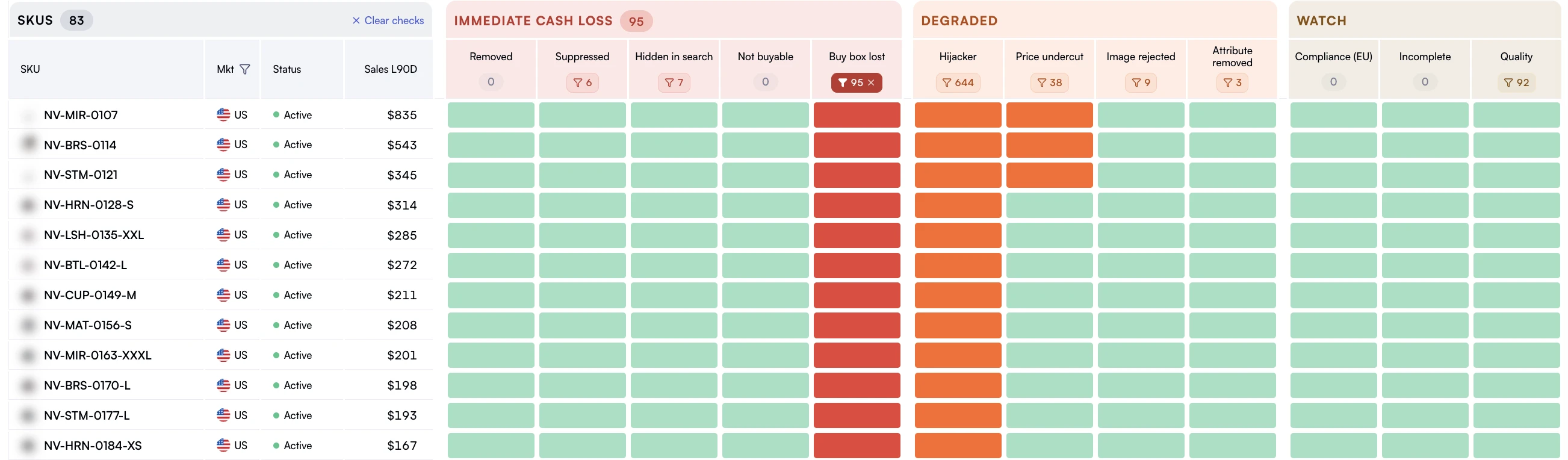
Listing health by SKU shows which products need an operational check.
Correlate Buy Box changes with revenue shifts. See exactly which SKUs lost revenue due to Buy Box drops.
Track Buy Box alongside advertising spend. Running PPC on a product where you don't hold the Buy Box wastes money because your ad clicks go to the winning seller. Nova's PPC analytics helps you avoid this.
Monitor account health metrics daily. Catch ODR or late shipment issues before they cross the threshold and cost you Buy Box eligibility.
Build custom reports. Use custom analytics to create Buy Box performance reports by product line, marketplace, or brand.
Did You Know?
Running Amazon PPC ads while you don't hold the Buy Box is one of the most common (and expensive) mistakes sellers make. Your Sponsored Products ad can still show, but when a shopper clicks it, they land on the product page and see another seller in the Buy Box. You paid for the click. The other seller gets the sale. Nova flags these situations so you can pause campaigns on Buy Box-suppressed ASINs. Learn more about PPC analytics for advertising efficiency.