How to Start Selling on Amazon 2026: Beginner Guide
Everything you need to go from zero to your first Amazon sale. Account setup, product sourcing, listing creation, FBA vs FBM, and the analytics foundation to grow.
Over 2 million active sellers compete on Amazon, yet thousands of new brands launch profitably every month. The difference between success and failure isn't luck. It's preparation. This guide walks you through every step from creating your seller account to making your first sale, with the analytics foundation you'll need to actually grow.
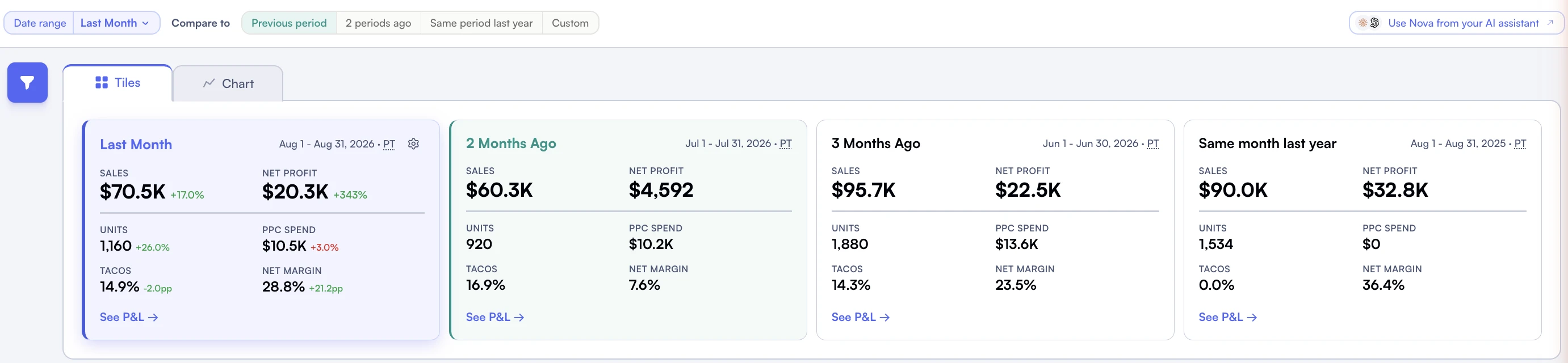
Period comparisons give sales and profit totals a starting point for investigation.
TL;DR - Key Takeaways
•A Professional seller account ($39.99/month) is required to access advertising, Buy Box eligibility, and bulk listing tools.
•Your first product choice matters more than anything else. Focus on categories with proven demand and manageable competition.
•FBA handles fulfillment, returns, and customer service for you. It costs more per unit but saves hundreds of hours annually.
•Your first listing needs optimized titles, bullet points, and images. 78% of Amazon searches are unbranded, so keywords matter.
•Start tracking your actual profit (not just revenue) from day one. Most new sellers don't realize they're losing money until month 3.
How Much Does It Cost to Start Selling on Amazon?
What it costs to start, in short
Starting an Amazon business costs between $2,500 and $15,000 for most private label sellers. This includes: Professional account ($39.99/month), initial inventory ($1,000-$5,000), product photography ($200-$500), UPC codes ($30), and launch advertising ($500-$2,000). Resellers can start with less since they don't need photography or branding.
Minimum Budget
$2,500
Small batch private label or reselling
Typical Budget
$5,000-$10,000
Single product launch with advertising
Time to First Sale
4-8 weeks
From account creation to first order
Step 1: Choose Your Seller Plan
Amazon offers two account types. For anyone serious about building a business, the Professional plan is the only real option. Here's why:
Feature
Individual ($0.99/item sold)
Professional ($39.99/month)
Buy Box Eligible
No
Yes
Amazon Advertising
No
Yes (Sponsored Products, Brands, Display)
Bulk Listing Tools
No
Yes
Business Reports
Limited
Full access
Break-Even Point
Under 40 items/month
Over 40 items/month
Brand Registry
No
Yes (with trademark)
Pro Tip: Start Professional From Day One
Don't start with an Individual account to "save money" and upgrade later. Without the Professional plan, you can't run ads, win the Buy Box, or access essential reports. That $39.99/month is the cheapest investment you'll make. If you sell more than 40 items in your first month, you'd actually pay more on the Individual plan anyway.
Government-issued ID (driver's license or passport)
Bank account for receiving disbursements
Credit card for the monthly subscription and any fees
Phone number for two-step verification
Tax information (SSN for individuals, EIN for businesses in the US)
The identity verification process takes 1-3 business days. Amazon may request a video call to verify your identity and documents. This is standard for all new sellers since 2023.
One Account Per Person
Amazon strictly enforces one seller account per person/entity. Creating multiple accounts leads to permanent suspension of all accounts. If you have a legitimate business reason for multiple accounts (separate businesses), you must request approval from Amazon first.
Step 3: Understand Amazon's Fee Structure
Before you source a single product, you need to understand what Amazon charges. Many new sellers focus on revenue and forget that Amazon takes 30-45% of the selling price through various fees.
The main fee categories are:
Referral fees: 8-15% of selling price depending on category (most categories are 15%)
FBA fulfillment fees: $3.22-$10+ per unit depending on size and weight
Monthly storage fees: $0.87-$2.40 per cubic foot depending on season
Inbound placement fees: $0.21-$1.58 per unit for multi-destination shipping (introduced in 2025)
This is where most new sellers spend the most time, and where most mistakes happen. There are three main selling models:
Model
What It Is
Startup Cost
Margin Potential
Private Label
Create your own brand, manufacture via suppliers
$3,000-$15,000
25-50%
Wholesale
Buy branded products in bulk from distributors
$2,000-$10,000
10-25%
Retail/Online Arbitrage
Buy discounted products and resell on Amazon
$500-$3,000
10-30%
Product Selection Criteria
Your first product should check these boxes: selling price between $15-$50 (sweet spot for margins after fees), lightweight and small (keeps FBA fees low), not dominated by mega brands, at least 300 units/month demand in your target category, and room for differentiation (better packaging, bundle, improved design). For deeper guidance, read our product research guide.
Step 5: Create Your First Listing
Your product listing is your storefront. Amazon shoppers can't touch, smell, or try your product. They make purchase decisions based on your images, title, bullet points, and reviews. A mediocre listing on a great product will underperform a great listing on a good product.
Title Optimization
Your title has 200 characters max (varies by category). Front-load your most important keywords because Amazon truncates titles on mobile after about 80 characters. Format: Brand Name + Key Feature + Product Type + Size/Quantity.
Bullet Points
You get 5 bullet points (1,000 characters each for Professional sellers). Lead each bullet with a BENEFIT in caps, then explain with features. Include keywords naturally. Don't stuff. Write for humans first, algorithms second.
Product Images
Amazon allows 7 images plus a video. Your main image must be on a pure white background. The remaining slots should include: lifestyle images showing the product in use, infographic images highlighting key features, size comparison images, and packaging shots. Professional photography costs $200-$500 for a full set and is absolutely worth the investment.
This is one of the biggest decisions you'll make. Fulfillment by Amazon (FBA) means you ship inventory to Amazon's warehouses and they handle storage, picking, packing, shipping, returns, and customer service. Fulfillment by Merchant (FBM) means you do all of that yourself.
Factor
FBA
FBM
Prime Eligibility
Automatic
Requires Seller Fulfilled Prime qualification
Buy Box Advantage
Significant advantage
Competitive disadvantage
Per-Unit Cost
Higher (fulfillment + storage fees)
Lower (your own labor and shipping costs)
Time Investment
Minimal (ship to Amazon, they handle rest)
High (daily packing, shipping, customer service)
Best For
Most sellers, especially beginners
Large/heavy items, hazmat, very high volume
For most new sellers, FBA is the right choice. The time savings alone justify the fees. You can focus on sourcing, marketing, and growing instead of packing boxes. For a detailed cost comparison with real numbers, read our FBA vs FBM analysis. And to understand all the fees involved, check out our complete Amazon fees guide.
Pro Tip: Use the FBA Revenue Calculator
Before committing to FBA, run your numbers through Amazon's FBA Revenue Calculator or Nova's profit calculator. Enter your product dimensions, weight, and selling price to see the exact fee breakdown. If your margin after all fees is below 20%, reconsider your pricing or sourcing cost.
Step 7: Launch and Get Your First Sales
Your listing is live. Now what? The first 30 days are critical for establishing your product's ranking momentum. Here's your launch sequence:
Week 1-2: Sponsored Products Campaign
Start with an automatic targeting campaign. Set a daily budget of $20-$50 and let Amazon's algorithm find relevant keywords. After 7-10 days, review the search term report. Move high-converting terms to a manual campaign with exact match targeting. Pause poor performers.
Don't panic about ACoS in the first month. A launch ACoS of 40-60% is normal. You're buying data (which keywords convert) and velocity (which helps organic ranking). For more on PPC strategy, read our advanced PPC strategies guide.
Week 2-4: Optimize Based on Data
After 2 weeks, you'll have enough data to make informed decisions. Check your conversion rate (10-15% is healthy for most categories). If it's below 8%, your listing needs work. Check your session count to see if you're getting enough traffic. Low sessions + decent conversion = you need more advertising or better keyword targeting. Decent sessions + low conversion = your listing isn't compelling enough.
Step 8: Track Performance and Optimize
This is where most sellers either level up or plateau. The difference? Analytics. Revenue is a vanity metric. Profit is what matters.
The #1 Beginner Mistake
Most new sellers track revenue in Seller Central and assume they're profitable. They forget about: referral fees, FBA fees, storage fees, PPC spend, COGS, inbound shipping, returns, and a dozen other costs. A product showing $10,000 in monthly revenue might only generate $800 in actual profit, or worse, lose money. You won't know unless you track every cost.
This is exactly why we built Nova. Our P&L dashboard pulls in every Amazon fee automatically and shows you true profit per product, per day. No spreadsheets. No guessing. You can see which products are actually making money and which ones are silently draining your bank account.
Key metrics every new seller should track daily:
True profit per unit: Revenue minus ALL costs (COGS, referral fees, FBA fees, PPC, storage). Use Nova's variable costs per unit tracking.
ACoS and TACoS: Advertising cost relative to ad revenue (ACoS) and total revenue (TACoS). Read our TACoS guide.
Conversion rate: Session-to-purchase ratio. Below 10% on most categories means your listing needs work.
Inventory levels: Days of inventory remaining. Running out of stock kills your ranking momentum.
Return rate: Above 10% signals a product quality or listing accuracy issue. Track with return rate analytics.
Why Start With Analytics Early?
Sellers who implement profit tracking in their first month make better decisions about which products to scale, which to discontinue, and where to invest their advertising budget. Those who wait until month 6 often discover they've been losing money on products they thought were profitable. Nova's analytics platform is built for this: true profit visibility from day one, across all your products and marketplaces.
Common Beginner Mistakes to Avoid
Check for these common launch mistakes:
Launching too many products at once. Focus on 1-3 products maximum. Master the launch process, optimize your listing, dial in your PPC, and prove profitability before expanding.
Ignoring product photography. Your main image is the most important conversion factor. Professional photos cost $200-$500 and pay for themselves within days.
Setting and forgetting PPC. Advertising requires weekly optimization. Check search term reports, add negative keywords, adjust bids. An unmanaged campaign bleeds money.
Not understanding fees before pricing. Price your product AFTER calculating all fees. Not before. Use our FBA break-even calculator to find your minimum viable price.
Skipping Brand Registry. If you're doing private label, apply for Brand Registry as soon as you have a trademark. It unlocks A+ Content, Sponsored Brands, and protection against listing hijackers. See our Brand Registry guide.
Not tracking true profit. Revenue is not profit. Amazon fees, COGS, advertising, and returns can eat 60-80% of your revenue. Track every cost from day one with a tool like Nova's P&L dashboard.
What Happens After Your First Sale?
Congratulations. You're an Amazon seller. Now the real work begins. The first 90 days establish your product's trajectory. Focus on:
Getting reviews: Use Amazon's "Request a Review" button. Enroll in the Vine program if you have Brand Registry. First 15-25 reviews are critical for conversion.
Optimizing PPC: Move from automatic to manual campaigns. Target your best-performing keywords with exact match. Keep TACoS under 15% once you're established.
Managing inventory: Reorder before you stock out. Use Days of Inventory tracking to time reorders. A stockout can set you back weeks in ranking.
Expanding to new marketplaces: Once your US business is profitable, consider expanding to UK, Germany, or other EU marketplaces. Nova supports multi-marketplace analytics across 23 Amazon marketplaces.