Record revenue on Prime Day often hides margin compression. Here's how to select the right SKUs, set PPC guardrails, and calculate real profitability after the event.
Prime Day 2026 ran in late June rather than its usual July slot. Revenue spikes on the day. For plenty of sellers it is also the day they lose the most money. Discounts, fee surcharges, and PPC bidding wars crush margins if you're not tracking the right numbers. Here's how to make sure Prime Day actually shows up in your bank account, and how to plan the next one. Reviewed September 2026.
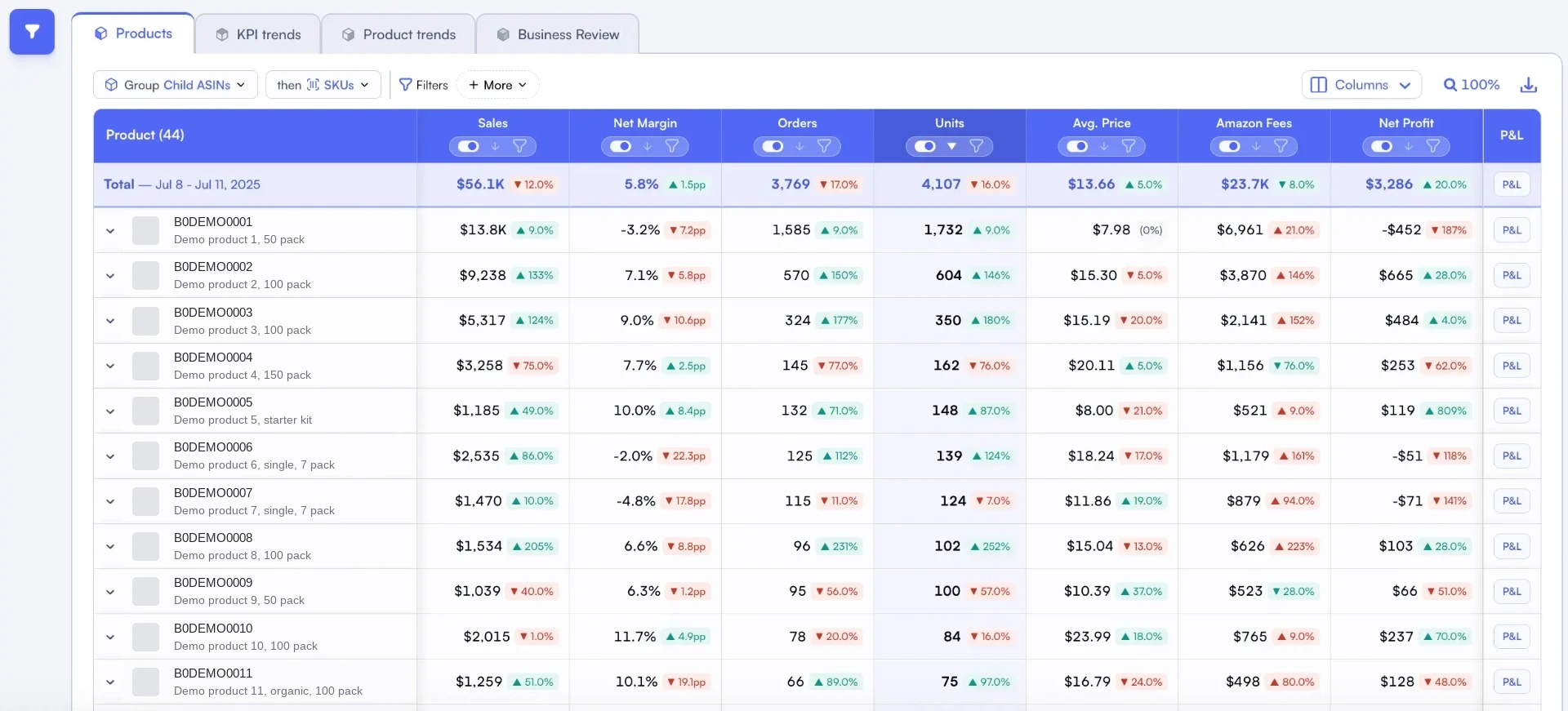
Year-over-year product comparisons help separate event sales growth from product performance.
Want the live view? See Nova's Prime Day analytics dashboard with per-SKU profit, ad spend and year-over-year compare built in. During the event, Live Orders Stream follows each order against the previous edition at the same minute.
In short
•Compare event-day contribution margin with your normal baseline before judging Prime Day performance
•Lightning Deal fees ($300-500), peak FBA surcharges, and PPC bid inflation can add 8-15% to your cost structure
•SKU selection based on contribution margin, not revenue, is the single biggest lever for Prime Day profitability
•Set TACoS-based guardrails before the event starts to prevent runaway ad spend from eating your margins
•Wait 14+ days post-event before calculating real profitability to account for returns and fee reconciliation
The Prime Day Profit Trap: Revenue Up, Margins Down
Every year, the same story plays out. Sellers post record revenue on Prime Day, celebrate on social media, then quietly realize two weeks later that they barely broke even. Or worse.
The revenue spike masks the margin compression, and it is worth checking the spike itself before budgeting for it. Amazon now runs several sales peaks a year, and they compete for the same inventory.
Average Revenue Spike
2-5x
Typical daily revenue increase during Prime Day
Margin Compression
8-15%
Additional costs from deals, fees, and PPC
Return Rate Increase
25-40%
Higher return rates on discounted Prime Day units
The math isn't complicated. You're discounting your product 20-30%. You're paying a Lightning Deal fee. Amazon's FBA fees include peak surcharges. PPC bids inflate because every competitor is bidding aggressively. And return rates jump because impulse buyers are less committed. Stack all of that together, and a product with a healthy 25% contribution margin on a normal day can easily go negative during Prime Day.
The 2026 Cost Context
Prime Day 2026 landed right after Amazon's April triple cost squeeze: ad payment auto-deductions (April 15), a 3.5% FBA fuel surcharge (April 17), and USPS package surcharges (April 26). Those costs are still in the baseline for the October and Q4 events. Running a peak event without recalculating your margins with these fees is how sellers lose money.
Pre-Prime Day Profit Audit: 4 Weeks Before the Event
The sellers who actually profit from Prime Day make their money in the four weeks before it starts. That's when the real work happens: deciding which SKUs to promote, which to hold back, and what your true cost floor is.
Step 1: Rank SKUs by Contribution Margin, Not Revenue
Most sellers pick their Prime Day deals based on what sells the most units. That's backwards. You should be selecting based on which products have enough margin to absorb a discount and still be profitable.
Pull your product-level P&L and calculate the contribution margin for each SKU. Then model what happens when you apply a 20% discount. Products with contribution margins above 35% are your Prime Day candidates. Products below 20% should sit this one out.
Pro Tip: The "Halo Effect" Exception
Some low-margin SKUs are worth promoting if they drive visibility for your entire catalog. A discounted hero product that ranks on page 1 can boost organic sales for your other listings. But you need to model this: does the lift in related product sales offset the margin hit on the promoted SKU? Track this using parent ASIN analytics.
Step 2: Calculate Your True Cost Floor
Your cost floor during Prime Day is higher than your normal cost floor. Here's the full stack you need to account for:
Cost Component
Normal Day
Prime Day
Delta
Referral Fee
15%
15% (on discounted price)
Slight decrease
FBA Pick & Pack
$3.22 avg
$3.22 + fuel surcharge
+3.5%
Lightning Deal Fee
$0
$300-500
+$300-500 flat
PPC Cost (CPC)
$0.80 avg
$1.20-1.80 avg
+50-125%
Discount
0%
20-30%
Revenue reduction
Return Rate
5-8%
8-12%
+3-4%
As Digital Commerce 360 reports, average CPCs during Prime Day increased 50-80% in 2025 compared to the week prior. Include this cost when recalculating break-even ACoS for the event. Your break-even ACoS shifts dramatically during the event.
The Prime Day Fee Stack: What It Actually Costs to Run a Deal
Let's model a real scenario. Say you're selling a product at $29.99 with a normal contribution margin of 28% ($8.40 per unit). Here's what happens when you run it as a Prime Day deal at 25% off:
Worked Example: $29.99 Product at 25% Off
Sale price: $22.49 (down from $29.99)
Revenue lost to discount: -$7.50 per unit
Referral fee savings: +$1.13 (15% on lower price)
FBA fuel surcharge: -$0.11 per unit (3.5% on $3.22)
Lightning Deal fee: -$1.50 per unit (assuming $450 fee / 300 units)
PPC increase: -$0.60 per unit (60% CPC inflation, same conversion rate)
Net margin per unit: $0.32 (down from $8.40)
That's a 96% margin reduction for a 2-3x volume spike.
This is why the sellers who profit from Prime Day don't just track revenue. They're watching their profit margins product by product, in real time, and pulling the plug on deals that go underwater.
Understanding exactly how Amazon's 40+ fee types stack during peak events is what separates profitable sellers from revenue-chasing ones. A tool that automatically tracks all fee components, like Nova's P&L analytics, makes this visible without manual spreadsheet gymnastics.
PPC Budget Allocation That Protects Margins
Every Prime Day, the same pattern repeats. Sellers increase their PPC budgets 3-5x, CPCs spike because everyone's doing the same thing, and by the end of the event, ad spend has consumed most of the incremental revenue.
The smarter approach is setting TACoS-based guardrails before the event starts. Here's how:
Calculate your Prime Day break-even ACoS for each product. With a 25% discount, your break-even ACoS drops. A product that normally breaks even at 35% ACoS might only break even at 18% during the deal.
Set campaign-level daily budgets, not portfolio-level. Portfolio budgets let top-spending campaigns drain budget from profitable ones. Set individual caps.
Create dayparting rules. CPCs peak in the first 2 hours of Prime Day. Consider front-loading Sponsored Products but pulling back on Sponsored Brands during the highest-competition windows.
Monitor TACoS hourly, not ACoS. ACoS only measures ad-attributed sales. TACoS measures ad spend against total revenue, which gives you the real picture of whether your advertising is efficient. Product-level ad spend tracking makes this possible without manual calculations.
Set "kill switch" thresholds. If a campaign's ACoS exceeds 2x your break-even by hour 4 of the event, pause it. Don't hope it improves. It rarely does during Prime Day.
What Top Sellers Do Differently
Discipline beats budget size. In its 2026 Prime Day retrospective, PMG found discount depth at a three-year low across the four-day June event, with purchases shifting earlier in the day. Sellers who front-load spend into the first hours and then cut underperforming campaigns hold margin better than those who let budgets run unchecked to the end.
Real-Time Monitoring During the Event: 5 Metrics That Matter
During Prime Day, you don't have time to analyze everything. Focus on five metrics and check them every 2-4 hours:
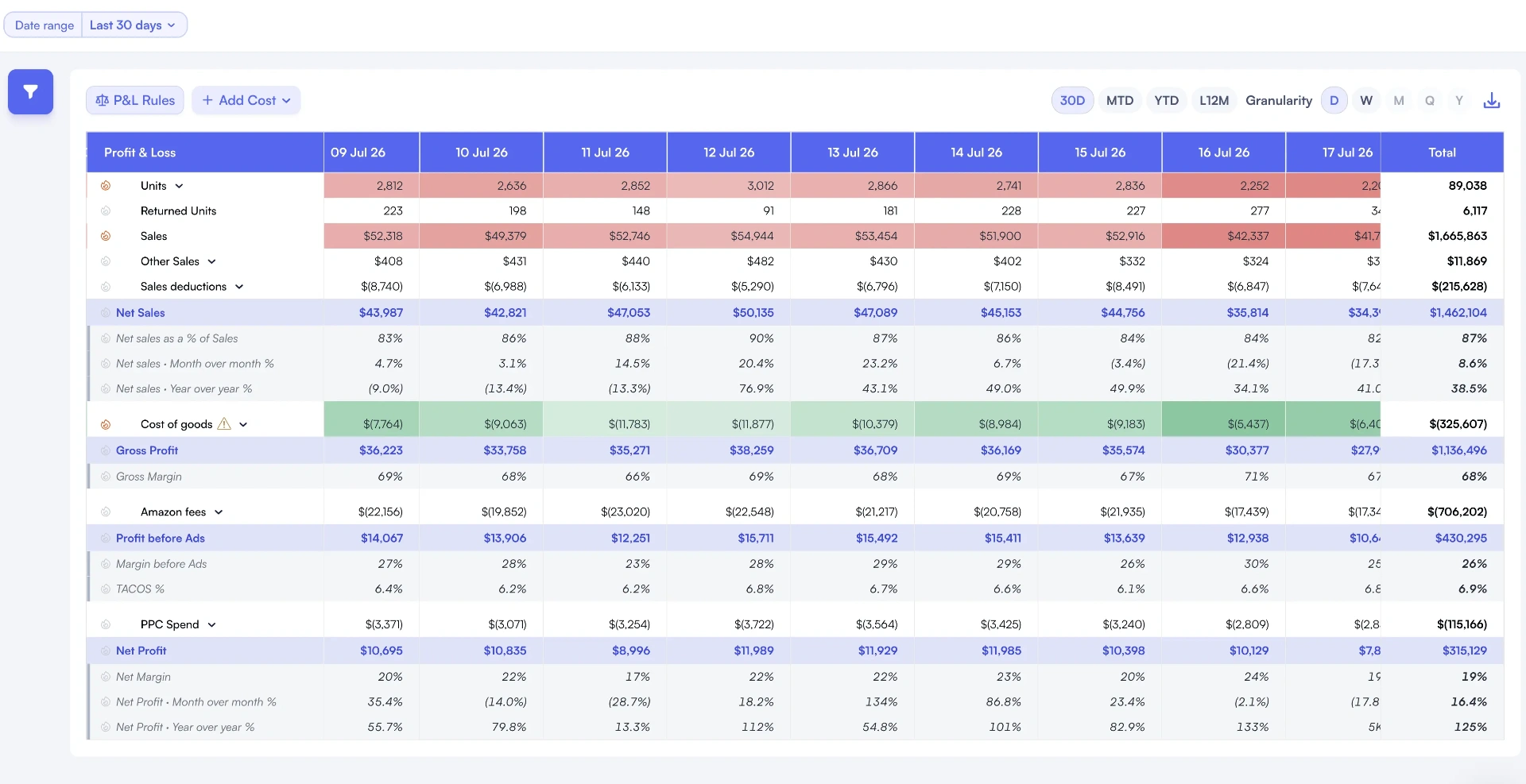
A daily profit view helps locate the days behind a change in period results.
1. Contribution Margin per Unit
Is each sale actually profitable after all costs? If this goes negative, pause the deal immediately.
2. TACoS (Total ACoS)
Your total ad spend as a percentage of total revenue. If it's climbing above your pre-set ceiling, cut low-performing campaigns.
3. Ad Spend Velocity
How fast you're burning through your budget. If you're 60% through your budget in the first 8 hours, you need to adjust bids down.
4. Conversion Rate by Hour
Conversion rates typically peak in hours 1-4, then drop. If conversions fall but CPCs stay high, you're paying more for less.
5. BSR Movement
BSR improvement is the long-term payoff of Prime Day. Track whether your key products are actually climbing in rank, which drives post-event organic sales. Use product performance tracking to spot which SKUs are winning and which are just burning cash.
The common thread here: you need product-level visibility, not account-level averages. A seller with 50 SKUs might have 10 products printing money and 5 products losing $3 per unit sold. Account-level metrics hide this completely. Nova's custom analytics let you build exactly the views you need for event monitoring.
Post-Prime Day Audit: Calculate Real Profitability Within 72 Hours
The event is over. Now comes the part most sellers skip: figuring out if they actually made money. Don't celebrate until you've run the numbers.
The Returns Window Problem
Prime Day purchases have a 30-day return window. Historically, return rates on Prime Day units run 25-40% higher than normal because buyers are impulse purchasing at a discount. A product with a normal 6% return rate might see 8-10% returns on Prime Day units.
This means your Day 1 profit calculation is overstated. Wait at least 14 days before making any conclusions, and factor in an estimated return rate based on your historical data for sale events.
2.Calculate total ad spend for the 48-hour window. Divide by incremental units sold (Prime Day units minus your normal daily run rate).
3.Track returns daily for 14 days. Adjust your profitability calculation as returns come in.
4.Measure BSR improvement at Day 7 and Day 14 post-event. This is the real ROI for many sellers: sustained organic rank improvement.
5.Document what worked and what didn't. Create a Prime Day playbook for Q4's October event with specific ACoS ceilings, discount limits, and SKU selections.
Connect It to Your Seasonal Strategy
Prime Day isn't a standalone event. It's a data point in your seasonal profit planning. The SKUs that performed well (profitable + BSR improvement) are your Q4 candidates. The SKUs that lost money despite high volume should either be excluded from future events or repriced to support better margins.
If you're running a fee reduction strategy, Prime Day results can inform which products to focus on. Products where FBA fees represent more than 30% of revenue are the most vulnerable during peak events and the best candidates for size-tier optimization or packaging changes.
The BSR Payoff Window
As Practical Ecommerce notes, the real value of Prime Day for many sellers isn't the event itself but the 2-4 weeks after. Products that achieve strong BSR improvement during Prime Day often see 15-30% higher organic sales in the following month. This "BSR dividend" can turn a break-even Prime Day into a profitable quarter. But you'll only see this if you're tracking organic vs. PPC sales separately.
7 Tactics to Maximize Prime Day Profit (Not Just Revenue)
Frequently Asked Questions
Start with your regular contribution margin per unit, then subtract the Lightning Deal fee ($300-500 divided by expected units sold), the discount amount (typically 20-30% off), and the estimated PPC cost increase during the event. If the remaining margin is positive, the deal is worth running. Many sellers find that Lightning Deals only break even on units sold during the deal window but generate a BSR boost that drives profitable organic sales in the following 2-4 weeks.
Prime Day 2026 will generate record revenue for Amazon sellers. That's guaranteed. But revenue isn't profit. The sellers who actually win Prime Day are the ones tracking contribution margin per product, setting PPC guardrails before the event, and waiting 14 days before celebrating.
Start your audit now. Pull your product-level P&L, calculate your post-discount margins, and decide which SKUs deserve your deal slots. The math you do in the next four weeks determines whether Prime Day shows up in your revenue reports or your bank account.