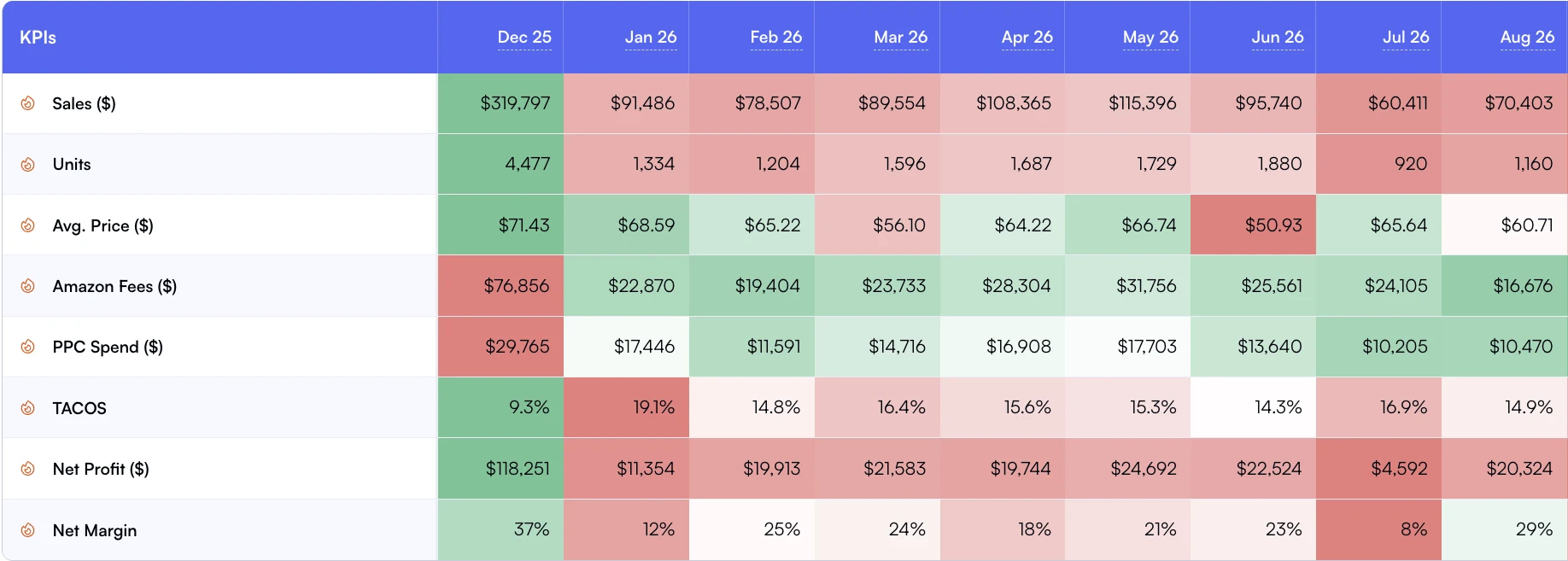
Q4 revenue goes up 40%. But does profit? For most sellers, the answer is "I have no idea until January." They know their top line surged. They know they spent more on ads. They know storage fees were higher. But whether the net result was more profit or just more activity? That requires a different kind of analysis than most sellers run.
Monthly trends show whether sales growth is keeping pace with profit.
The problem isn't seasonal planning itself. Every seller plans for Q4. They forecast inventory, negotiate with suppliers, and set advertising budgets. What they don't do is plan for seasonal profitability. Which products should you push in Q4 vs. Which should you pause? How should ad spend shift by product based on seasonal margin potential? And after the season ends, how do you measure whether the strategy actually worked?
This guide covers the Seasonal Profit Calendar: a 4-phase framework that replaces "spend more in Q4 and hope for the best" with a structured approach to seasonal portfolio management. It's built for sellers managing 100+ SKUs who need to make allocation decisions across a large catalog, not one product at a time.
In short
•Q4 revenue goes up 40% for most sellers. Profit? Most can't answer that question until January.
•The Seasonal Profit Calendar has 4 phases: Pre-Season Modeling, Ramp-Up Execution, Peak Monitoring, and Post-Season Audit.
•Prioritize seasonal SKUs by historical margin data, not sales volume. Your highest-revenue Q4 product might be your lowest-margin one.
•Post-season audits that compare projected vs. Actual margins reveal whether your seasonal strategy created profit or just created revenue.
Q4 Revenue Lift
30-50%
Average increase for Amazon sellers
Q4 CPC Increase
40-80%
Peak season ad cost inflation
Sellers With Profit Plan
Under 15%
Track seasonal P&L, not just revenue
The Seasonal Profit Calendar
Four phases. Each with a specific objective, timeline, and set of actions. The calendar works for Q4 (Prime Day through holiday season), but the framework applies equally to any seasonal event: Back to School, Valentine's Day, Summer, or category-specific peaks.
Phase 1: Pre-Season Modeling (8 to 6 weeks before peak)
Objective: Decide what to push and what to pause
Most sellers select Q4 push products based on last year's revenue. This is backwards. Revenue without margin data is meaningless. Your $100K Q4 product might have generated $5K in profit after ad costs, storage fees, and returns. Meanwhile, your $30K product might have delivered $8K in profit.
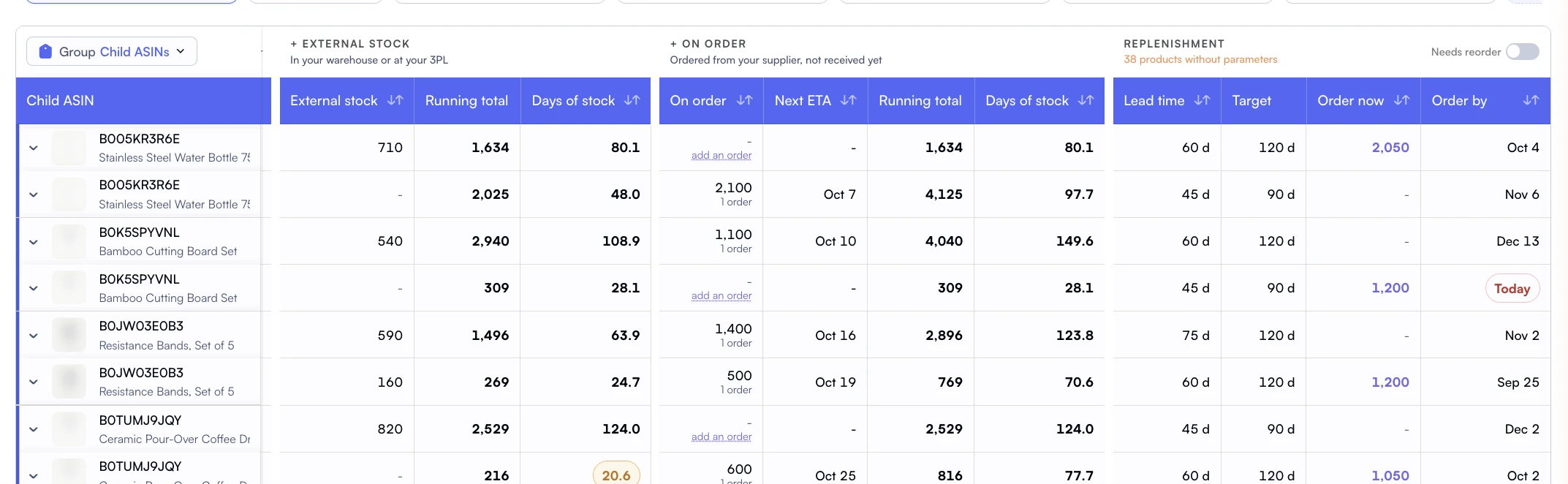
Lead times and stock targets turn seasonal inventory plans into replenishment decisions.
Pull last year's Q4 data from your P&L dashboard. Filter to October through December. Sort by contribution margin per SKU, not revenue. This is your starting point for allocation decisions.
Build three tiers based on historical Q4 margin:
Tier 1 (Margin Champions): 20%+ contribution margin in prior Q4. These get maximum ad budget allocation and inventory priority.
Tier 2 (Volume Drivers): 10 to 20% contribution margin. Maintain current spend levels. Don't increase aggressively because rising CPCs will compress margins further.
Tier 3 (Margin Risks): under 10% contribution margin. Reduce or pause ad spend during peak CPC periods. These products can't absorb the 40 to 80% CPC increases that Q4 brings.
Phase 2: Ramp-Up Execution (4 to 2 weeks before peak)
Objective: Shift budgets and verify tracking
This is where the pre-season model turns into action. Reallocate ad spend according to your tier classification. Set up monitoring dashboards. Verify that your COGS data is current (supplier price changes often take effect in Q4).
Key actions during ramp-up:
Shift ad budgets: Move 20 to 30% of Tier 3 budget to Tier 1 products. Don't just add new budget; reallocate from low-margin to high-margin.
Set TACoS guardrails: Define maximum acceptable TACoS per tier. Tier 1 can tolerate 18 to 22% TACoS. Tier 2 should stay under 15%. Tier 3 should stay under 12% or get paused.
Update COGS: any new supplier pricing should be reflected in your analytics before peak season starts.
Tag seasonal products: Use product tags to create "Q4 Push," "Q4 Maintain," and "Q4 Pause" cohorts for easy monitoring.
Phase 3: Peak Monitoring (During peak season)
Objective: Daily P&L checks and real-time adjustments
Peak season is not "set and forget." CPCs change daily. Competitors launch flash deals. Conversion rates fluctuate with promotional calendar shifts. You need daily dashboard checks to catch margin compression before it accumulates.
Nova's real-time sales data helps you follow orders and units during peak season. CPC spikes and their margin effects belong to the separate advertising and confirmed-report review, not the live order feed.
Daily monitoring checklist:
Check Tier 1 product TACoS against guardrails. If a Tier 1 product exceeds 22% TACoS for 2+ consecutive days, investigate.
Monitor Tier 2 products for margin compression. If contribution margin drops below 8%, pause non-essential campaigns.
Verify Tier 3 products remain paused or at minimal spend. Peak-season CPCs make thin margins negative fast.
Review Winners and Losers daily to catch sudden shifts in product performance.
Phase 4: Post-Season Audit (2 to 3 weeks after peak)
Objective: Measure what actually happened vs. What you planned
This is the phase most sellers skip. They see the revenue number, feel good about it, and move on. But revenue without context is dangerous. You need to answer three questions:
Did Tier 1 products deliver the margins we projected? Compare projected vs. Actual contribution margin per SKU. Flag any product where actual margin was more than 5 points below projection.
Did the budget reallocation work? Compare portfolio TACoS this Q4 vs. Last Q4. If TACoS improved despite higher spend, your tiering strategy worked.
What was the true seasonal ROI? Calculate incremental profit from the seasonal strategy (this year's Q4 profit minus last year's Q4 profit, adjusted for catalog changes). This is the number that justifies your planning effort.
Seasonal Ad Budget Allocation Table
This framework gives you starting percentages for allocating your total seasonal ad budget across product tiers. Adjust based on your specific catalog composition and competitive dynamics.
Budget Allocation
Tier 1 (Margin Champions)
Tier 2 (Volume Drivers)
Tier 3 (Margin Risks)
Pre-Season (Normal)
40%
40%
20%
Ramp-Up (2 weeks out)
50%
35%
15%
Peak Season
60%
30%
10%
Post-Season Wind Down
45%
40%
15%
The shift is deliberate: during peak, your highest-margin products absorb rising CPCs better. Putting 60% of your peak budget behind Tier 1 products protects portfolio profitability even when cost-per-clicks spike 40 to 80%.
Common Mistake: Chasing Revenue Over Margin
The $500K Revenue Trap
A kitchen accessories brand ran their standard playbook for Q4 2024: increase all ad budgets by 50% across the board, push their highest-revenue products hardest, and measure success by top-line growth.
Results looked great on the surface: $500K in Q4 revenue, up 42% year-over-year. But the P&L told a different story. Their highest-revenue product ($85K in sales) had a 6% contribution margin after peak CPCs, returning just $5,100 in profit. Meanwhile, their 8th-highest revenue product ($22K in sales) had a 28% contribution margin, delivering $6,160 in profit.
Total Q4 profit was $38K on $500K revenue (7.6% margin). The prior year, with $352K revenue, they'd generated $35K profit (9.9% margin). They grew revenue 42% but profit only 8.5%, and their margin compressed by 2.3 percentage points. More work, more risk, almost the same profit.
Case Study: Margin-First Seasonal Strategy
Pet supplies brand, 280 SKUs, Q4 2025
After implementing the Seasonal Profit Calendar, a pet supplies brand took a different approach to Q4 2025. They classified their 280 SKUs into tiers using prior-year margin data: 65 Tier 1 products, 120 Tier 2, and 95 Tier 3.
Instead of a blanket budget increase, they shifted 25% of Tier 3 ad spend to Tier 1 products. They paused campaigns entirely on 40 Tier 3 products where Q4 CPC increases would push contribution margin negative. They set daily TACoS guardrails and monitored using Day-to-Day dashboards.
Q4 results: revenue grew 28% (below the category average of 35%). But contribution margin grew 52%. Total profit: $67K vs. $44K the prior year. They made $23K more in profit while growing revenue less aggressively than competitors.
The post-season audit confirmed the strategy: Tier 1 products delivered 24% average contribution margin (beating the 20% projection). Tier 3 pauses prevented an estimated $12K in peak-season losses. The portfolio TACoS improved from 16.8% to 14.2% despite the competitive Q4 environment.
Building a seasonal profit strategy for your next peak season? and we'll help you classify your catalog and set up the monitoring framework.
Connecting Seasonal Planning to Your Year-Round Portfolio Strategy
Seasonal planning isn't a standalone exercise. It integrates with every other element of portfolio management:
Lifecycle stage Affects seasonal allocation. Growth-stage products get more aggressive Q4 budgets. Decline-stage products should be liquidated before peak storage fees hit.
Launch timing Matters seasonally. Launching into Q4 means inflated CPCs and compressed margins. Launch in Q1 to Q2 and use the seasonal calm to build organic traction before Q4.
SKU rationalization should happen before seasonal planning. Sunset declining products in Q2 to Q3 so you're not carrying dead inventory into peak storage fee season.
Contribution margin optimization provides the data backbone for tier classification. If you don't have per-SKU margin data, you can't tier effectively.
Weekly business reviews keep seasonal execution on track. Shift from weekly to daily reviews during peak season, then back to weekly during post-season audit.
Frequently Asked Questions
Questions
August at the latest. The pre-season modeling phase (selecting which products to push, setting margin targets, and allocating ad budgets) takes 4 to 6 weeks when done properly. Inventory decisions for Q4 need to be made by early September to allow for manufacturing and shipping lead times. If you're starting Q4 planning in October, you're already reacting instead of planning.
Rank products by historical Q4 contribution margin, not revenue. A product that does $50K in Q4 revenue at 8% margin ($4K profit) is less valuable than one doing $20K at 25% margin ($5K profit). Use P&L analytics to pull last year's Q4 per-SKU margins, then allocate ad budget proportionally to margin potential, not volume potential.
Increase budgets on high-margin products. Maintain or reduce budgets on high-revenue, low-margin products. The common mistake is applying a blanket 50% budget increase across all campaigns. Instead, calculate a target TACoS per product based on seasonal margin targets and adjust spend accordingly. Products with 25%+ contribution margin can absorb higher CPCs. Products already running thin margins can't.
Use daily P&L dashboards with real-time sales data. During peak season, conditions change fast: CPCs spike, competitors run aggressive promotions, and conversion rates fluctuate daily. Waiting for weekly reports means discovering problems 5 to 7 days too late. Nova's real-time sales data shows changes in orders and units as they arrive; ad spend refreshes every two hours for margin reviews.
A post-season audit compares your pre-season projections (target margin per SKU, planned ad spend, expected revenue) against actual results. It reveals two things: (1) Which products outperformed or underperformed margin expectations, and (2) Whether your seasonal strategy actually created profit or just created revenue. Without this step, you'll repeat the same mistakes next year. Run the audit within 3 weeks of season end, before the data gets stale and memory fades.