Map every SKU to a lifecycle stage (Launch, Growth, Maturity, Decline) with stage-specific KPIs and decision playbooks. Stop treating all products the same.
Your best seller from 2024 is in decline. Your newest launch is burning cash. Are you measuring them the same way? Most sellers are. They apply the same KPIs, the same TACoS targets, and the same margin expectations to every product in their catalog, regardless of where that product sits in its natural evolution.
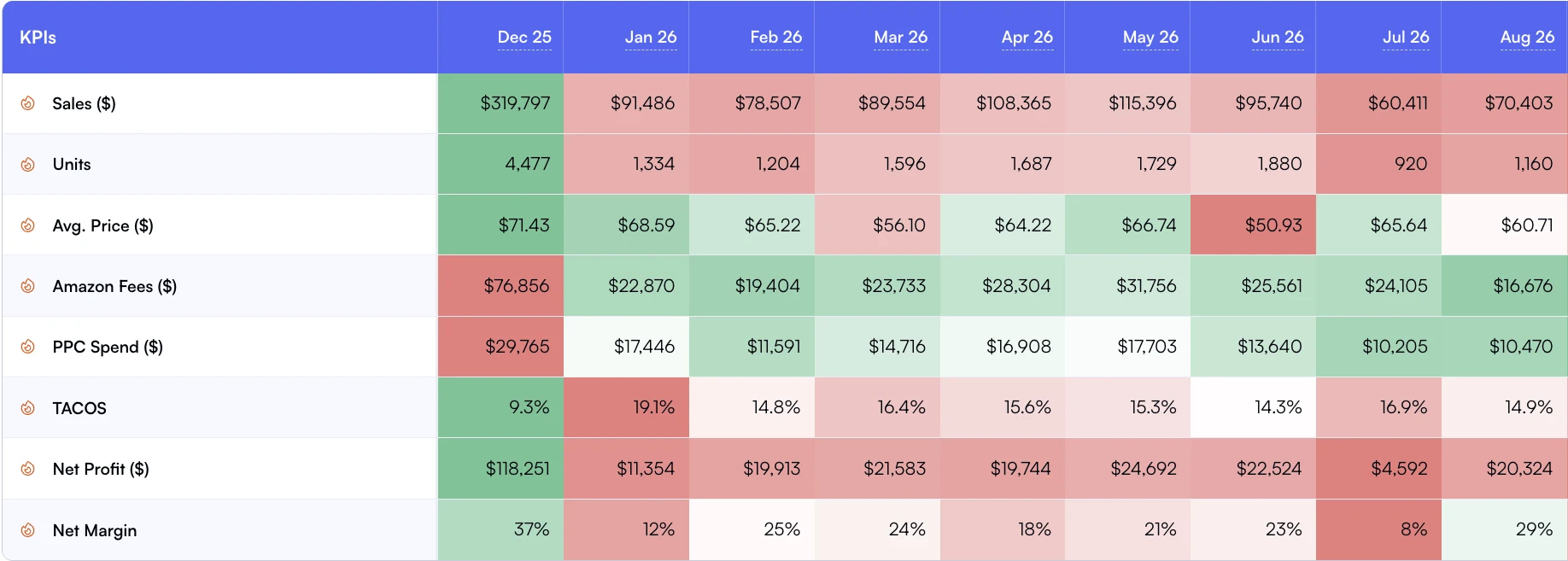
Monthly trends show whether changes in sales are carrying through to profit.
That's how you end up killing healthy launches too early (because they haven't hit profitability at Day 30) and propping up declining products too long (because they still generate revenue, just less of it every month).
The fix isn't more data. It's stage-appropriate data. A product in its first 60 days needs completely different metrics than one that's been selling for three years. This guide walks through the 4 lifecycle stages for Amazon products, the KPIs that matter at each stage, and the decision playbooks that turn reactive firefighting into proactive portfolio management.
In short
•Every SKU moves through 4 stages: Launch, Growth, Maturity, Decline. Most sellers measure all of them the same way.
•Stage-specific KPIs prevent you from killing a healthy launch too early or propping up a declining product too long.
•Classify products by combining revenue trend direction, TACoS trajectory, BSR movement, and margin stability over rolling 90-day windows.
•A quarterly lifecycle review across your full catalog turns reactive firefighting into proactive portfolio management.
Average Product Lifespan
18-24 months
Before entering decline on Amazon
Products Misclassified
35-40%
When using one-size-fits-all KPIs
Margin Improvement
12-18%
After stage-appropriate optimization
The 4 Lifecycle Stages for Amazon Products
Every product moves through a predictable arc. The speed varies (some products mature in 6 months, others take 2 years), but the stages are consistent. Understanding where each SKU sits determines which metrics you track, which actions you take, and how much capital you allocate.
Stage 1: Launch (Day 0 to 90)
The product is new. You're spending heavily on ads to drive initial traffic, building review velocity, and testing pricing. Profitability is negative by design. The goal is traction, not margin.
Key signals: low review count (under 25), high TACoS (30%+), volatile conversion rates, BSR not yet stabilized. If you're measuring a launch product against your mature catalog averages, you'll kill it before it has a chance.
Stage 2: Growth (Month 3 to 12)
The product found its audience. Revenue is climbing month-over-month. TACoS is declining as organic sales increase. BSR is improving. Reviews are accumulating steadily.
Key signals: 3+ months of consecutive revenue growth, TACoS trending down, organic sales share increasing, BSR improving. This is where you invest. Increase ad budgets on winners, expand to additional keywords, and consider international marketplace expansion.
Stage 3: Maturity (Year 1 to 3+)
Revenue plateaus. Organic sales carry most of the load. Margins are stable and predictable. The product has strong review defensibility (100+ reviews, 4.0+ rating).
Key signals: flat or low-single-digit revenue growth, stable TACoS (under 15%), high organic sales ratio (60%+), consistent margins. The goal here is margin optimization and defense. Reduce wasteful ad spend, negotiate better COGS, and protect your listing from competitors.
Stage 4: Decline (Variable)
Revenue drops for 3+ consecutive months. BSR regresses. Competitors entered with better pricing or fresher listings. Return rates may increase. TACoS climbs because you need more ads to maintain shrinking sales.
Key signals: 3+ months of revenue decline, BSR climbing (worse rank), rising TACoS, margin compression, increasing return rate. This doesn't mean "kill it." It means "decide": can you revive it with a listing refresh and price adjustment, or is it time to harvest remaining value and sunset?
Stage-Specific KPI Benchmarks
Here's the critical shift: each stage has different "healthy" ranges for the same metrics. A 35% TACoS is catastrophic for a mature product but perfectly normal for a launch. A flat BSR is concerning during Growth but ideal during Maturity.
Metric
Launch
Growth
Maturity
Decline
TACoS
25-40%
15-25% (declining)
8-15% (stable)
15%+ (rising)
Revenue Trend
Volatile
10-30% MoM growth
-2% to +5% MoM
-5% MoM or worse
Organic Sales Ratio
10-30%
30-50% (improving)
50-80%
Declining
Conversion Rate
5-12% (unstable)
12-20% (improving)
15-25% (stable)
Declining from baseline
BSR Direction
Finding floor
Improving steadily
Stable range
Regressing
Contribution Margin
Negative (acceptable)
Breakeven to positive
15-30%+
Compressing
Review Velocity
Critical priority
Steady accumulation
Maintenance mode
Slowing / negative trends
The table above is your diagnostic tool. When you pull up a product's metrics in your Day-to-Day dashboard, compare them against the benchmarks for that product's stage, not your portfolio average.
How to Classify SKUs by Lifecycle Stage
Classification isn't subjective. You can build systematic rules using three data points available in any P&L analytics platform:
90-day revenue trend direction: is the trailing 90-day revenue growing, flat, or declining compared to the prior 90 days?
TACoS trajectory: is TACoS improving (falling), stable, or worsening (rising) over the same period?
Product age and review count: How long has the product been active, and does it have enough reviews to be considered established?
Classification Decision Tree
If product age is under 90 days and review count is under 25: classify as Launch regardless of other metrics.
If revenue trend is positive and TACoS is declining: classify as Growth.
If revenue trend is flat (within +/- 5%) and TACoS is stable: classify as Maturity.
If revenue trend is negative for 3+ months or TACoS is rising while revenue declines: classify as Decline.
Use Winners and Losers to quickly identify which products are trending up or down. Then apply product tags (Launch, Growth, Maturity, Decline) to track stage transitions over time.
Decision Playbooks by Stage
Classification without action is just categorization. Each stage demands a different playbook:
Launch Playbook: Invest with Guardrails
Budget: Allocate 2 to 3x your target steady-state ad spend. Expect negative contribution margin for 60 to 90 days.
Focus: Session volume, conversion rate stability, and review velocity. These three metrics predict whether the product will graduate to Growth.
Kill signal: If conversion rate hasn't stabilized above 8% by Day 60, or if you haven't reached 15 reviews by Day 90, the product likely won't scale. Read our 90-Day Launch Scorecard for the complete framework.
Tracking: Set up dedicated custom breakdowns for launch products so their metrics don't dilute your mature portfolio averages.
Growth Playbook: Scale Deliberately
Budget: increase ad spend on keywords where ACoS is below your target and organic rank is improving. Pull back on keywords that aren't building organic momentum.
Expansion: Consider launching variations (sizes, colors) and testing additional marketplaces for products showing strong Growth signals.
Tracking: Monitor weekly. Growth-stage products change fast, and the window to capitalize on momentum is narrow.
Maturity Playbook: Optimize and Defend
Budget: Shift from growth-oriented keyword expansion to defensive and efficiency campaigns. Focus on branded keywords and exact match high-converters.
Focus: Margin stability, organic sales ratio maintenance, and competitive monitoring via BSR trends.
COGS negotiation: Mature products with predictable demand give you use to negotiate bulk pricing with suppliers. Track COGS per SKU to measure the impact.
Tracking: Bi-weekly is sufficient for most mature products. Flag anything where margin drops more than 3 points for immediate review.
Decline Playbook: Decide Fast
Option A (Revive): Refresh the listing, adjust pricing, test new main images. Give the refresh 60 days to show results. If BSR and conversion rate don't improve, move to Option B or C.
Option B (Harvest): Cut ad spend to zero or near-zero. Let organic sales wind down naturally while you collect remaining margin. This works for products with strong review defensibility.
Option C (Sunset): Liquidate inventory, close the listing. Use our SKU rationalization framework to make the final call.
Tracking: Daily during the decision window. Declining products can accelerate fast, especially if competitors are the cause.
Worked example: a 400-SKU catalogue reclassified quarterly
Illustrative, not a customer
The arithmetic below is a worked illustration of the framework, not a reported result. Take a catalogue of 400 SKUs run against a single flat TACoS target, reviewed monthly at portfolio level, where a product is either "working" or "not working" with no stage in between.
Reclassify it once with Winners and Losers and Day-to-Day trending and you might land on 45 SKUs in Launch, 80 in Growth, 210 in Maturity and 65 in Decline. Each group then gets its own playbook instead of one shared target: budget goes up on Launch, Growth spend shifts toward organic-building keywords, Maturity is trimmed for efficiency, and Decline runs through the Revive, Harvest or Sunset tree above.
The mechanism worth understanding is the last one. If 30 of those Decline SKUs each lose $500 a month, sunsetting them adds $15,000 a month of contribution while removing zero from the products that were funding the business. The catalogue gets smaller and the profit gets larger, because the flat target was quietly subsidising the losers with the winners' margin.
Setting Up Lifecycle Tracking in Nova
The implementation is straightforward if you already use product tagging. Create four tags (Launch, Growth, Maturity, Decline) and assign them during your first classification pass. Then use daily dashboards to monitor each stage cohort separately.
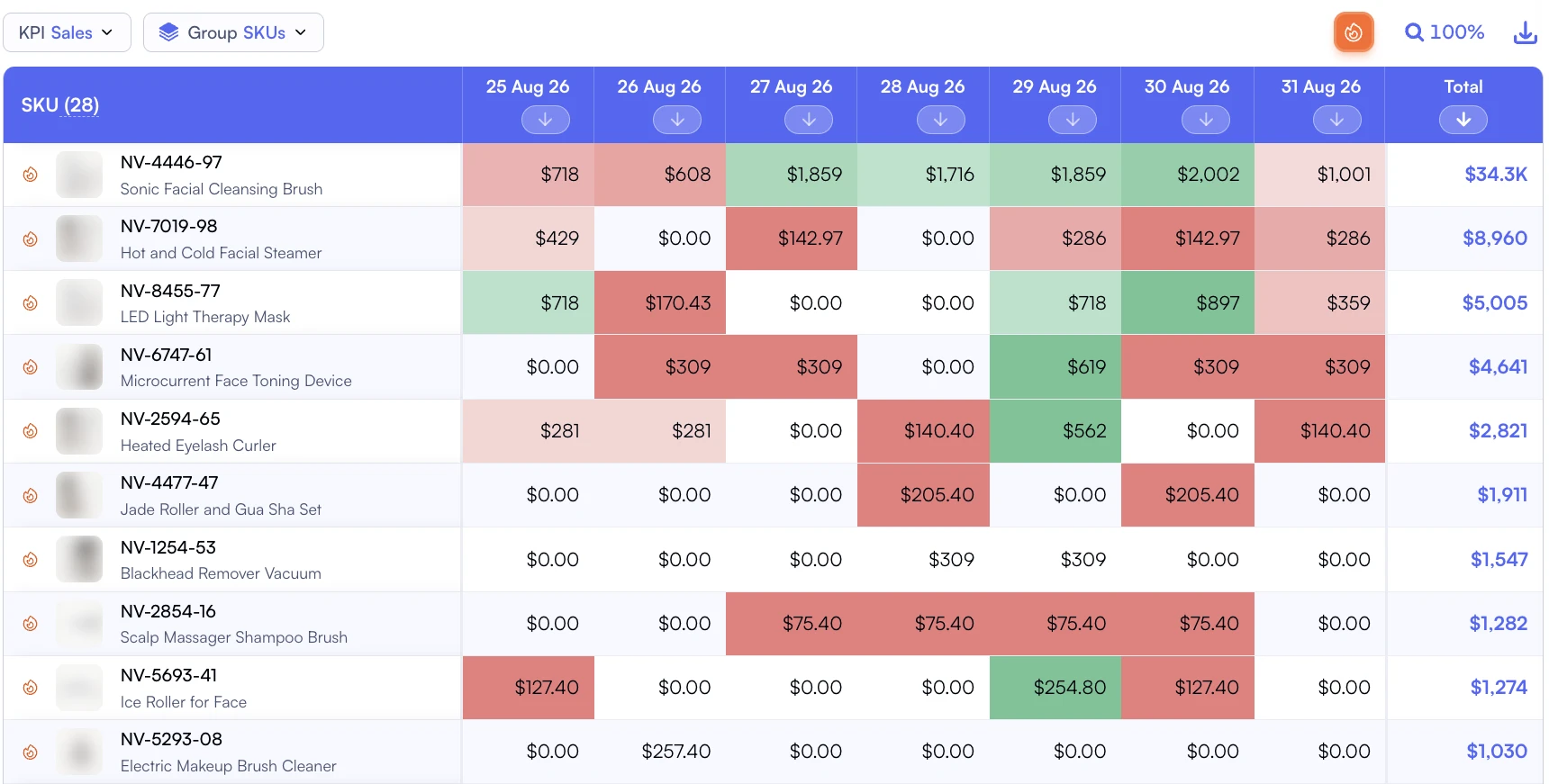
Daily sales by SKU show how demand changes across products over time.
Step 1: Export your full catalog from Products Feed with 90-day rolling metrics.
Step 2: Apply the classification decision tree (see above) to each SKU.
Step 3: Tag each product with its lifecycle stage.
Step 4: build stage-specific views using Custom Breakdowns to track each cohort against its stage-appropriate benchmarks.
Step 5: Set a quarterly calendar reminder to reclassify. Products that graduated from Launch to Growth (or slipped from Maturity to Decline) get their tags updated.
Pro Tip
Don't wait for the quarterly review to catch stage transitions. Set up alerts for two signals: (1) any Growth-tagged product where revenue dropped 10%+ in a rolling 30-day window, and (2) any Maturity-tagged product where TACoS increased 5+ points. These are your early-warning indicators of stage shifts.
If you're managing a large catalog and want help setting up lifecycle tracking, . We'll walk through your catalog and build the classification framework together.
How Lifecycle Analytics Connects to Your Broader Portfolio Strategy
Lifecycle classification doesn't replace your existing frameworks. It enhances them:
SKU rationalization: Use lifecycle stage as an input to your Keep/Kill/Grow decisions. Products in Decline automatically surface for rationalization review.
Catalog profit optimization: the 4-Quadrant framework (Stars, Cash Cows, Question Marks, Dogs) becomes more accurate when you overlay lifecycle stage. A "Dog" in Launch stage is very different from a "Dog" in Maturity.
Portfolio segmentation: Lifecycle stage becomes another dimension for segmenting your catalog alongside brand, category, and marketplace.
Seasonal planning: Products in different lifecycle stages need different seasonal strategies. Growth-stage products deserve aggressive Q4 budgets. Decline-stage products should be liquidated before peak storage fees hit.
Frequently Asked Questions
Questions
Track three signals over a rolling 90-day window: revenue trend (growing, flat, or declining), TACoS trajectory (improving or worsening), and BSR movement (climbing or falling). A product with rising revenue, falling TACoS, and improving BSR is in Growth. Flat revenue with stable margins signals Maturity. Declining revenue with rising TACoS points to Decline. Use a Winners and Losers dashboard to spot these patterns across your full catalog.
Quarterly for your full catalog, monthly for your top 20% of products by revenue. Lifecycle transitions don't happen overnight. A product typically spends 2 to 4 weeks shifting between stages, so monthly reviews for high-impact SKUs catch transitions early. Quarterly full-catalog reviews ensure nothing slips through the cracks, especially long-tail products.
Not automatically. Decline means the product needs a decision, not necessarily a death sentence. Check three things first: (1) Is the decline seasonal? Compare year-over-year, not month-over-month. (2) Does the product serve a strategic role in a parent ASIN family? (3) Can you reverse the decline with a listing refresh or pricing adjustment? If the answer to all three is no and contribution margin has been negative for 3+ months, it's time to sunset.
SKU rationalization is a one-time audit that classifies products as Keep, Kill, or Grow based on current profitability. Lifecycle analytics is an ongoing system that tracks where every product sits in its natural evolution and applies stage-appropriate KPIs and actions. Think of rationalization as a snapshot and lifecycle analytics as a video. Read our SKU rationalization guide for the snapshot approach.
Partially. You can use product tagging combined with custom metric thresholds to flag products that meet stage criteria. For example, tag any product where 90-day revenue trend is negative and TACoS increased more than 3 points as 'Decline candidate.' The classification logic is systematic, but the final decision (invest, maintain, harvest, or sunset) requires human judgment about competitive context and strategic priorities.
Sources and References
Harvard Business Review: Exploit the Product Life Cycle (Theodore Levitt, 1965, foundational framework)