




Business Reports

Amazon Business Reports That Show Profit, Not Just Revenue

Seller Central shows what you sell. Nova shows what you keep. Build custom reports with 70+ metrics, save your views, and get automated P&L with 40+ fee breakdowns. Business reports built for profit, not vanity metrics.

Try For Free
Rated 4.9/5 · 14-day free trial
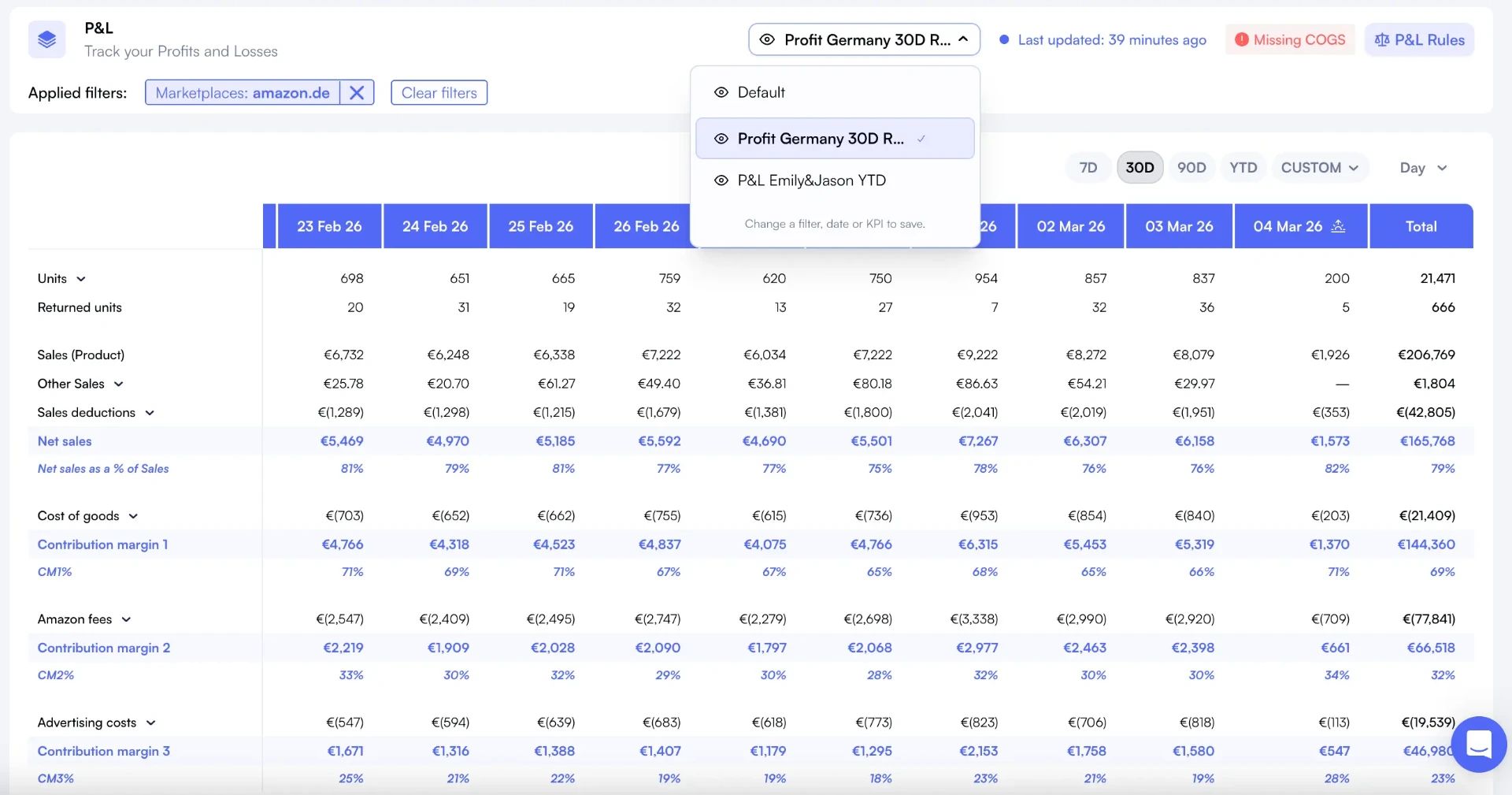
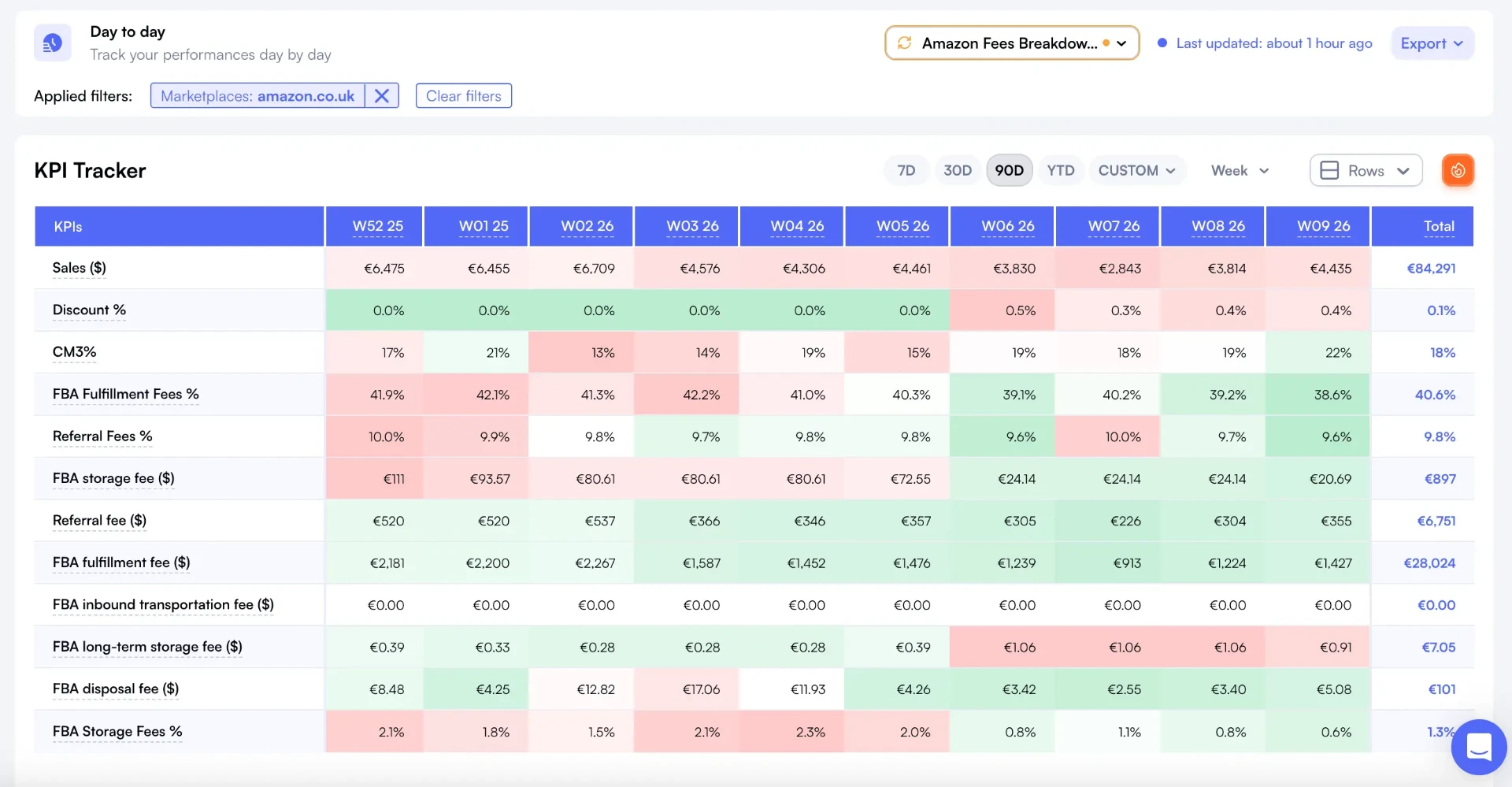
Nova Day-to-Day saved view with heatmap fees breakdown filtered on UK marketplace showing a real saved report in action

Why Amazon business reports from Seller Central fall short

Revenue isn't profit. Seller Central reports show what you sell but hide what Amazon takes. You need reports that show what you actually keep.

01

Seller Central reports show revenue without

Seller Central reports show revenue without true cost breakdowns. Referral fees, FBA fees, storage, returns, and ad spend aren't in one view. You export, merge, and calculate in spreadsheets just to see if you made money.

02

No per-product profit in Seller Central

No per-product profit in Seller Central. You see aggregate sales but can't tell which products make money and which lose it after all fees. Scaling a losing product costs more than knowing sooner.

03

Reports aren't customizable

Reports aren't customizable. You can't choose which KPIs to display, save filtered views, or group by brand. Every time you need a specific report, you start from scratch with exports.

04

Weekly reporting takes hours

Weekly reporting takes hours. Download from Seller Central, merge with ad data, add COGS, format for stakeholders. By the time the report is done, the data is stale and decisions are late.

See Nova in action

Automated P&L reports, fee breakdowns per product, custom KPIs, and saved views. No more spreadsheet gymnastics.

Reporting Builder

Pick from 70+ metrics to build exactly the report you need.

Saved Views

Save your filter, column, and grouping settings. Reload instantly anytime.

Automated P&L Reports

Per-product P&L with revenue, 40+ fees, COGS, and profit in one view.

Fee Breakdown Reports

See every Amazon fee type per SKU: referral, FBA, storage, returns, and more.

Brand-Level Reports

Group by brand or category with Custom Breakdowns for portfolio reporting.

Multi-Marketplace Reports

Unified reports across 21 marketplaces with automatic currency conversion.

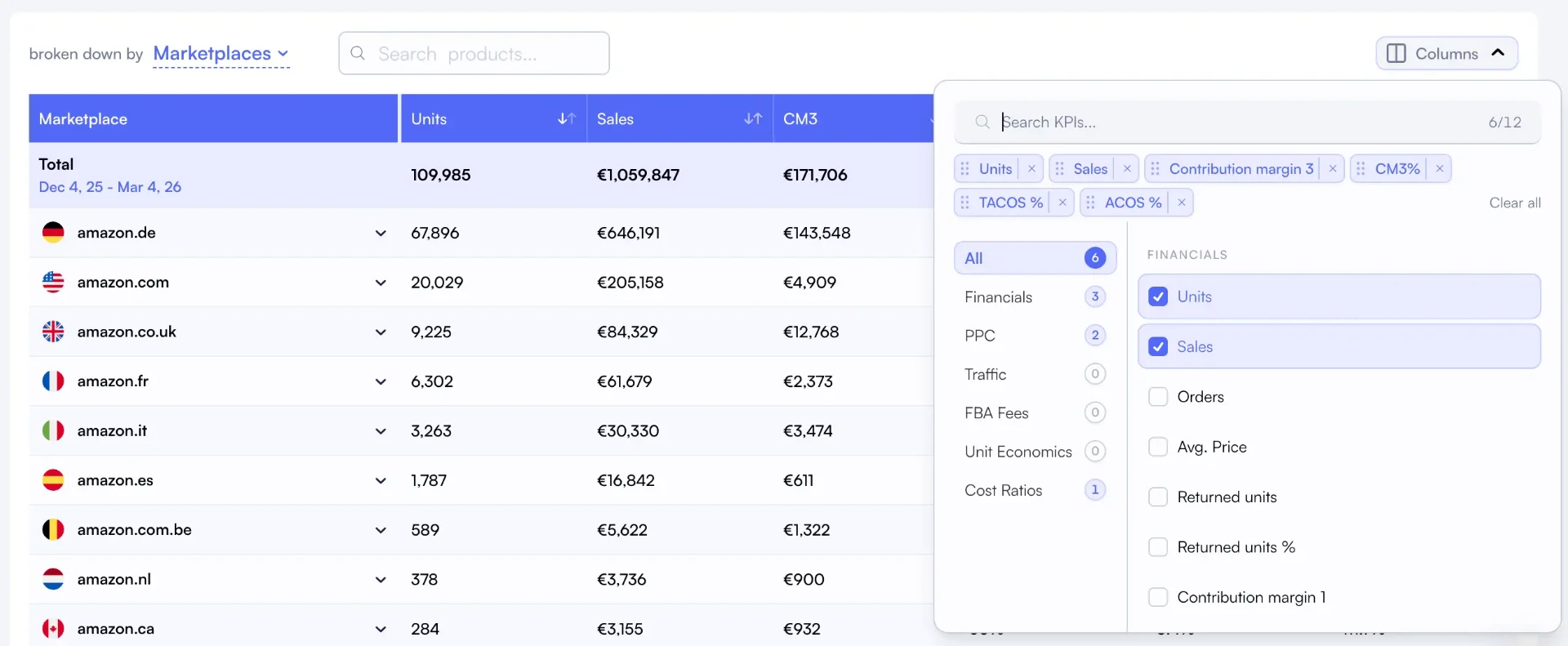
Nova reporting builder KPI metric selector showing 70+ available metrics for custom report columns
Nova P&L fees breakdown showing referral fees, FBA fees, storage fees, and more per product
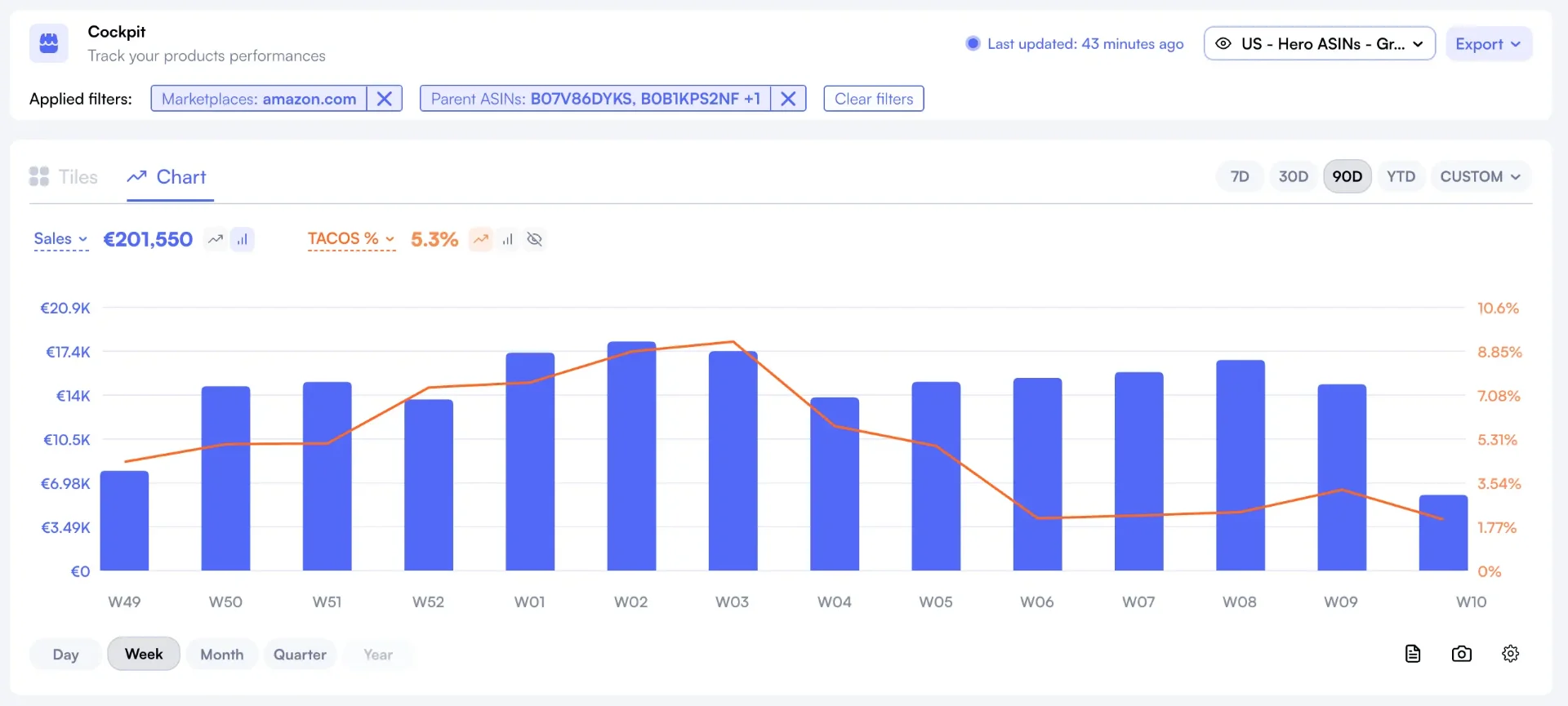
Nova Day-to-Day analytics dashboard showing a saved daily report with key Amazon KPIs

40+

Fee Types in Reports

Every Amazon fee broken down per product in your P&L.

70+

Custom KPIs

Choose exactly which metrics appear in your reports.

21

Marketplaces

Unified reporting across all Amazon regions.

Replace Spreadsheet Reports in 5 Minutes

Connect your Seller Central account and see automated P&L reports with all fee breakdowns per product. Save your views, choose your KPIs, and stop exporting. Free 14-day trial.

Start Free Trial

Nova vs Seller Central vs Manual Reports

Three approaches to Amazon business reporting. Only one shows profit per product automatically.

CapabilitySeller CentralSpreadsheetsNova
Per-product P&LNot availableManual calculationAutomated, real-time
Fee breakdown per SKUAggregate totals onlyExport and parse40+ fees per product
Custom KPI columnsFixed columnsManual setup70+ selectable metrics
Saved report viewsNot availableSeparate filesOne-click saved views
Brand-level groupingNot availablePivot tablesCustom Breakdowns
PPC in reportsSeparate consoleManual mergeIntegrated automatically
COGS in reportsNot availableManual entryPer-SKU COGS tracking
Multi-marketplaceOne marketplaceSeparate sheets21 marketplaces unified
Data freshness24-48 hour delayWeekly exportsHourly refresh
Accuracy vs SettlementEstimate~75-85%99.8%

How it works

From zero to automated business reports in 5 minutes. No downloads, no spreadsheets, no formatting.

1

Connect Your Amazon Account

Link your Seller Central account through Amazon's official SP-API. Nova pulls orders, fees, returns, ad data, and COGS automatically. Takes under 2 minutes.

2

Configure Your Reports

Choose your KPI columns, set date ranges, group by brand or category, and apply filters. Save the view for instant access. Build the exact report you need.

3

See Profit, Not Just Revenue

Your reports show per-product P&L with all 40+ fee types, COGS, and ad spend deducted. Updated every 30 minutes. Export as CSV when needed.

Who needs better Amazon business reports?

From solo sellers tired of spreadsheets to agencies delivering client reports at scale.

$10K - $200K/mo

FBA Sellers

  • See per-product profit without spreadsheets
  • Track all 40+ Amazon fees automatically
  • Custom KPI columns for your business
  • Replace weekly export-and-format cycles
Most popular: Starter plan

$100K - $500K/mo

Brand Managers

  • Brand-level P&L reports via Custom Breakdowns
  • Saved views for weekly stakeholder reporting
  • Multi-marketplace reports with currency conversion
  • Performance trends over custom date ranges
Most popular: Professional plan

$500K+/mo

Agencies & Operators

  • Per-client reporting across 100+ accounts
  • Automated reports that replace manual builds
  • Custom KPI views per client or brand
  • Export-ready reports for client presentations
Most popular: Enterprise plan

Nova connects reporting to your entire analytics stack. Explore our P&L Analytics, Reporting Builder, and Custom Analytics for complete reporting flexibility. Build brand-level reports with Custom Breakdowns.

What Are Amazon Business Reports?

Amazon business reports are the dashboards and data exports sellers use to understand their business performance. Seller Central provides basic reports showing orders, units, and revenue. But these reports don't show true profit. They don't break down all 40+ fee types per product, don't include COGS or ad spend, and don't let you customize which metrics you see.

The gap between "what I sold" and "what I kept" is where most sellers lose money without realizing it. A product showing $50K in monthly revenue might only deliver $2K in profit after Amazon takes referral fees, FBA fulfillment fees, storage costs, return processing fees, and advertising costs. Without per-product P&L reports, you can't tell the winners from the losers.

Nova replaces manual reporting with automated, profit-based business reports. Every product shows revenue, all fee categories, COGS, ad spend, and contribution margin. You choose your KPI columns, save your views, and group by brand or category. Reports refresh every 30 minutes. That's how you run an Amazon business on data instead of gut feel.

Why Sellers Choose Nova for Business Reports

"I used to spend 4 hours every Monday building my weekly report in Google Sheets. Now I open Nova, click my saved view, and the data is there. It's always current, always accurate."

FBA Seller, Health & Beauty

95 SKUs, $160K/month revenue

"Our clients expect weekly performance reports. Before Nova, each report took 45 minutes to build. Now we pull up per-client saved views and export. We manage 30 clients and save 20+ hours per week."

Amazon Agency Owner

30 client accounts, $4M/month managed

Simple, transparent pricing

Start free. Scale when you're ready.

14-day free trial • No credit card required • Cancel anytime

Sellers & Brand Owners

Full analytics. All marketplaces.

Starting at$29/month
Start 14-day free trial
  • Profit & loss analytics
  • PPC Analytics
  • Custom breakdowns
  • Buy Box %
  • BSR Tracker
  • Returns Analytics
  • Consolidated Data Exports
  • Priority support
Enterprise & Agency

Unlimited accounts. Dedicated support.

Custom
  • Unlimited orders
  • Unlimited accounts
  • Unlimited team seats
  • Advanced User Management System
  • Client-first view
  • Dedicated account manager
  • Custom data exports
  • SLA guarantees

Amazon Business Reports: Frequently Asked Questions

Everything you need to know about Nova's reporting capabilities for Amazon sellers.

Seller Central reports show revenue and basic metrics. They don't show true profit after all 40+ fee types, COGS, and ad spend. Nova's reports give you a complete P&L per product, per brand, and per marketplace. You see what you actually keep, not just what you sell.
Yes. Nova's reporting builder lets you select from 70+ KPIs including contribution margin, TACoS, CM3%, referral fees, storage costs, and more. You choose which columns to display and save those views for instant access. No more exporting and pivoting in spreadsheets.
Yes. Nova supports saved views. Configure your filters, columns, date range, and grouping once, then save it. Access the same report view instantly next time. You can also export reports as CSV for sharing with team members or accountants.
Nova refreshes data every 30 minutes, so your reports are always current. You don't need to download, export, or merge data from Seller Central. Open your saved view and the latest numbers are there. No manual report generation needed.
Nova tracks 40+ Amazon fee types including referral fees, FBA fulfillment fees, storage fees (monthly and long-term), advertising fees, return processing fees, removal fees, and more. Every fee is broken down per product in your P&L reports.
Yes. Nova supports 21 Amazon marketplaces with automatic currency conversion. You can view reports per marketplace or aggregate across all regions. Compare performance between US, UK, Germany, Japan, and other Amazon regions side by side.
Yes. Nova offers a 14-day free trial with full access to all reporting features including P&L, fee breakdowns, saved views, and custom KPI selection. No credit card required.
Yes. Nova's Custom Breakdowns let you group products by brand, category, lifecycle stage, or any custom tag. Your reports then show metrics at the group level. This is how brand managers and agencies create brand-level or category-level business reports.

Stop Exporting. Start Seeing Profit.

Join 2,000+ Amazon sellers who replaced spreadsheet reports with Nova's automated P&L dashboards. See per-product profit, save your views, and make faster decisions. Start in 5 minutes.